Showing posts with label Appraisal. Show all posts

Friday, September 25, 2015

Overcoming Digital Preservation Challenges to Better Serve Users

This afternoon, I'll be participating on a panel at Network Detroit, a conference aimed at sharing and promoting cutting-edge digital work in the humanities. In it, I'll be giving a little different spin on the ArchivesSpace-Archivematica-DSpace Workflow Integration project, one that "fits it into a larger socio-historical and theoretical professional context" and that, hopefully, is halfway interesting digital humanities folks. I even wrote it out humanities conference-style. Citations for quotes and images (as well as acknowledgements for some stuff I stole wholesale from Mike's last blog post on access) are currently in my notes and slides; I'll get those into here soon.

Also, thank you Dallas for organizing a reading group that helped introduce me to archival theory.


Good afternoon. My name is Max Eckard, and I’m the Assistant Archivist for Digital Curation at the Bentley Historical Library (University of Michigan). For some context, and I’m quoting here from our website, “the Bentley Historical Library collects the materials for and promotes the study of... two great... institutions, the State of Michigan [including Detroit] and the University of Michigan.” If you can’t tell from my job title, I work with digital stuff.

I came here today to talk about our Mellon foundation-funded ArchivesSpace-Archivematica-DSpace Workflow Integration project. 


It’s pretty exciting. We’re taking three open source pieces of software, each of which currently occupy their own spaces in the digital curation ecosystem, and integrating them into an end-to-end digital archiving workflow. It will facilitate the formal ingest, description and overall curation of digital archives, all the way to deposit into a preservation and access repository. We’re even doing it in way that will facilitate this workflow for the larger community as well.

And I still plan to talk about this project, but just a little. I started thinking about the audience today--that is, digital humanities folks--and I realized that you might not actually be that interested in the details of what we’re doing.

Instead, I’d like to use this time to think a little bigger about this project and what it is--really--that we’re trying to accomplish. I also thought I'd try my hand a making a real, formal argument--I even wrote this out humanities-conference style.


I’ll start with the concept of archives, what they are, what they do and competing visions for how they function in society and culture. You may even get your first introduction to the way that archivists think about archives. Then I’ll talk about our project, where it fits into this larger socio-historical and theoretical professional context, and how, in many ways, it is a practical critique of our collective professional reaction to the Digital Revolution. Finally, I’ll conclude with my perspective on how and where our profession would like to grow, and here’s a spoiler: it has to do with that second “end” in end-to-end, access. All in 15-20 minutes. So here we go…


Definitions are important. You can’t have a conversation, let alone make an argument, without them.


As you might imagine, there’s not one way that the word “archives” has been or is defined, but I’m going to suggest that we use this definition from the Society of American Archivists (SAA) the professional association for members of our profession, at least in the United States:


Now, I know this isn’t the archives you may have heard about from humanist theorists like Jacques Derrida or Michel Foucault. I also know this isn’t the way this word gets used the vernacular. However, I do think there is something we can all learn from a key difference I see between these humanist definitions and the vernacular use of the word “archives” and the SAA’s definition of it, namely, the latter’s emphasis on the collection itself--and the people and organizations that created it--as well the practical consideration of how it should be collected, that is, on product and process.
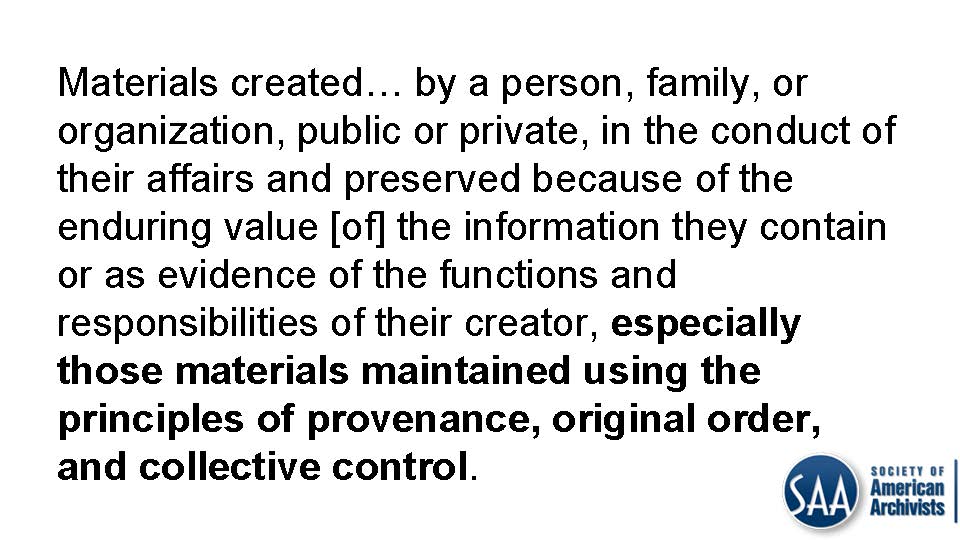

Before continuing I’d like to draw your attention to the phrase in that definition that starts with “especially” because it enumerates some of the oldest modern archival principles:


provenance...


...and original order...


...as well as collective control.


Right from the very beginning of modern archival thinking, which really came into its own after the French Revolution in Europe, provenance and original order have been core archival principles.

In this context, the term “provenance” connotes the individual, family, or organization that created or received the items in a collection. The principle of provenance or the respect des fonds dictates that records of different origins (provenance) be kept separate to preserve their context.

In this context, the term “original order” connotes the organization and sequence of records established by the creator of the records.


Both were codified in the The Manual for the Arrangement and Description of Archives (Manual) of 1898, which detailed these and many other rules concerning both the nature and treatment of archives.

It’s interesting to note that the very first rule in the Manual, the “foundation upon which everything must rest,” according to its authors, gave its own definition of the word archives: “the whole of the written documents, drawings and printed matter, officially received or produced by an administrative body or one of its officials.” Already that should give you some sense of the context out of which these particular principles came, but I’ll get more into that in a second.

If you were to further investigate that definition from the SAA, you’d see that there is an extensive Notes section, which details two more prominent thinkers (DWEM) in the history of archival theory: Hilary Jenkinson and Theodore Schellenberg.


Jenkinson, writing just twenty-four years after the Manual in 1922, defended archives as “impartial evidence” and envisioned archivists as “guardians” of that evidence. He argued that the only real archives were those records that were “part of an official transaction and were preserved for official reference.” For Jenkinson, who, importantly, was coming out of the same context from which the Manual came (and again, more on that in a second), the records creator is responsible for determining which records should be transferred to the archives for preservation. So there’s another archival principle:


...evidential value.


I’ll note here, because I am also supposed to be thinking about cultural criticism and how it relates to my topic, that it is this early context, the context that produced the Manual and Jenkinson, with its emphasis on “administrative bodies” and “officials,” who alone--because archivists were impartial!--were able to determine which records would be preserved for posterity, that the postmodern critique of archives as political agents of the collective memory, whose institutional origins legitimized institutional, statist power and helped to marginalize those without such power, is perhaps most obviously justified (although how far we’ve come since then is definitely up for debate--and trust me, I’m probably on your side).


Fast forward to the middle of the twentieth century, when Schellenberg was writing. Times were changing. Archives were still largely institutional, but the nature of the records they collected were very different. Facing a paper avalanche in the mounting crisis of contemporary records, archivists could no longer responsibly retain the “whole,” as the Manual put it (and Foucault, I might add), of anything. Archival theory responded by shifting from focusing on preservation of records to selection of records for preservation. Schellenberg called this selection process:


...appraisal.

To quote the SAA:


He also advocated for working with researchers to determine what records had secondary value. I think is a pretty exciting development in this story, although in his time “researchers” really just meant “historians,” so sorry digital humanities folks.

Many archivists, especially in the United States and including us at the Bentley, have been influenced by Schellenberg.


And then came the Digital Revolution. From Wikipedia:


Analogous to the Agricultural Revolution and Industrial Revolution, the Digital Revolution marked the beginning of the Information Age.

Needless to say, the Digital Revolution has had a profound effect on the nature and treatment of archives in contemporary society, as well as their use. And this is only to be expected, because the very context that produced the Manual and the works of Jenkinson has fundamentally changed.


With the advent of the Internet and social media and the democratizing effect these have had on society (And I’m thinking here of the Arab Spring, and other informal, non-hierarchical movements like #OccupyWallStreet and #BlackLivesMatter...), no one can honestly say that the only records that make a difference anymore, even politically, are those that are produced by “administrative bodies” or “officials.”


Likewise, if Schellenberg thought there was too much paper back in his day, what would he have thought of today’s version of that crisis, which is on a totally different scale? Did you know that there are:
  • 2.9 million emails sent, every second;
  • 375 megabytes of data consumed by households, each day;
  • 24 petabytes of data processed by Google, per day (did you even know petabytes was a word?);
  • etc., etc., etc.

What would Schellenberg have thought of Big Data?

So, the context has fundamentally changed… but wait, there’s more. The records themselves have also fundamentally changed. Digital records (the actual stuff that gets archived), are much more fragile than their physical counterparts, and we have less experience with them.


Digital preservation is challenging!

Specifically, there are issues with digital storage media:
"Digital materials are especially vulnerable to loss and destruction because they are stored on fragile magnetic and optical media that deteriorate rapidly and that can fail suddenly." (Hedstrom and Montgomery 1998)

There are issues with changes in technology:
"Unlike the situation that applies to books, digital archiving requires relatively frequent investments to overcome rapid obsolescence introduced by galloping technological change." (Feeney 1999)

And, there are issues with authenticity and integrity:
“While it is technically feasible to alter records in a paper environment, the relative ease with which this can be achieved in the digital environment, either deliberately or inadvertently, has given this issue more pressing urgency.”

There are other issues, like money (of course!), the fact that access always has to be mediated and the myth that digital material is somehow immaterial, but I don’t really want to get into all that here.


So we, as a profession, started scrambling. We even invented a whole new specialization within library and information science to deal with these radical changes in context and content:


...digital curation. Since it’s inception over 10 years ago, digital curators have been hard at work developing strategies that help to mitigate some of the risks I just enumerated, in part to help ensure continued access to digital materials for as long as they are needed.


We adopted and created models, for example, like the Open Archival Information System (OAIS) Reference Model and the DCC Curation Lifecycle Model to inform the systems and the work that we do. We created metadata schemes to record new types of information about digital material, like the Preservation Metadata Implementation Standard (PREMIS), which records information on…


...provenance (sound familiar?), but also preservation activity done to preserve digital material, the technical environment needed to render or interact with it, and rights management.


We started using techniques like checksums and file format migrations in order to verify the authenticity and integrity of digital material (because digital material doesn’t have....


...evidential value if it isn’t what it purports to be).


We even borrowed techniques from law enforcement called write-blocking and disk imaging, so that we could make exact, sector-by-sector copies of source mediums, perfectly replicating the structure and contents of a storage device, which I think sounds a whole lot like a techy version of…


...original order.

Along the way there was a lot of education and advocacy that occurred and is occurring around these issues for both archivists and content creators and actually, a lot of this is the stuff that the Archivematica part of the ArchivesSpace-Archivematica-DSpace Workflow Integration project is good at.


So, where have these developments left us? Technology-wise, it’s maybe mid-2000s. Digital curators often complain that the technology we’ve created to deal with digital archives seems to lag about 10 years behind the archives themselves. Archival theory-wise, though, it’s probably more like 1924, with the Manual and Jenkinson, with provenance, original order and impartial evidence.

Others have observed that even in the face of the enormous scale of the digital deluge, archivists somewhat ironically abandoned another core component of archival theory (also mentioned in the SAA definition, even though I haven’t talked much about it here):


...collective control.


This they did in favor of item-level description, and, with it, “informational content over provenance and context,” treating digital objects as “discrete and isolated items” rather than as part of the “comprehensive information universe of the record creator,” but I think you might have to be an archivist to appreciate that one.


OK, I’d like to start to wrap this up. Two things and then I’m done.


The first is that the ArchivesSpace-Archivematica-DSpace Workflow Integration project is definitely overcoming digital curation and preservation challenges, and it’s doing so in a novel way that brings contemporary archival practice back in line with contemporary archival theory. To be honest, the Curation (previously Digital Curation) division at the Bentley already had a strong, nationally-recognized reputation for this, but for dramatic effect I’ll just pretend that this is all thanks to our project!


The project has a number of goals, but the one that has taken the most time and resources is the development of new appraisal and arrangement functionality in Archivematica, so archivists may review content and, among other things, deaccession or separate some or even all of it from a collection. That is, so that archivists can begin to do with digital records what they have been doing for a long time now with paper records:


...some good ole fashioned Schellenbergian appraisal.


The arrangement part of this new functionality is also really exciting. It helps to address the collective control issue I outlined earlier by allowing archivists to create intellectual arrangements and associate them with archival objects from ArchiveSpace in a pretty sophisticated way, in aggregate, with APIs and everything. Really, this is cool stuff!

But now what? When the grant is over, where will we be?


I really wanted to end this talk by asserting that our work leaves us (us at the Bentley and us as a profession) in a better place to serve users like you. And it does. We were already helping to mitigate all of those risks for everything that comes in our door, making sure it will be available and usable for future generations. At the end of this project we will be doing it even better than we are now.

But, if I’m honest, I’m actually not entirely sure that this project leaves us in a place to better serve users, or, as we call it, to provide “access,” at least not directly.


Actually, and I’m trying to think critically here, what it does is make our lives easier. It improves our process so we can make more product, and, I hate to say it, but our profession is notorious for thinking about product and process, sometimes at the expense of the end users--read, people--that we’re doing all this for. When we do think about access, it’s often an afterthought, and it’s usually about how to lock it down. In fact, there’s not even a reference to access (or users, or even researchers) in the definition of archives I provided earlier, that is, the definition provided by the professional organization for archivists, even if you check the Notes!

But there’s some good news. We are getting better about this. The Bentley is putting a lot of time and resources into some exciting initiatives to provide better access to our materials, both physical and digital, getting some audio and video online, and to engage users that we haven’t traditionally engaged. As a profession, we’re also getting better. It is now common for library and information science programs to teach courses on user experience, and at the SAA’s annual meeting this past August, we talked a lot about access, especially for digital material. It’s an exciting time to be in this field.

At the end of this project, all I can really say is that we (at the Bentley and we in the profession) are more poised than we ever have been to, like you’re doing in your profession, shift the paradigm, to redefine archives even! We’re living in the Information Age, after all. Providing access can mean so much more than it ever has, and, with the Internet, it can break down barriers of time and space like never before. And yes, users like you are pushing the boundaries of what it means to do research with digital archives, and we have to keep up with the new ways you want access. And you should continue to demand this non-traditional type of access. And we should continue to try to keep up...


This last part is to all the archivists and librarians out there (digital humanities folks, you can take it or leave it):

Here’s what we’re currently thinking about with regard to access, at least practice-wise at the Bentley, although I suspect that an abstracted version of this is also what’s on deck for archival theory:
  • exploring and better understanding the challenges and opportunities surrounding the OAIS functional entity of ‘access’;
  • managing rights and enforcing restrictions/permissions (which is something, by the way, that we’ve also historically taken a progressive stance on because, as one of my favorite Tweets from this year's SAA Annual Meeting went:


  • establishing use metrics and collecting quantitative data regarding the impact of our collections and outcomes of curation activities;
  • permitting users a more seamless experience in searching for and using materials that are in disparate/siloed locations; and'
  • leveraging linked data to facilitate research across collections and institutions.


At this stage in the game, we aren't even thinking about specific implementation strategies, but we do know that an access portal should emphasize interoperability, employ open source software and, importantly, focus on end users.


It’s taken us an amazingly long time (since 1898), to get to that last one, a focus on end users.

To conclude, archives have always been about product and process. I’d like to end by suggesting a third “P” to help us move forward in our thinking about access in archival theory and practice:


...people.


What did you think? Was it a fair assessment? Let us know!

Monday, July 13, 2015

Separation Anxiety!

To Save or Not to Save...

My old mentor, Tom Powers, used to say that the business of archives is not just about saving things, but also throwing them away--whether to adhere to collecting policies, conserve resources, or to help researchers identify truly essential records.  Identifying 'separations' is therefore an essential part of the appraisal process here at the Bentley Historical Library.  While your institution might refer to this process as 'weeding' or 'deaccessioning', I'm willing to bet that our goals are the same: removing out-of-scope or superfluous content from accessions before they become part of our permanent collections.

Of course, with this great power comes great responsibility, which leads to what my good friend David Wallace refers to as the 'dark night of the (archival) soul': can we fully anticipate future uses? Are we getting rid of things that some researcher, somewhere, at some time, might find truly useful?

Clearly, it's possible.

At the same time, we're in this for the long-haul, not a sprint; the overall sustainability of our collections (and institutions) furthermore demands the strategic use of our limited resources.  Saving everything "just in case" isn't good archival practice: it's hoarding.  We're also keenly aware that having staff review and weed content at the item-level is neither efficient nor sustainable (and certainly not the best use of staff time and salaries).  Balancing available resources and staff time with the widest possible (and practical) future uses of digital archives thus becomes the crux of the matter (and something we'll no doubt continue to wrestle with for many moons to come)...

Documenting our Policies

No matter what course of action we take, it remains important to make our thoughts and reasoning available if for no other reason than to manage stakeholder expectations.  Since revamping our processing workflows for physical and digital materials last year, we've put renewed emphasis on 'MPLP' strategies, especially the idea that any kind of weeding or separations should occur at the same level (i.e., folder or series) as the arrangement and description.  Item-level weeding is strictly avoided unless there are particularly compelling reasons to remove individual items (such as extremely large file sizes or the presence of sensitive personal information).

To ensure consistency (and transparency for donors and researchers), we apply the same criteria for separations to digital and physical items, as outlined in our processing manual.  The following categories of materials are thus typically not retained:
  • Out of scope material that was not created by or about the creator or items that fall outside of the Bentley's collecting priorities.
  • Non-unique or published material that is readily available in other libraries, another collection at the Bentley, or in a publication.  
  • Non-summary financial records such as itemized account statements, purchase orders, vouchers, old bills and receipts, cancelled checks, and other miscellaneous financial records.
  • "Housekeeping" records such as routine memos about meeting times, reminders regarding minor rules and regulations, or information about social activities.
  • Duplicate material.
During our review and appraisal of digital archives, we thus keep an eye out for entire directories that contain the above categories of materials.  Given the impracticality of looking at every file, we rely upon reviewing directory and filenames and then viewing/rendering a representative sample of content as needed (using tools mentioned in my previous post on appraisal).  The goal here is not to search for individual files that meet the above criteria, but to catch larger aggregations of content that are simply not appropriate for our permanent collections.

Automation Alley

As with other aspects of our ingest and processing workflows, we've tried to automate (or at least semi-automate) aspects of our separations/deaccessioning efforts.  Two examples of this were discussed in that aforementioned entry on appraisal: scanning for sensitive personal information with bulk_extractor (which still requires the manual review and verification of results) and the identification of duplicate content.

As I discussed our approach to separating duplicate content in that piece, I won't rehash it here (short version: we don't weed individual files, but will deaccession an entire 'backup' folder if it mirrors content in another directory.  Wait--was that a rehash? Sorry...).  I will, however, note that there have been some informative discussions on the topic of duplicates on the 'digital curation' Google group, including this thread on photo deduplication which has some great links...

Another strategy that we've employed in our current workflows and are developing with Artefactual Systems for inclusion in Archivematica's new appraisal and arrangement tab is functionality to separate all files with a particular extension.  Our primary use case has been to remove system files (such as thumbs.db, temporary or backup files, .DS_Store and the contents of __MACOSX directories, including resource forks) that we've considered to be artifacts of the operating system rather than the outcome of functions and activities of our collections' creators.

On this score, some recent discussions from the Digital Curation and Archivematica Google groups have been relevant.  Jay Gattuso, Digital Preservation Analyst at the National Library of New Zealand notes that their "current approach is to not ingest the .DS_Store files, as they are not regarded by as an artefact of the collection, more as an artefact of the system the collection came from."  This represents our general line of thinking, which has also influenced our approach to migrating content off of removable media and disk imaging: we are devoting our resources to the preservation of content rather than the preservation of file systems and storage environments (except in cases where the preservation of that file system or environment is essential to maintaining the functionality and/or accessibility of important content).

Chris Adams adds some important nuances to the same thread, reporting that .DS_Store files are "only used to store custom desktop settings and the most which would happen without them is that you'd lose a custom background or sort order" and noting that "Resource forks (i.e. ._ files on non-HFS filesystems) are far more of a concern because classic Mac applications often stored important user data in them – the classic example being text documents where the regular file fork had only plain text but the resource fork contained styling, images, etc. which are critical for displaying the document as actually authored."

Knowing that there could be important information in legacy resource forks reinforces the need to discuss record creation and management practices with donors as part of the accession process.  In many cases, however, these conversations aren't convenient or even possible (as when we deal with the estate of a deceased creator).  What do we do then?  A quick Google search reveals several tools to view/extract the contents of resource forks...it strikes me that it might be possible to put together a script that could cycle through resource forks and flag any that contain additional information and should thus be preserved.  Not having really worked with resource forks or (to my knowledge) encountering one that stored the kind of additional information Adams mentions, I don't know how feasible this would be.

Whence?

So...where does this leave us?  

As part of our grant we want to be able to separate/deaccession material from within Archivematica by applying tags to specific folders/files or by doing a bulk operation based upon file format extension.  Once the deaccession is finalized, Archivematica would query the user for a description and rationale for the action and create a deaccession record in ArchivesSpace:


Beyond this development work, we're trying to inform our decision-making process for separations/deaccessions by better understanding researcher needs and expectations.  Our archivists have participated in HASTAC 2015 up at Michigan State University in addition to various digital humanities events here at the University of Michigan.  Knowing what kinds of data, tools, and procedures are gaining popularity will hopefully help us save more of the materials (and metadata) that researchers want and need.  Of course, there are still the Rumsfeldian unknown unknowns to contend with....

In any case, your input and feedback (and/or scalable solutions for what to do with those Mac resource forks) would be most gratefully appreciated: let us know what you think!

Monday, June 15, 2015

The Work of Appraisal in the Age of Digital Reproduction

With apologies to Walter Benjamin, I would like to reflect on some of the challenges and strategies associated with the appraisal of digital archives that we've faced here at the Bentley Historical Library.  The following discussion will highlight current digital archives appraisal techniques employed by the Bentley, many of which we are hoping to integrate into the forthcoming Archivematica Appraisal and Arrangement tab.

Foundations and Principles

In working with digital archives, the Bentley seeks to apply the same archival principles that inform our handling of physical collections, with added steps to ensure the authenticity, integrity, and security of content.

By and large, appraisal tends to be an iterative process as we seek to understand the intellectual content and scope of materials to determine if they should be retained as part of our permanent collections.  If we're really lucky, curation staff and/or field archivists might be able to review content (or a sample thereof) prior to its acquisition and accession, a process that helps us pinpoint the materials we are interested in and avoid the transfer of content that we have identified as out of scope or superfluous.

This pre-accession appraisal may not be possible for various reasons (technical issues, geographic distance, scheduling conflicts, etc.), but in the vast majority of cases, we have some level of understanding about the nature of digital content and its relationship to our collecting policy by the time it's received, from a high-level overview or item-level description in a spreadsheet.

Whatever the case, appraisal is a crucial part of our ingest workflow, as it helps us to:
  • Establish basic intellectual control of the content, directory structure, and/or original storage environment to facilitate the arrangement and description of content.
  • Identify content that should be included in our permanent collections as well as superfluous or out-of-scope materials that will be separated (deaccessioned).
  • Determine potential preservation issues posed by unique file formats, content dependencies, or other hardware/software issues.
  • Address copyright or other intellectual property issues by applying appropriate access/use restrictions.
  • Discover and verify the presence of sensitive personally identifiable information such as Social Security and credit card numbers.
As we strive to employ More Product, Less Process (MPLP) strategies to the greatest extent possible, it is important to employ tools and strategies that will avoid inefficiencies and ensure that appraisal occurs at an appropriate level of granularity.  I should also note that we take a nimble and common-sense approach to appraisal: not all procedures will be required for all accessions and in cases where donors provide detailed descriptive information for fairly homogeneous content, appraisal may be fairly minimal.

Characterizing Content

One of the first steps we take with a new digital accession is to get a high-level understanding of the volume, diversity, and nature of files.  We currently glean much of this information from TreeSize Professional, a proprietary hard disk space manager from JAM Software (similar open-source applications include WinDirStat and KDirStat.)

Directory Structure

The tree command line utility, available in both Windows and Linux/OS X shells, provides a simple graphical representation of the directory structure in an accession.

For very large or complex folder hierarchies, it may be difficult to keep track of the parent/child relationships within the tree output.  In these cases, it may be easier to review the output of dir or ls (in the Windows CMD.EXE shell, dir /S /B /A:D [folder] will provide a recursive listing of all directories within a folder) or to review the directory structure in a file manager or other application.

Relative Size of Directories

Knowing where the largest number or volume of files are located in a directory structure can be helpful in identifying areas of the accession that might require additional work or where more extensive content review will be required.  TreeSize Professional produces various visualizations of the relative size of directories in pie charts, bar graphs, and tree maps and permits archivists to toggle between views of the number of files, size, and allocated space on disk:

Clicking on an element of a graph or chart will permit you to view a representation of the next level, a process that may be repeated until you drill down to the files themselves.

Age of Files

Determining the 'age' of files requires analysis of filesystem MAC times (Modification, Access, and Creation times), which can be a little dicey, especially if content has been migrated from one type of file system to another (the specifics of which I won't try to get into...).  TreeSize permits archivists to create custom intervals to define the age of files and will create visualizations based on any of the MAC times (we generally use last modified, as it often coincides with creation dates and indicates when the content was last actively used).  Clicking on any of the segments in the graph will produce a list of all files associated with that interval:


While this information may not be useful if the donor has accidentally altered the timestamps during the transfer process, knowing that there are especially old files in an accession can help guide our review of content and prepare us for any additional preservation steps that might be required.  For instance, knowing that a collection includes word processing files in a proprietary file format from the 1990s might lead us to explore additional file format migration pathways if the content is of sufficient value.

File Format Information

We've also found it helpful to see information about the breakdown of file formats in an accession to better understand the range of materials and assist with preservation planning, in the event that high-value content is in a unique file format or is part of a complex digital object that requires additional preservation actions.  TreeSize presents a table of file format information (also available for download as a delimited spreadsheet or Excel file) that arranges content into file format types defined by the archivist ('video files', 'image files', etc.) and which includes the number and relative size of files associated with a given format.  A bar chart also provides a visual representation of the file format distribution; right-clicking on any format will give an option to see a complete listing (with full file paths) of associated content:

It's important to note that TreeSize Professional only reviews file extensions in producing these reports (as we're only looking for a general characterization of an accession, we can live with this potential ambiguity).  The 'Miscellaneous' or 'Unknown file types' in the first line of the above screen shot thus include files with extensions that have not been identified in the TreeSize user interface or operating system default applications for files.  If more accurate information is needed, running a file format identification utility such as DROID, fido, or Siegfried (all of which consult the PRONOM file format registry).  We actually have an additional step in our workflow that cycles through all files identified as having an 'extension' mismatch and uses the PRONOM registry and the TrID file identification tool to suggest more accurate extensions.

Duplicate Content


TreeSize Professional also has a default search that will identify duplicate content within a search location based upon MD5 checksum collisions, with results available in a table (and also via spreadsheet export).

I've long felt that managing duplicate content in a digital accession can be tricky business due to the amount of work required to make informed decisions.  From an MPLP approach, it doesn't make sense to weed out individual duplicate files, especially when it can be difficult (if not impossible) to determine which version of a file may be the record version.  In addition, we often find that 'duplicate' files may actually exist in more than one location for good reason.  For instance, a report may have been created and stored in one part of a directory structure and then stored again alongside materials that were collected for an important executive committee meeting.  We've therefore resigned ourselves to having some level of redundancy in collections and primarily use duplicate detection to identify entire folders or directory trees that are backups and suitable candidates for separation or deaccesioning.


Reviewing Content

While the steps described above help identify potential issues and information based on broad characterizations, we also manually review files to verify the potential presence of personally identifiable information and better understand the intellectual content of an accession.  In keeping with our MPLP approach, we only seek to review a representative sample of content (much as we do with physical items) and browse/skim documents to understand the nature and basic function of records.  In-depth review is reserved for particularly thorny arrangement/description challenges or high-value collections that require a more granular approach.

Identification of Personally Identifiable Information


We conduct a scan and review of personally identifiable information (such as Social Security numbers and credit card numbers) as a discrete workflow step, but it still constitutes an important aspect of appraisal.  At this point, we are using bulk_extractor (and primarily the 'accounts' scanner) with the following command (the '-x' options prevent additional scanners from running):

 bulk_extractor.exe -o [output\directory] -x aes -x base64 -x elf -x email -x exif -x gps -x gzip -x hiberfile -x httplogs -x json -x kml -x net -x rar -x sqlite -x vcard -x windirs -x winlnk -x winpe -x winprefetch -R [target\directory]  

We then launch Bulk Extractor Viewer, which allows us to review the potential sensitive information in context to verify if it represents a potential issue.

Based upon this review, we may delete nonessential content or use BEViewer's 'bookmark' feature to track content that will need to be embargoed with an appropriate access restriction.

Quick View Plus

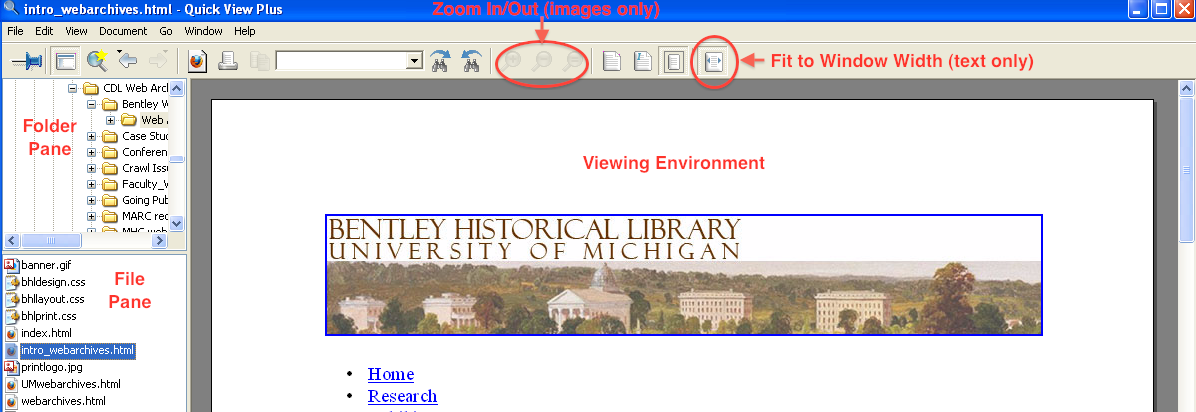
The proprietary Windows application Quick View Plus (QVP) is our go-to tool when we need to review content.  In addition to being able to view more than 300 different file formats, QVP will not change the 'last accessed' time stored in the file system metadata.

The QVP interface is divided into three main parts in addition to the navigation menu and ribbon at the top of the application window. The right portion of the interface holds the Viewing Environment while the left-hand side is divided between the Folder Pane (which can also be used to review the directory structure) on the top and the File Pane on the bottom.


After QVP opens, the right and left arrows may be used to expand/collapse subfolders and navigate to the appropriate location in the Folder Pane. Once a folder has been selected, a list of its contents (both subfolders and files) will be displayed in the File Pane; after a file is selected, it will appear in the Viewing Environment.  While we've noticed some issues with the display of PDF files, QVP meets the vast majority of our content review needs.  Moving to the browser-based (and open source) environment of Archivematica, it will be interesting to see how well we are able to view/render content using standard browser plugins.  We'll keep you posted...

Image Viewers: IrfanView and Inkscape

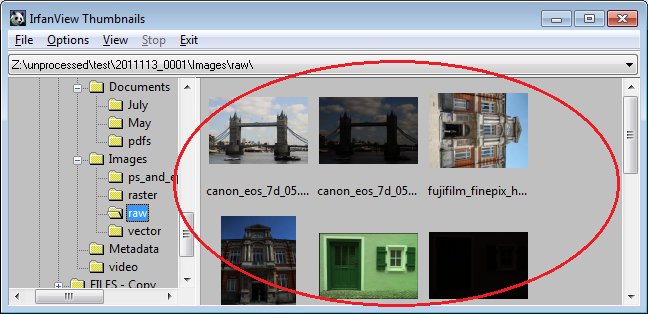
While QVP can handle pretty much every raster image we throw at it, the 'thumbnail' interface of IrfanView is pretty handy when we need to browse through folders that primarily contain images: 

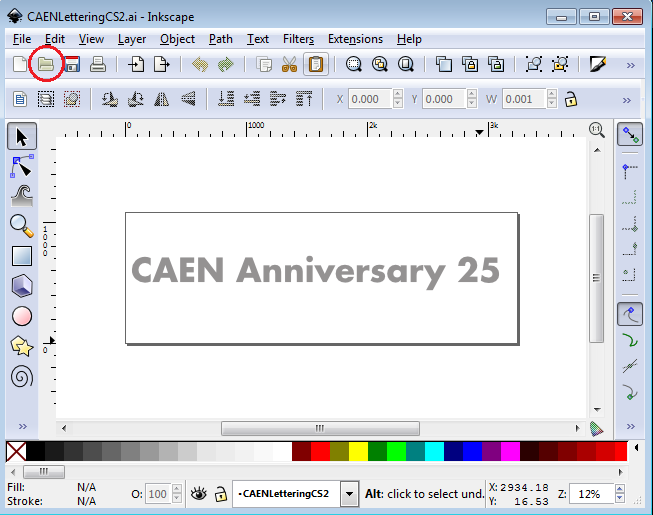
QVP is not able to render vector graphic files and so we employ Inkscape when we encounter such content.  


It's open source and freely available (and can also be used via the command line for file format conversion)--if you haven't checked it out, have at it!

Sound Recordings and Moving Images

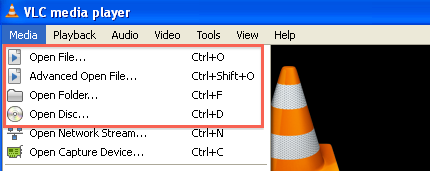
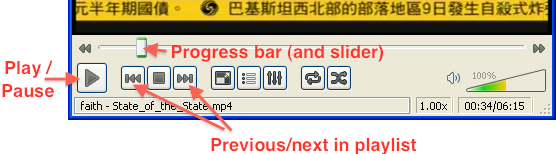
When it comes to reviewing sound recordings and moving images, VLC Media Player is our preferred app.  An open-source project that supports a ton of audio and video codecs, VLC permits you to load an entire directory of audio/video as a playlist that you can then advance through.

Play controls are located at the bottom of the Media Player window; in addition to Play, Pause, and Stop buttons, the archivist may fast forward or reverse progress by adjusting the slider on the progress bar.


So...What's in Your Wallet?

At the end of the day, appraisal is about making informed choices concerning what we will include in our final collections and how that material will be arranged, described, and made accessible.  While some aspects can be automated (and there's clearly a lot more potential work that enterprising archivists/techies could explore via natural language processing, topic modeling, facial recognition software, automated transcription), there is also a need for human intelligence to decide what to deaccession, what to keep, and how it will be described.  Or at least that's our take--please feel free to share what tools and strategies you employ at your institution!