The Bentley Historical Library's Mellon-funded ArchivesSpace-Archivematica-DSpace Workflow Integration project (2014-2016) united three Open Source platforms for more efficient creation and reuse of metadata and to streamline the ingest of digital archives.
We continue to explore innovative archival practice and emerging technologies to curate our collections—read all about it here!
With the forthcoming release of Archivematica version 1.6, folks are going to get a chance to roll out the new Appraisal and Arrangement Tab. We're excited to implement Archivematica—and the Appraisal Tab—in a production environment and will continue to blog about our experiences (as well as the additional enhancements we've contracted with Artefactual Systems to complete).
In the meantime, we wanted to share two screencasts to help folks get up and running with the Appraisal Tab and also get a better idea of the digital archives workflow we're implementing here at the Bentley Historical Library. Without further ado, I give you:
Part 1: Configuring ArchivesSpace and DSpace Integration within Archivematica
This screencast provides a step-by-step guide to adding instances of ArchivesSpace and DSpace for use with the Appraisal and Arrangement Tab.
Part 2: Appraisal, Arrangement to ArchivesSpace and Deposit to DSpace
This screencast demonstrates the functionality of Archivematica's Appraisal and Arrangement Tab, including the appraisal of digital content within the Appraisal and Arrangement Tab, the arrangement of content to corresponding ArchivesSpace Resource records, and the deposit of content to a DSpace collection.
Some features in the above may change over time and with subsequent releases of Archivematica—and our local practice is sure to evolve as we get more experience under our belt—but we hope you find these videos helpful. As always, please feel free to leave a comment or drop us a line at bhl-mellon-grant[at]umich.edu
Greetings, all; as hard as it is to believe, the Bentley Historical Library's ArchivesSpace-Archivematica-DSpace Workflow Integration project has come to a close.
October 31 marked the end of two and a half years of intense planning, development, and testing but it also signaled the beginning of a new phase as we here at the University of Michigan begin to implement the project outcomes in a full production environment.
While this development work won't be available until version 1.6 of Archivematica (release date forthcoming), we wanted to take this opportunity to glance backward and also look ahead...
Project Outcomes
In our inaugural blog post back on April 8, 2015, we identified three major development objectives for the project:
1. Introduce functionality into Archivematica that will permit users to review, appraise, deaccession, and arrange content in a new "Appraisal and Arrangement" tab in the system dashboard.
2. Load (and create) ASpace archival object records in the Archivematica "Appraisal and Arrangement" tab and then drag and drop content onto the appropriate archival objects to define Submission Information Packages (SIPs) that will in turn be described as 'digital objects' in ASpace and deposited as discrete 'items' in DSpace. This work will build upon the SIP Arrangement panel developed for Simon Fraser University and the Rockefeller Archives Center's Archivematica-Archivists' Toolkit integration (as demonstrated around the 12 minute point of the first video here).
3. Create new archival object and digital object records in ASpace and associate the latter with DSpace handles to provide URIs/'href' values for <dao> elements in exported EADs.
I am extremely pleased to announce that we have achieved each of these outcomes in the development work that concluded on October 31. More specifically, the project has resulted in:
1. The creation of a new Appraisal and Arrangement tab in Archivematica that will permit users to characterize, review, arrange, and describe digital archives with such features as:
Browsing the folder hierarchies of transfers in the "Backlog" pane.
Identifying file format distributions (in both tables and pie charts) and sensitive personal information (Social Security and Credit Card numbers) in the "Analysis" pane.
Displaying items in a "File List" pane, with contents updated based upon selections in the Backlog and Analysis panes.
Previewing content (using available web browser plugins) within the Analysis pane (with the ability to download and locally render other file types).
Tagging content (to aid in archival description, the identification of sensitive information, deaccession decisions, etc.) with the added ability to facet by tags in both the Backlog and File List panes.
What's in your transfer?
2. The integration of Archivematica and ArchivesSpace, so that users can:
Review, create, and edit archival description from ArchivesSpace directly within Archivematica (with information being written back to ASpace via its API) without having to switch between applications/browser windows.
Drag and drop content from the Backlog pane onto archival description in the ASpace pane, thereby associating data with metadata (and also establishing a Submission Information Package ready to undergo Archivematica's Ingest procedures).
Hey, you got your digital content in my archival description!
3. The integration of Archivematica and DSpace so that:
Users select a DSpace collection from available Storage Service locations during the 'Store AIP' microservice.
The Archivematica Storage Service splits the AIP into two archive files (one for the digital content, which will be publicly accessible by default, and the other for administrative metadata and log files, which will be restricted from public access by default) and automatically deposits them as a new item to the selected DSpace collection.
Upon successful deposit, a new digital object record (with the unique DSpace handle URL for the item) will be created in ASpace and associated with the appropriate archival object.
My repository has a first name, it's D-S-P-A-C-E...
4. Documentation related to the use of the Appraisal tab.
Max Eckard has produced a manual for use by the Bentley's archivists and student employees and he's looking to contribute to the documentation of the Appraisal tab in the Archivematica version 1.6 user manual.
It's just a jump to the left, and then a step to the right...
Because a (moving) image is worth a thousand words, I invite you to feast your eyes (and ears) on this rather brisk demo performed by Max:
Next Steps
As mentioned above, with the grant's conclusion we're moving forward with getting these new features implemented in a production environment. This work is going to proceed on several fronts:
1. Configuring Archivematica to work with our local, highly customized version of DSpace ("Deep Blue").
The developers at Artefactual Systems worked with an out-of-the-box copy of DSpace (version 5.5); UM's instance (around since 2006) has had a fair number of bells and whistles added to it over the years. As a result, Max is spending a lot of quality time on Slack with colleagues in Michigan's Library Information Technology group.
2. Customizing metadata fields to be used in Deep Blue to accommodate our qualified Dublin Core (i.e., dc.contributor.author as opposed to dc.creator).
3. Establishing workflows to streamline the deposit of restricted content to the repository.
While our default workflow involves content that will be publicly accessible via DSpace, the Bentley also encounters a decent amount of material that must be restricted from the general public (due to sensitive information, regulations such as FERPA or HIPAA, donor requests, etc.) or that can only be accessed in our reading room (due to copyright issues). We've established some semi-automated strategies for dealing with these materials and will look at trying to streamline this process.
4. Identifying and addressing bugs in advance of going live (and the release of Archivemcatica 1.6 release).
As we've been testing the Appraisal tab, we've reported a number of bugs to Artefactual Systems and also identified some enhancements related to local practice that we will contract with Artefactual Systems to address independently of our grant project.
5. Training additional staff so that all of our processing archivists and graduate students are using Archivematica to arrange and describe digital archives in addition to their work with physical and analog materials.
Thank you!!!
Finally, we'd like to thank all the following organizations and individuals for their steadfast support and ample contributions to this project!
The Andrew W. Mellon Foundation
Donald J. Waters, Senior Program Officer
Kristen C. Ratanatharathorn, Senior Program Associate
The Bentley Historical Library
Terrence J. McDonald, Director
Nancy Bartlett, Associate Director
Angela Clark, Business Administrator
Kellie Carpenter, Administrative Assistant
The University of Michigan Library
John Weise, Associate Director of Library IT and Head, Digital Library Platform & Services
Aaron Elkiss, Systems Programmer/Analyst Senior
Jose Blanco, Applications Programmer/Analyst Senior
Everyone at Artefactual Systems (especially Evelyn, Justin, Sarah, Nick, Holly, Dan, and Radda as well as Misty and Courtney)
The readers of this blog and everyone who reached out to us through comments, emails, tweets, and professional meetings. Thank you!!!! Your questions, comments, and overall interest in the project were profoundly valuable!
We plan to continue blogging about our engagement with innovative archival practice and technology—so please continue to stop by to see what's new here on Beal Avenue. Until next time, keep on keeping on!
As mentioned before in a previous post on PREMIS and PREMIS Rights Statements, we've been exploring ways that we can create rights statements as we're processing SIPs in Archivematica and then use those rights statements to set access profiles for the AIPs in our DSpace repository.
At that point, our our thinking was mostly theoretical. Since then, we've had some time to think about it, to confer with our MLibrary colleagues as well as those at the Rockefeller Archive Center and even reflect on Ed Pinsent's comments on the last post (thanks, everyone!). In this post, I'd like to give an update on how we plan (yes, still just a plan--things could change!) to actually do it. Before I dive in, though, I should remind our readers that what we're proposing here is a bit like trying, as the expression goes, to fit a "square peg in a round hole." Here's a quote from the PREMIS Data Dictionary for Preservation Metadata:
PREMIS primarily defines characteristics of Rights and permissions concerned with preservation activities, not those associated with access and/or distribution.
Yikes. "Not those associated with access and/or distribution." hrm...
The Access Profiles
Let's start at the end. In DeepBlue, our DSpace repository, we have some amount of control over both a digital object--or, to use DSpace-speak, bitstream(s)--and its associated metadata--or item. We can associate each of them (independently of one another) with one of four (or actually as many as we care to create) of what are called groups. In practice, we apply a handful of common combinations of item and bitream(s) groups when we deposit AIPs in our DSpace repository:
Open: Both items and bitstreams are open to be viewed/downloaded by anyone in the whole world.
Bentley Reading Room users: While items can be viewed by anyone, downloading of bitstreams must be done from within the Bentley's IP range. This can be from a wired or wireless connection.
University of Michigan users: Items can be viewed by anyone, but only University of Michigan affiliates may download bitstreams.
Totally restricted/embargoed items: Nobody (except Bentley archivists, who may also fulfill reference requests) can view or download anything, item or bitstream(s). Typically, these types of things are embargoed until a particular date (based on local policies), at which point in time both item and bitstream(s) will become open.[1]
Audio/visual items with copyright or other types of concerns: Items can be viewed by anyone, but only Bentley archivists can download bitstreams. Heretofore this profile consists mostly of audio/visual material that is preserved in DSpace but made available for streaming (not downloading) in the Bentley Digital Media Library.
A Quick Refresher on Act[ion]s in PREMIS Rights Statements
As a reminder, PREMIS Rights Statements are made up of one basis (the raison d'être of the rights statement, something like copyright or policy) and one or more actions associated with that basis (these are very specific actions the repository is or isn't allowed to do). Since the basis won't have an impact on its associated action, I won't go into much detail about them here.
Actions come from a controlled vocabulary, made up of things like:
replicate: make an exact copy
migration: make a copy identical in content in a different file format
modify: make a version different in content
use: read without copying or modifying
disseminate: create a copy or version for use outside of the preservation repository
delete: remove from the repository
As you can see, these have a very "digital preservation" feel (in the most narrow sense of the word[2]). Hence the data dictionary's warning above.
Actions may be allowed in all cases or, of course, they may have restrictions. These express situations where, for instance, dissemination is permitted, but only to a specific type of person (say, one that's affiliated with your institution), or, taken to the extreme, that dissemination is not permitted, period. At least in Archivematica's case, you've got three choices to that express such restrictions: allow, disallow or conditional. This may sound like it covers a lot, but as you'll see, we had to get a little creative with this, as we end up using "conditional" to describe a number of different conditions.
Other than that, there are some begin and end dates associated with that action, and a note containing a textual description of the right granted if additional description is needed.
Mapping PREMIS Rights Statements in Archivematica to DSpace Groups
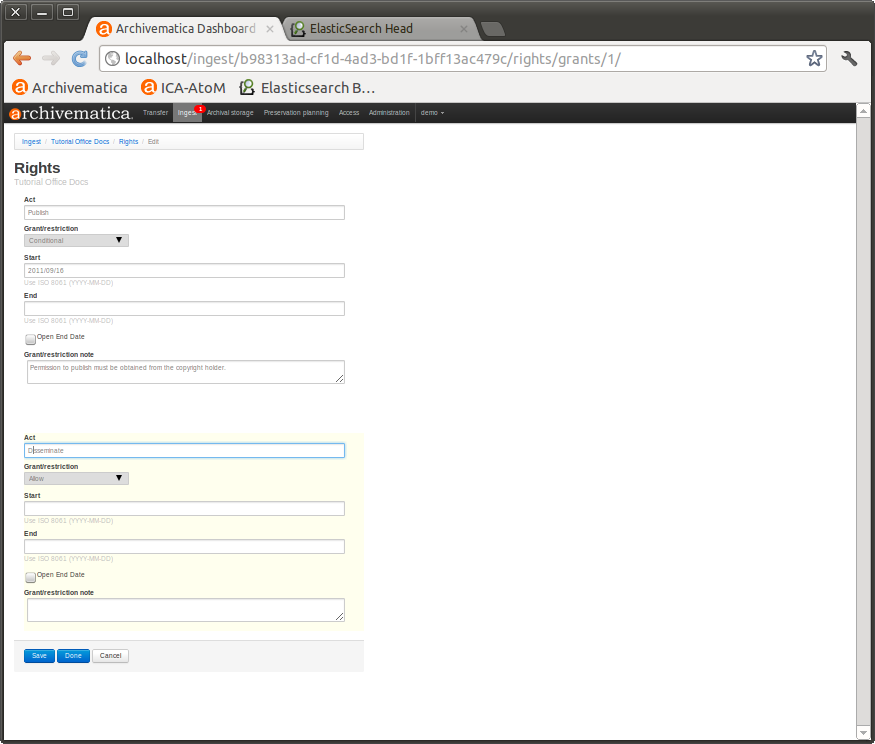
SIP rights template--second page
Now on to mapping the PREMIS Rights Statements implementation in Archivematica to the groups in DSpace. There's a couple different ways we might have approached this.
One way might have been to try to use an Act to tell the repository exactly what it was allowed to do with both the item and the bitstream for a particular AIP. While this approach gave us the granularity we'd need for machine-actionable PREMIS Rights Statements, we worried that it would be overly cumbersome for our human processors that would be, for the most part, manually adding them to SIPs and keying in the data.
Another way might have been to use a local controlled vocabulary for the Act field, something like "disseminate-bentley", "disseminate-umich", etc. However, associating a particular target with an action seemed, in the word of one of our DSpace gurus, "somewhat contrary to the spirit of the allowed actions" (see this sample controlled vocabulary for the 'act' element, some of which I listed above). You'll also notice if you click that link that "disseminate-bentley", "disseminate-umich", etc. are not on that list, and for good reason! We even thought briefly about using the Restriction field to specify the target audience before realizing that it too has a controlled vocabulary (one that's actually enforced by Archivematica and then used later on in some logic).
In the end, we settled on using the Note field to specify audience. Now, we know this isn't the most elegant solution--in general, the intention of the notes is specifically to not be machine-actionable, but we felt that since this PREMIS Rights Statement would ultimately be preserved in the AIP (in the METS!), and since there's a chance someone might run across it outside of our repository environment, that this was the way to go.
So here's our plan, at least an overview:
DeepBlue Groups
Archivematica PREMIS Rights Statements
Item
Bitstream
Act
Restriction
Restriction note
Anonymous
Anonymous
None
None
None
Anonymous
Reading Room only
disseminate
Conditional
Reading Room
Anonymous
University of Michigan only
disseminate
Conditional
University of Michigan
Anonymous
Archivists only
disseminate
Conditional
BDML
Archivists only
Archivists only
disseminate
Disallow
Executive records (ER)
Personnel records (PR)
Student records (SR)
Patient/client records (CR)
A couple of notes here:
We will not use PREMIS Rights Statements (at least those that apply to access/distribution) for AIPs that don't have restrictions.
When we do use PREMIS Rights Statements, they will be as minimal as we can make them with the intention that they will only be used by machines, not humans. Human readable rights statements will be recorded elsewhere, like ArchivesSpace Conditions Governing Access and Use notes.
Most of the time, the End Date field will be OPEN, except when a Bentley policy is involved (ER, PR, SR and CR above). In those cases, an end date will let the repository know when a particular restriction expires.
Once an AIP with some sort of restriction is ready to go to DeepBlue, we'll park it somewhere temporarily[2], parse the METS file in the AIP, determine (based on the rights statements) the item and bitstream permissions, convert it to the DSpace Simple Archive Format and upload in batch to DeepBlue from there. It's sounding like the identifier for the Digital Object in ArchivesSpace will be in the AIP, so we're pretty confident we'll also be able to add the Handle back to ArchivesSpace farily easily as well.
We also think (hope!) that this approach, as long as we're consistent, would allow us to change our minds relatively easily in the future, say, if we decided after all that a more granular approach was the way to go.
But Wait! "disseminate" is Hard to Spell!
It occurred to us that in order for this approach to work, our processors can never make typos. We've all been there... this is a pretty unrealistic expectation.
For the time being, we're planning to use Greasemonkey (in Firefox) and Tampermonkey (in Chrome) to help us out with this particular problem. These are browser extensions that customize the way a web page displays or behaves using small bits of JavaScript.
We've written a fairly basic script (you can see our draft here), that looks for URL patterns that match the Add Act pages in Archivematica (as you can see in that script, http://sandbox.archivematica.org/transfer/*/rights/grants/*/ and http://sandbox.archivematica.org/ingest/*/rights/grants/*/). When it finds one, it adds an additional dropdown, like so...
It even has a nice logo!
When an option is chosen (Reading Room was chosen above), it automatically fills out the rest of the form, just like we need it. When a Bentley policy is involved (that requires an end date), it asks a processor for a creation or accession date (still working on a nice datepicker option for this), does some math, and calculates the appropriate end date. It's not the most elegant solution but we think it works for now!
Conclusion
In the end, it's perhaps a little clearer as to why PREMIS wasn't really meant for this kind of thing. Still, maybe square pegs sometimes do fit into round holes...
Seriously, though, let us know what you think!
[1] Although these types of things are not viewable, downloadable or even searchable in DSpace, typically we still provide a link to them in the collections finding aid. [2] Philosophically, I'd argue that access and distribution is a fundamental part of digital preservation... maybe the most fundamental part. [3] At the end of the grant, AIPs without restrictions will be automatically uploaded to DSpace
and recorded in ArchivesSpace without any more human intervention!
If you're interested, we've also been working on some optimization issues, packaging AIPs and prioritizing our development requests for improvements to the Appraisal and Arrangement tab (including some exciting UI enhancements--thanks, Dan!)--but all of that's a topic for another day!
Today's post is on the Archivematica-DSpace part of the ArchivesSpace-Archivematica-DSpace Workflow Integration project. I suspect this will be a two-parter. Today, I'll outline the workflow we envision as well as some of the options we're weighing for making it happen. Later, I'll report back on what course of action we decided to take and why.
Workflow
The essential workflow goes like this:
An archivist accessions (ArchivesSpace), transfers (Archivematica), appraises and arranges (forthcoming in Archivematica 1.6) a SIP.
An archivist "Finalize[s] Arrangement" for a particular digital object and it's components.
Archivematica runs said digital object through the rest of it's Ingest process (we'll be normalizing for preservation but you can do whatever you like!).
Archivematica creates a single Digital Object in ArchivesSpace, with one or more associated Digital Object Components.
Archivematica spits out a bagged AIP (actually two bags, one with the data itself and one with more administrative-type information) into a user-selected collection in DSpace, data (an item composed of one or more bitstreams) and metadata, the latter likely coming from the ArchivesSpace metadata we've been using/creating already within Archivematica (i.e., not pulled from ArchivesSpace, or at least not pulled immediately from ArchivesSpace). [1]
Archivematica updates ArchivesSpace with the relevant information: handle, URL, etc.
Considerations
It all doesn't come down to workflow. We have some goals for the way we'd like for this to work, and Archivematica and DSpace have some additional responsibilities as components of an OAIS.
Our Goals
One of our goals for this Mellon-funded project is to ensure that new features and functionality are modular so that other institutions may adopt some or all project deliverables. Indeed, this is a requirement of Mellon's, an organization that "aims to maximize the use and sustainability of technology," and would like for "funded work to be made publicly available for the long-term benefit of... cultural institutions."
This is something we take very seriously. It has informed everything about this process, from the way we've done development (so that, for example, institutions who don't use ArchivesSpace can still make use of the Appraisal and Arrangement tab), to our attempts to ensure that workflows are flexible (for MPLP as a baseline folks and for item-level folks) to our plans for sustainability (all code, in addition to just being out there, will be incorporated into Archivematica's core code and maintained by Artefactual going forward). It's even informed the way we've tried to reach out to others on thorny issues and the way we're trying to be as open as possible and share as much as we can on this blog.
All of this holds true for this process of deciding how we'll get data and metadata from Archivematica and DSpace. Ideally, we'd like for this to work for all institutions, regardless of the repository they're using (or even if they're not using a repository, but that parts easy). As we consider a move to Hydra in the next few years, this would actually work out well for us too. If that won't work, we'd at least like for this to work for everyone who uses DSpace, and not be tied specifically to Deep Blue. If even that won't work, we'll reluctantly settle for something that will only work for Deep Blue, for our local Dublin Core conventions or that MLibrary LIT developers will have to develop and maintain because, after all, we do have to make sure that data and metadata do actually get from Archivematica to DSpace by the time the grant concludes.
In addition, Archivematica and DSpace, by virtue of the fact that they are components of a digital preservation system, have some additional responsibilities above and beyond just exchanging data and metadata. Archivematica, for instance, needs to be able to ensure that AIPs have successfully transferred to what we're using for Archival Storage (i.e., DSpace), for example, by having some mechanism to verify checksums on both ends of a transfer. For all you OAIS junkies out there, that would be the Error Checking function of the Archival Storage Functional Entity:
The Error Checking function provides statistically acceptable assurance that no components
of the AIP are corrupted in Archival Storage or during any internal Archival Storage data
transfer... The Preservation Description Information (PDI) Fixity Information provides some assurance that the Content Information has not been altered as the AIP is moved and accessed.
As a result, whatever protocol or method we use to transfer data and metadata needs to be able to check this kind of thing and throw up an error if something goes wrong.
Archivematica also has a responsibility to be able to reassemble the AIP upon request. That would be the Provide Data function of the Archival Storage Functional Entity:
This function receives
an AIP request that identifies the requested AIP(s) and provides them on the requested media
type or transfers them to a temporary storage area.
As a result, Archivematica will need to have more granular information about individual bitstreams that make up an AIP than we originally anticipated needing, for example, for the minimal metadata that we'll record for Digital Objects in ArchivesSpace. [2] The handles are important for this, but so are the bitstream URLs, even for the administrative bit that will be hidden to users.
Those are just two examples but I hope they serve to illustrate the fact that this data/metadata exchange won't be quite as simple as copying files from one place to another.
Options
Just last week we had a brainstorming session with representatives from Artefactual, the Bentley, MLibrary LIT and the University of Edinburgh (including someone who works on SWORD) on the topic of Archivematica-DSpace data and metadata exchange. Justin at Artefactual began by outlining what he sees as the three options for getting data and metadata from Archivematica to DSpace, and we spent the hour discussing the advantages and disadvantages of each.
REST API
The DSpace REST API provides a programmatic interface to DSpace Communities, Collections, Items and Bitstreams. In the latest version, the REST API allows authentication to access restricted content as well as allowing Create, Edit and Delete on DSpace Objects. REST Endpoints allow you to do things like login, logout and, important for our purposes, post metadata and bitstreams to items, post policies to bitstreams, and get handles.
We'd need to develop a callback for something like verifying checksums.
While you can get access to restricted content, we're not sure if it can handle groups that we use for permissions (for example, Bentley IP addresses for Reading Room Only material).
Harder to get handle.
Simple Archive Format
DSpace also has a set of command line tools for importing and exporting items in batches using the DSpace Simple Archive Format. The basic idea is to produce a particular directory structure (like the one you see above) with sub-directories for Items. Each sub-directory contains components for the item's descriptive metadata and the files that make up the item. There are also conventions for the XML files and for the contents of the contents folder. Important for our purposes, the Simple Archive Format allows you to import items to particular collections, can alert (e-mail) folks that items have been imported, can resume a failed import and can add items from a ZIP file. There's also a UI for import, but I don't suspect we'll be using that.
It's simple! But seriously, we have a lot of experience with it--we use it all the time.
Less work to implement.
We could do everything we want with it with some development.
Already works with our locally-grown embargo functionality.
Returns a file that maps deposited filenames to what they became.
Some disadvantages:
This would not work with other repositories.
There are some questions about how difficult it would be to make this work for DSpace and specific instances of DSpace like Deep Blue, given variations in Dublin Core and that kind of thing.
We'd need to develop a callback for something like verifying checksums.
It's an offline communication format, so it's slower and involves more code to maintain.
Would have to be developed by individual institutions.
SWORD (Simple Web-service Offering Repository Deposit) is an interoperability standard that allows digital repositories to accept the deposit of content from multiple sources in different formats via a standardized protocol. SWORD allows clients to talk to repository servers. Important for our purposes, it allows deposit to a SWORD-compliant repository (DSpace is one of them, and so is Fedora) by a third party system (like Archivematica). It allows you to deposit files and, in its latest version, copes not only with the "fire and forget" deposit scenario, but also to facilitate the functions needed to support the whole deposit lifecycle--such as notifying a depositor that a deposit was successful and even verifying a Content-MD5 header. Cool stuff.
If you want to know more about SWORD, check out their website.
Some advantages of using sword:
This would work for other repositories besides DSpace, which means a lot for our goals.
It's good for depositing files.
Hydra/Fedora support is already there.
Does things live and dynamically.
May allow you to create a handle and add metadata later.
Can e-mail folks letting them know that ingest was successful.
And some disadvantages:
It's not really for adding or editing metadata.
Doesn't handle permissions, restrictions or embargoed items.
Conclusion
Decisions, decisions! It's important to note that it's not like these are all mutually exclusive options. Simple Archive Format scripts and SWORD could be used in conjunction, for example, and this is one of the options we're currently exploring. We could also make changes to the DSpace code itself.
Well, that's about it for Archivematica-DSpace/Deep Blue Integration. Check back soon for an update on the course we've decided to take!
[1] I'm actually not sure what order this will happen in, that is, whether the Digital Object will get created in ArchivesSpace first or if content will get deposited into DeepBlue first.
[2] Check out Mike's post on digital objects and ArchivesSpace for more information on how we envision using Digital Objects in ArchivesSpace. Full disclosure, our thinking on this is evolving a bit, but for now it's still true that we'd like to use Digital Objects in ArchivesSpace mostly for their ability to point or link out to, in our case, a handle. That a fairly minimal implementation compared to all the rich technical and administrative metadata you could add to Digital Objects. It's a system of record thing!
One (somewhat unexpected) challenge in our ArchivesSpace-Archivematica-DSpace Workflow Integration project has involved mapping terms and terminologies across the different platforms. In conversations with our development partners at Artefactual Systems, members of the ASpace community, and other peer institutions, we've found that it's really important to take a moment and make sure we're all on the same page when we're talking about something like a 'digital object.'
Having some common ground/shared understanding is very important, as our workflow establishes the following equivalences:
I'd like to take this opportunity to review the reasons behind this structure, but first I think it would be useful to take a look at how others in the ASpace user community are approaching digital object records.
Perspectives on the ASpace Digital Object Record
As evidenced by the introductory materials for an ASpace workshop that was held here in Ann Arbor this past January, the digital object record was designed to be flexible:
The Digital Object record is optimized for recording metadata for digitized facsimiles or born-digital resources. The Digital Object record can either be single- or multilevel, that is, it can have sub-components just like a Resource record. Moreover, the record can represent the structural relationship between the metadata and associated digital files--whether as simple relationships (e.g., a metadata record associated with a scanned image, and its derivatives) or complex relationships (e.g., a metadata record for a multi-paged item; and additionally, a metadata record for each scanned page, and its derivatives). One or more file versions can be referenced from the Digital Object metadata record. The Digital Object record can be created from within a Resource record, or created independently and then either linked or not to a Resource record.
While this flexibility is great, it also provokes a lot of questions about just how to implement the digital object records, some of which have been featured in conversations on the ArchivesSpace Google Group as well as the ArchivesSpace Users Group.
On one end of the spectrum, we have complex digital objects--multilevel intellectual entities comprised of multiple bitstreams that can be represented in a structured hierarchy. Brad Westbrook provides some examples of this use case in this thread from the ASpace Google Group. Those of us in attendance at the "Using Open-Source Tools to Fulfill Digital Preservation Requirements" workshop a couple weeks ago at iPRES got to see a real-world example of how a complex digital object could be represented in ASpace via content from the UC San Diego Research Data Curation Program in the Online Archive of California.
Far more common (based upon conversations with peers and posts to the lists), is a simpler approach in which the digital object record is used primarily to record URL information that will provide links to content from the public ASpace interface or from <dao> elements in exported EAD. This thread provides some valuable thoughts from Ben Goldman, Jarrett Drake, Chris Prom, Maureen Callahan, and our own Max Eckard.
Several of the important ideas raised in that conversation include the need for institutions to:
Define systems of record for data/metadata and determine how ASpace fits into this ecosystem.
Identify how information in the digital object records can be used now and in the future (i.e., the records can bring together digital content stored in various systems/locations, serialize information to EAD files, respond to queries via the API, etc.)
I won't attempt to delineate the different positions in the thread but encourage you to give it a thorough read!
Moving from this (very) brief review of the landscape, I wanted to identify some of our key assumptions here at the Bentley:
The general position outlined by Max is still accurate ("We're thinking of the DO module more as a place to record location than as a place to "manage" digital objects or the events that happen to them"): we are primarily interested in using the ASpace digital object module to create <dao> tags and links to content in EAD finding aids.
We would therefore not be looking to include technical/preservation metadata about AIPs in the digital object record or do extensive arrangement with the digital object components.
With the above in mind, the ‘digital object’ records become somewhat analogous to physical ‘instances’--these are manifestations of the archival description expressed in the associated archival object record.
In addition, within AS a digital object may be ‘simple’ or ‘complex’ (in the latter case, comprised of one or more digital object components). We're now contemplating slightly more 'complex' digital object records...
We've also been working with Artefactual Systems and some other peer institutions to think more about how and where to record machine-understandable/actionable PREMIS rights information associated with digital objects.
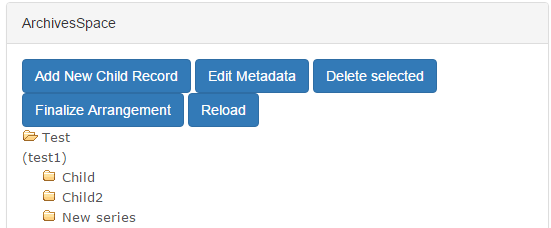
Within the new Appraisal and Arrangement tab, a dedicated ASpace pane will display the ‘archival objects’ (i.e., the subordinate components) of a given resource record in a hierarchical structure. Within the ASpace pane, users will be able to create new archival objects and add basic metadata.
Within the appraisal tab, archivists will drag/drop content (individual files and/or entire directories) to a given ‘archival object’ in the ASpace pane.
All content associated with an archival object will be a single SIP/AIP in Archivematica.
Furthermore, each SIP/AIP will comprise a single ASpace ‘digital object’
We are not spinning off separate DIPs; we may configure Archivematica's Format Policy Registry (FPR) to spin off lightweight copies for some file formats, but otherwise the Archival Information Packages (AIPs) will serve for both preservation and access.
The Bentley's past/current use of DSpace is another factor here, as a single 'item' may contain one or more 'bitstreams' (i.e., files). We therefore would like to be able to do some minimal arrangement of bitstreams within an ASpace digital object to control how materials will be deposited to DSpace.
Whenever possible, we strive to describe materials at an aggregate level, which means that a fairly large number of files (in number or space on disk) may be associated with a given 'item.' We also package content in .zip files to reduce the number of files we have to manage and that our users have to download.
To avoid presenting our users with extremely large .zip files that could be difficult to download and access, we often will chunk content across multiple .zips--i.e., instead of one 10 GB .zip, we will provide users with five 2 GB zips, as evidenced in this example from our Governor Jennifer Granholm collection:
In other cases, we might want to differentiate between access and preservation copies of materials in a collection. As an example, the following DSpace item includes an .mp4 access copy of a video recording while the .zip file contains an .iso image file of the original DVD:
We see the DSpace item as being the equivalent of the ASpace digital object record, with the individual bitstreams corresponding to the digital object components.
We won't be using DSpace forever (Michigan recently became a Hydra partner) and so we don't want to predicate our ASpace-Archivematica workflows on legacy systems.
Potential New Features
So...where does this leave us? I wanted to talk through a possible arrangement workflow (based upon the new Appraisal tab) and how this might be translated into ASpace digital object records. Let's see how this goes...
We've suggested the addition of an “Add digital object component” button in the ASpace pane (see above screenshot), which could function as follows:
A user would select a particular archival object in the ASpace pane and click the “Add digital object component” button.
Clicking the button will trigger the creation of a ‘digital object component’ that will appear as a child of the archival object.
Adding at least one digital object component essentially creates the main digital object record (which may include multiple components).
All the ‘digital object components’ nested under an archival object will comprise a single AS ‘digital object.’
In arranging the digital object components, users would only be able to work with 1 level of hierarchy--this will be very simple and minimal ‘arrangement.’
A digital object component will essentially be a bucket or a virtual container where one or more files and/or folders may be dragged/dropped.
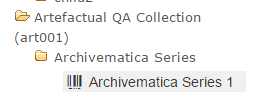
To visually distinguish the ‘digital object component’ from archival objects, it should have a different icon (perhaps use the following from the digital object record in ASpace) and/or the text might have a different colored background.
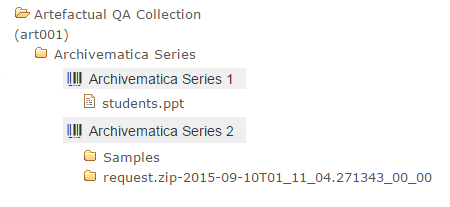
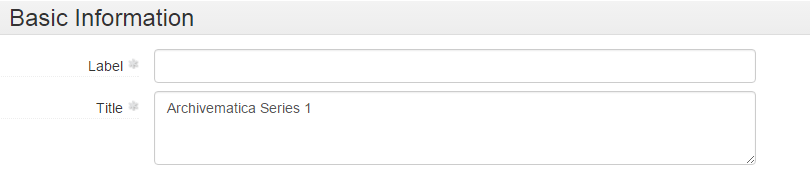
The digital object component would display a default title, comprised of the associated archival object’s title and/or date and a consecutive integer. (In other words, for the archival object ‘Archivematica Series’, the first digital object component would be ‘Archivematica Series 1’, the next would be ‘Archivematica Series 2’ and so forth.)
The user would drag one or more files/folders on top of a digital object component. The file(s) and/or folder(s) would be nested under the digital object component. The following example has two digital object components:
The user can select a digital object component and click the ‘Edit Metadata’ button. This would permit the user to edit the only pieces of metadata required for digital object components, ‘title’ and/or ‘label’, as seen below in AS:
We've also thought about some simple rules for digital object components (and information packages), as well. Once an archivist clicks the 'Finalize Arrangement' button, Archivematica will create a SIP for the materials associated with a given archival object and commence its Ingest procedures, which may result in the creation of preservation copies (or OCR text). Based upon this:
If there is only one file, it will be deposited to DSpace as individual bitstreams.
If there is more than one file and/or a folder (including derivatives produced by Archivematica), everything in the digital object component will be included in a single .zip file (perhaps using the digital object component title) that will be deposited to DSpace.
Additional components of the AIP produced by Archivematica (the logs folder, metadata folder, and METS file) will be packaged in a .zip file and deposited as an additional digital object component (perhaps with some default file name). The Bentley would want this content to be be inaccessible to the general public (and ‘not published’ within the ASpace digital object record).
After Ingest processes are complete and the content has been deposited to DSpace, information will be written back to the ASpace digital object record. The main (i.e., 'top level') digital object would by default inherit the title and/or date of the associated archival object, employ the DSpace handle for File URI (as well as identifier? TBD…), and have an extent (in bytes) that represents all associated content. PREMIS rights information could also be written to the digital object record, though we'd love to hear from folks with thoughts about this (for instance, would the associated archival object be a more suitable location?).
The digital object components (i.e., each specific grouping of content as well as the Archivematica logs and metadata) would then be added as children of the main digital object record:
The digital object component records might also include extent information, more specific rights information, or...???
It's been exciting to think about the possibilities of ASpace's digital object record, but the fairly wide-open nature of the endeavor is also daunting, as there's no established best practices to fall back on. What do you think? How are (or would) you proceed? We'd love to get your feedback and/or reactions!
With a tip o' the hat to Raymond Carver, I want to use this post to try to and illuminate (for myself, if nothing else) some of the angles and issues surrounding 'access' to digital archives.
On the surface, the topic appears simple: I have some stuff that I want people to see, so I put it online or provide a dedicated terminal in my reading room and—voila!—access!
Made available by Flickr user Steve Rhode under a CC Attribution-NonCommercial-NoDerivs 2.0 Generic License
But even in this rosy scenario, there are a lot of questions: what platform would you use to host things online? Will access copies (i.e., DIPs) differ from preservation copies (AIPs)? If using a dedicated terminal, how will content be organized and how will researchers find desired materials? If copying files to a terminal or removable media, will staff be able to respond to researcher requests in a timely fashion? And what about rights?
Now, I certainly don't want to be like a certain you-know-who...
...but there are a lot of considerations here. Complex ones, too. At the same time, simply waiting around for the stars to align and the *perfect* solution to emerge won't cut it, either. Therefore, inspired by the various presentations on access that I saw last month at SAA, I'd like to give a brief overview of our current approach to access and then lay out some of the questions and challenges we're starting to explore here at the Bentley.
Just Dropped In (To See What Condition My Condition Is In)
The Bentley Historical Library has taken a fairly aggressive (progressive?) approach to providing access to our 'open' or unrestricted digital archives. All such content is freely available for download and use via our archival community in Deep Blue, the University of Michigan's DSpace repository:
Deep Blue is managed by staff in the University of Michigan Library Information Technology division and we considered ourselves to be very fortunate when we started using it as both a preservation repository and access portal in 2008. Prior to that (and not having any in-house IT), digital materials were either placed on optical disk and brought out to patrons in our reading room or hung off of our website and linked to from finding aids.
Moving to Deep Blue/DSpace was clearly a step forward, but the change brought about some additional challenges due to the basic structure (dare I say data model?) of the repository:
A 'community' contains 'collections' (which may be grouped together in sub-communities, we've formed one of these for university faculty papers)
A collection in turn contain 'items' (which may be associated with one or more files or 'bitstreams').
The default metadata schema is Dublin Core (which makes crosswalking from EAD ...interesting...)
While this relatively flat structure works great for traditional institutional repository fare (white papers, articles, and discrete digital objects), it really isn't suited for the complex intellectual hierarchies of archival collections. So we've had to make do...
As with our physical and/or analog record groups and manuscript collections, our materials in Deep Blue are organized by the principle of provenance (and are often extensions of existing collections):
Within a collection we have our items—and here's where we've had to get creative:
Given the flat structure of DSpace, we are using the title metadata to help group related content together and preserve the hierarchical intellectual arrangement of materials. As a result, the following description from our Jennifer Granholm finding aid...
...becomes the following item title in Deep Blue:
We also package materials in .zip files so that we only have to manage one file and our users don't have to download hundreds or even thousands of files. Because content must actually be downloaded to a local machine to be used or rendered (unless a particular file format renders with a browser plugin), we have taken to chunking content across multiple .zip files when it gets to be above 2 GB:
The above digital object represents speeches, addresses, and other audio recordings from former Michigan Governor Jennifer Granholm for the year 2010. All together, there's about 20 GB of content; by dividing this body of content into smaller chunks representing each month of the year, we've made it a bit easier for folks to download content. And while I certainly don't think this solution is ideal, it's still a lot better than bringing a stack of CDs out to folks in our reading room.
Earlier in this post, I alluded to open or unrestricted content; we actually have three access profiles based upon rights and restrictions:
Open materials may be accessed by anyone anywhere at any time.
Restricted materials are only available to system administrators and digital curation staff; the items are not visible to other users nor is the metadata searchable. Content is restricted for a number of reasons, including specifications in a gift agreement; the presence of sensitive personal data (related to HIPAA or FERPA as well as credit card numbers and Social Security numbers); and internal policy (for example, all executive records of the University of Michigan, while FOIA-able, are restricted for 20 years from the date of accession).
Reading-room only materials may only be accessed by computers within the IP address range of the library itself (and are not accessible by patrons using university wifi). This class is primarily composed of content where we do not hold copyright or donors have requested more restricted access. Our reading room rules, which all researchers must agree to follow, stipulate that these items "may not be copied, emailed or transferred in any way." (While placing the burden on the researcher is by no means foolproof, it's much easier to implement and maintain than the locked-down computer terminals with which we earlier experimented.)
In addition to having the metadata and text-based file contents (when not packaged in .zip files) indexed by Google and other search engines, all materials are linked from online finding aids and/or catalog records. People certainly seem to be finding our content, too: from 2008 through last month, we've registered 620,375 downloads (a figure that excludes downloads from robots or web crawlers).
Access: the Final Frontier
As we enter the final six months of our Mellon grant (and prepare to kick off a Hydra development project with colleagues at the University of Michigan Library), we have returned, time and again, to the challenge of providing access to digital archives.
There are a lot of great access portals to collections out there! Some of the ones we've been particularly impressed with include those of:
Those are just a few of the many examples out there (and we meant to include your digital collections, but ran out of time...), but we've noticed that while these (and other innovative solutions) are vast improvements over an off-the-shelf option like CONTENTdm, they seem pretty unique to their local institutional context and IT environment.
The work we've been doing with Archivematica and ArchivesSpace has made us firm advocates of community-based approaches where folks at different institutions can share and contribute to common solutions, without having to reinvent the wheel (and continue to support and maintain that reinvented wheel. Indefinitely. All by themselves.).
This community interest recently led us to contribute user stories to the ArcLight project, "an effort to build a Hydra/Blacklight-based environment to support discovery (and digital delivery) of information in archives, initiated by Stanford University Libraries." Likewise, we were excited to hear about the DPLA Archival Description Working Group and its implications for describing—and searching for and retrieving—digital archives.
Beyond the above, we've also been trying to articulate the different aspects or considerations related to access that could be common to cultural heritage institutions of all sizes and shares. These are some very, very rough ideas, but we're interested in how we can:
Explore and better understand the challenges and opportunities surrounding OAIS functional entity of ‘access’
Present (and make understandable) the context/content of archival materials (including the relationships between digital, physical, and analog materials)
Enable search and retrieval of information while balancing item-level, aggregate, and collection-level description
Provide tools and functionality to view/render various formats (born-digital and digitized), including images, text, audio and moving image, web archives, and disk images
Facilitate the analysis and reuse of data (including visual representations of metadata/data and tools or functionality that would facilitate distant reading of materials and other digital scholarship techniques)
Increase engagement with users (crowdsourcing or feedback)
Manage rights and enforce restrictions/permissions
Establish use metrics and collect quantitative data regarding impact of our collections and outcomes of curation activities
Permit users a more seamless experience using materials in searching for and using materials that are in disparate/siloed locations: online catalogs, HathiTrust, digital repositories, web archives, etc.
Leverage linked data: facilitate research across collections and institutions
At this stage in the game, we aren't even thinking about specific implementation strategies, as it seems there could/should/might/shall/will be a core set of features or functional requirements that could exist independent of any particular repository platform. Having said that, it seems to us that an access portal should:
Emphasize on Interoperability:
Create connections between tools and services
Permit us/other institutions to broaden current work and ‘plug in’ to larger framework
Avoid siloed/local solutions
Employ open source software:
There is a “need for engagement beyond simply making source code available, including supporting the development of user communities, creating adequate documentation, and cultivating relationships between developers working in libraries around the country.” (IMLS National Digital Platform)
Focus on end users
Meet needs within LAM communities for common solutions and interoperability as well as those of end users related to the access and use of digital archives.
End users are creating, accessing, and organizing content in ways that were never before possible and, in many cases, without the support of a knowledge professional. The user should figure prominently in our strategy. How do we bring in their views, and identify the missing voices? (IMLS National Digital Platform)
So that's what we've been thinking about and pondering as of late... What are we missing? What seems unnecessary? What do you talk about when you talk about access?
Last week, we "sat down" with Abbey Potter at the Library of Congress to kick of a new series of interviews run by the National Digital Stewardship Alliance (NDSA) Infrastructure Working Group. Modeled in part after MTV Cribs, a show that featured (actually, still features!) tours of the houses and mansions of celebrities, the "Digital Preservation Infrastructure Tours" series asks individuals to answer questions about their organization and the technologies and tools they use (i.e., their houses and mansions) to serve as case studies in digital preservation systems.
"Here comes the rooster digital preservation system!"
So... welcome! The post went up yesterday on the Signal!
Welcome back, readers! Previous posts have provided an overview of the Bentley Historical Library and University of Michigan Library's "ArchivesSpace-Archivematica-DSpace Workflow Integration" project and given some background on digital preservation and curation efforts at the Bentley. In this post, I would like to give an update on what's been accomplished thus far and where we're going.
Unexpected Challenges
As with most endeavors, our project has faced some unexpected challenges, the first of which related to staffing. Per our proposal, we originally intended to hire a software developer for a two-year term position at the University of Michigan Library to handle the technical aspects of integrating ArchivesSpace, Archivematica, and DSpace in a digital archives workflow. This approach was selected during the planning phase so that the developer could share knowledge and expertise with other Library Information Technology (LIT) staff through daily interactions. However, given the improving economy and the unique 'chaos to order' skills/experience required by the position, we were unable to secure any candidates after three months of intensive recruiting.
Rather than extend the posting for a fourth month and risk further delays, our team began to explore the possibility of contracting directly with Artefactual Systems Inc. for the necessary development work. We soon realized this strategy would reap immense benefits for the project, due to the company's expert knowledge of Archivematica, extensive experience with the agile development of open source software for libraries and archives, and large network in the archival and digital preservation communities. Staff members at Artefactual Systems were also highly familiar with the project, as President Evelyn McClellan and Director of Archivematica Technical Services Justin Simpson were in regular communication with us since the planning stages of the grant in the summer of 2013 and staff had already been tapped to provide consulting services for LIT developers. After completing the budget reallocation process, we finalized this arrangement in December 2014.
We faced even greater adversity with the illness and loss of our dear friend and colleague Nancy Deromedi. The grant's original Principal Investigator, Deromedi pioneered the collection and preservation of digital and web archives at the Bentley, as outlined in my previous post. As head of the library's Digital Curation Division from 2011-2014, she was incredibly supportive of my work developing the AutoPro ingest and processing tool and was a great advocate for open access to born-digital archives. Upon being named Associate Director for Curation during the Bentley's 2014 reorganization, Deromedi asked me to unify our paper and digital processing procedures to ensure the standardization of descriptive practices and empower processing staff to handle all types of archival materials, regardless of format. The move was typical of her progressive vision, dynamic leadership, and willingness to take risks.
Deromedi had been diagnosed with esophageal cancer in late 2013, but continued to work on the grant proposal and numerous other projects while undergoing rounds of treatment through early 2014. In March 2014, she underwent major surgery, but after only three months of recovery and rehabilitation she was back at the Bentley, full of enthusiasm and determination to see the grant project to a successful outcome. She provided leadership on the early stages of the budget reallocation process, but doctors discovered a recurrence of her cancer in September and on October 13, 2014 she passed away.
Nancy M. Deromedi
Nancy Deromedi was a skilled and knowledgeable archivist, a great mentor and leader, and a dear colleague and friend. Our work on this grant is very much a tribute to her vision and record of achievement.
Moving Forward
While the delay in hiring a developer was vexing, Nancy Deromedi's illness and death posed very serious obstacles to progress. Nevertheless, project staff made steady (albeit slow) progress on a number of fronts through 2014 to the present. These include:
Digital preservation policy review: Archivists undertook a review of current digital preservation policies and procedures. While a final document is still in draft form, the exercise helped confirm preservation strategies (such as the creation of preservation copies of content in at-risk file formats) as well as approaches for handling sensitive personal information.
Software review and evaluation: While archivists had experimented with sandbox versions of Archivematica and ArchivesSpace, a more thorough review of each system was undertaken, which included local implementations of each platform. In addition to understanding basic features and functionality, this work helped project staff identify development needs. Future posts will provide more information about these undertakings.
Hiring additional staff: In January 2015, the Bentley hired Assistant Archivist for Digital Curation Max Eckard and Project Archivist Dallas Pillen. Max currently devotes 100% of his time to the grant and Dallas is likewise fully engaged with the project, with exceptions for some weekly reference shifts and technical support for the Bentley's implementation of the Aeon registration and circulation management system. Look for future posts from both Max and Dallas!
Artefactual Systems site visit: The Bentley hosted Evelyn McLellan and Justin Simpson from Artefactual Systems from January 13-15, 2015. These were three days of nearly nonstop activity, which included:
An overview of the Bentley's existing digital backlog and its collections in Deep Blue, the University of Michigan's DSpace repository.
A thorough review of current Bentley procedures and workflows for the accession, ingest, and description of digital archives.
Analysis of current features and functionality of ArchivesSpace and Archivematica, with discussion of areas for future development and integration.
Meetings with LIT systems administrators about Michigan's current DSpace implementation and plans for the move to Hydra.
Archivematica demonstration for archivists, librarians, administrators, and IT staff from the Bentley Historical Library, University of Michigan Library, Clements Library, and Gerald R. Ford Presidential Library.
Review of Archivematica installation and maintenance for LIT staff and installation of a local Archivematica instance.
UML workflow diagrams: Artefactual Systems prepared a basic workflow diagrams that were reviewed by project staff at the Bentley Historical Library and University of Michigan Library. After five revisions, staff at Artefactual Systems and Michigan arrived at a version that will serve as a foundation for development work (but which will continue to be refined). While a better version will be made available on the Archivematica wiki, a copy of version 4 is available here.
Consultation Final Report: Based upon the site visit and follow up telecons , Artefactual Systems prepared a final consultation report for the Bentley, which identified key development tasks and time estimates, an updated workflow diagram, and suggested strategies for moving forward with the integration work. The main areas of development will include:
Developing a new appraisal/arrangement dashboard tab in Archivematica. Here's a mockup of this tab, displaying the transfer backlog and associated reports (an additional ASpace archival object pane would also be available in the finished tab).
Archivematica-ArchivesSpace integration: notably the ability to create archival object records associate content, thereby creating Archivematica SIPs and ArchivesSpace digital objects.
AIP repackaging: the Bentley will be providing access to AIPs (as opposed to DIPs) in its repository, to avoid redundant storage of content and ensure that researchers have access to original materials. As part of this approach, the Bentley needs to be able to package multiple files and/or folders into zip files to simplify patron access to and archival management of content. See an example of how we do this with our A. Alfred Taubman collection.
DSpace/Deep Blue integration: including the ability to automatically upload data and administrative/descriptive metadata from ArchivesSpace as well as the ability to update file URIs in ASpace digital object records with DSpace handles.
External tools integration: integration: Ability to review transfer contents using BulkExtractor; ability to generate PREMIS rights information from BulkExtractor reports; addition of other external tools for analysis and file viewing.
Agile development sprints: After prioritizing and refining the proposed development tasks, we recently kicked off agile development cycles, in which we will use weekly telecons to identify priorities, review current work, and plan next steps. As part of this effort, Bentley archivists are creating user stories to identify potential features and functionality. In addition, the Archivematica wiki will feature development requirements, images of design features, our telecon meeting agendas, and other relevant information. A page for the appraisal and arrangement tab is currently up.
Suffice it to say, a lot has been going on! Stay tuned for more news and updates and, as always, feel free to drop us a line or leave a comment.