Showing posts with label GitHub. Show all posts

Monday, October 5, 2015

Tools for the programming archivist: ead manipulation with python and lxml

LXML is an awesome python tool for reading and editing xml files, and we've been using it extensively during the grant period to do programmatic cleanup to our legacy EAD files. To give an example of just how powerful the library is, late last week we ran a script to make tens of thousands of edits to all of our ~2800 EAD files, and it took all of 2 minutes to complete. This would have been an impossible task to complete manually, but lxml made it easy.

We want to share the love, so in this post we'll be walking through how we use the tool to make basic xml edits, with some exploration of the pitfalls and caveats we've encountered along the way.

Setup

Assuming you already have a version of python on your system, you'll first need to install the lxml library

In an ideal world, that should be as easy as running "pip install lxml" from a command-line. If that doesn't work, you have a few options based on what your OS is:

  1. If you're on a mac, try "sudo pip install lxml", and type in your password when prompted.
  2. If you're on windows, you may need to run a special installer. Try this official version. You may be required to first install these two dependencies: libxml2 and libxslt.

We'll also need an ead file (or directory of files) to work on. For this demo we'll be using the ead for the UMich gargoyle collection (raw data here).

Basic usage


Parsing the ead file

First, we need to point lxml to the input ead.

Now we have an lxml "etree" or "element tree" object to work with, and we can do all sorts of things with it. From this parent tree, we can now select individual tags or groups of tags in the ead document to perform actions on, based on just about any criteria we can come up with. To do this we'll first need to use an "xpath" search:


Using xpaths

There are a few things to know about lxml's xpath function:

First, it takes input in the xpath language standard, which is a standardized way to designate exact locations within an xml file. For example, the above search returns a list of every extent tag appearing in the ead file -- the double slashes at the beginning mean that it should look for those tags anywhere in the document. If I wanted to be more specific, I could use an exact search, which would be something like "/ead/archdesc/did/physdesc/extent". We will only be going into basic xpath usage here, but the language is ridiculously powerful - if you're curious as to more advanced things you can do with it, check out this tutorial.

Second, an xpath search always returns a list, even if only one result is found. It's really easy to forget this while writing a quick script, so if you're getting errors talking about your code finding a list when it didn't expect one, that's probably the reason.

A few more xpath examples:


Accessing individual tags and their data

The xpath search will give us a list of results, but to look at or edit any individual tag we'll need to grab it out of the search results. Once we have an individual element (lxml's representation of the tag) we can start to access some of its data:


Tag manipulation

Ok! Now that we know how to get at subsections of the ead file, we can start doing some programmatic edits. In our experience, our edits fall into one of just a few categories of possible changes:

  • editing tag text
  • editing tag types
  • moving tags around
  • creating new tags
  • deleting old tags
  • editing attributes

We'll go through each of these and give some examples and practical tips from our own experience working with EADs at the Bentley.


Editing tag text

This is usually a fairly straightforward task, though there is one big exception when dealing with groups of inline tags. A simple straightforward example:

This gets more complicated when you're dealing with a tag like the following:

<unittitle>Ann Arbor Township records, <unitdate>1991-2002</unitdate>, inclusive</unittitle>

Trying to access unittitle.text here will only return "Ann Arbor Township records, " and ignore everything afterwards. There is no easy way around this through lxml itself, so in these cases we've found it easiest to just convert the whole element to a string using the etree.tostring() method, doing some normal python string manipulation on that result, then converting it back into an element using etree.fromstring() and inserting it back into the ead file. That looks a little like this:

Don't worry if some of that didn't make sense -- we'll be going over more of the creating, inserting, and moving elements later on.


Editing tag types

The most straight-forward of edits. Here's an example:


Editing tag attributes

Attributes are accessed by calling .attrib on the element, which returns a python dictionary containing a set of keys (the attribute names) and their respective values:

Editing the attributes is a pretty straightforward task, largely using python's various dictionary access methods:


Deleting tags

Here you will need to access the parent tag of the tag to be deleted using the element's .getparent() method:


Creating tags

There are two primary ways of going about this - one long and verbose, and the other a kind of short-hand built in to lxml. We'll do the long way first:

The alternate method is to use lxml's element builder tool. This is what that would look like:


Moving tags around

The easiest way to do this is to treat the element objects as if they were a python list. Just like python's normal list methods, etree elements can use .insert, .append, .index, or .remove. The only gotcha to keep in mind is that lxml never copies elements when they are moved -- the singular element itself is removed from where it was and placed somewhere else. Here's a move in action:


Saving the results

Once you've made all the edits you want, you'll need to write the new ead data to a file. The easiest way we've found to do this is using the etree.tostring() method, but there are a few important caveats to note. .tostring() takes a few optional arguments you will want to be sure to include: to keep your original xml declaration you'll need to set xml_declaration=True, and to keep a text encoding statement, you'll need encoding="utf-8" (or whatever encoding you're working with):

We can also pretty-print the results, which will help ensure the ead file has well-formed indentation, and is generally not an incomprehensible mess of tags. Because of some oddities in the way lxml handles tag spacing, to get pretty-print to work you'll need to add one extra step to the the input file parsing process:

Note that the new parser will effectively remove all whitespace (spaces and newlines) between tags, which can cause problems if you have any complicated tag structure. We had some major issues with this early on, and ended up writing our own custom pretty-printing code on top of what is already in lxml, which ensures that inline tags keep proper spacing (as in, <date>1926,</date> <date>1965</date> doesn't become <date>1926,</date><date>1965</date>), and to prevent other special cases like xml lists from collapsing into big blocks of tags. Anyone is welcome to use or adapt what we've written - check it out here!


Thanks for reading along! We've found lxml to be indispensable in our cleanup work here at the Bentley, and we hope you'll find it useful as well. And if you have any thoughts or use any other tools in your own workflows we'd love to hear about them -- let us know in the comments below!

Friday, July 31, 2015

Order from the chaos: Reconciling local data with LoC auth records

Arkheion and the Dragon, part II

By the end of last week's post/parable we had Library of Congress (LoC) name authority IDs for many of our person and corporation names, but had a lot of uncertainty as to whether these IDs had been matched correctly. The OpenRefine script we were using to query VIAF for LoC IDs also didn't support searching for any control access types beyond person and corp names.

We weren't quite satisfied with this, so after looking into some of our options, we decided to try a new approach: we would move from OpenRefine to Python for handling VIAF API queries and data processing, add a bit of web scraping, then use more refined fuzzy-string matching to remove false-positives from the API results. By the time we had finished, we had confirmed LoC IDs for over 6500 unique entities (along with ~2000 often hilariously wrong results) and, as an added benefit, were able to update many of our human agent records with new death-dates. All told the process took about a day.

Here's how we did it:

The VIAF API

OCLC offers a number of programmatic access points into VIAF's data, all of which you can see and interactively explore here. Since we're essentially doing a plain-text search across the VIAF database, the "SRU search" API seemed to be what we were looking for. Here is what an SRU search query might look like:

http://viaf.org/viaf/search?query=[search index]+[search type]+[search query]&sortKeys=[what to sort by]&httpAccept=[data format to return]

Or, split into its parts:

http://viaf.org/viaf/search
    ?query=[search index]+[match type]+[search query]
    &sortKeys=[what to sort by]
    &httpAccept=[data format to return]

There are a number of other parameters that can be assigned - this document gives a detailed overview of what exactly every field is, and what values each can hold. It's interesting to read, but to save some time here is a condensed version, using only the fields we need for the reconciliation project:

  1. Search query: how and where to find the requested data. This is itself made up of three parts:
    1. Search index: what index to search through. Relevant options for our project are:
      • local.corporateNames: corporation names
      • local.geographicNames: geographic locations
      • local.personalNames: names of people
      • local.sources: which authority source to search through. "lc" for Library of Congress.
    2. Match type: how to match the items in the search query to the indicated search index -- e.g. exact("="), any of the terms in the query ("any"), all of the terms ("all"), etc.
    3. Search query: the text to search for, in quotes
  2. Sort keys: what to sort the results by. At the moment, VIAF can only sort by holdings count ("holdingscount").
  3. httpAccept: what data format to return the results in. We want the xml version ("application/xml")

Putting it all together, if we wanted to search for someone, say, Jane Austen, we would use the following API call:

http://viaf.org/viaf/search
    ?query=local.personalNames+all+"Jane Austen"+and+local.sources+=+lc
    &sortKeys=holdingscount
    &httpAccept=application/xml

The neat thing about web APIs is that you can try them out right in your browser. Check out the Jane Austen results here! It's an xml document with every relevant result, ordered by number of holdings for each entry worldwide, and including including full VIAF metadata for every entity. That's a lot of data when all we're looking for is the single line with the first entry's LoC id. This is where Python comes in.

Workflow:

Before we dive in to the code, here is the high-level workflow we ended up settling on:

  1. Query VIAF with the given term
  2. If there's a match, grab the LoC auth id
  3. Use the LoC web address to grab the authoritative version of the entity's name.
  4. Intelligently compare the original entity string to the returned LC value. If the comparison fails, then we treat the result as a false positive.

Let's dig in!

VIAF, LC, and Python

First, we wrote an interface to the VIAF API in python, using the built-in urllib2 library to make the web requests and lxml to parse the returned xml metadata. That code looked something like this:


You can see above that the search function takes three values: the name of the VIAF index to search in (which matches to one of our persname, corpname, or geogname tags), the text to search for, and the authority to search within (here LC, but it could be any that VIAF supports).

With the VIAF search results in hand, our script began searching through the xml metadata for the first, presumably most relevant result. All sorts of interesting stuff can be found in that data, but for our immediate purposes we were only interested in the Library of Congress ID:


Now that we had the LC auth ID, we could query the Library of Congress site to grab the authoritative version of the term's name. Here we used BeautifulSoup, a python module for extracting data from html:


Now we had four data points for every term: Our original term name, an unvetted LoC ID number and name, and the type of controlaccess term the item belongs to (persname, corpname, or geogname). As before, there were a number of obvious false-positives, but there were enough terms that we did not have nearly enough time to check through them individually. As Max hinted at in last week's post, this was fuzzywuzzy's time to shine.


Fuzzy Wuzzy was (not) a bear

(also not a Rudyard Kipling poem)

Max gave an overview of fuzzywuzzy, but just as a refresher: it's a python module with a variety of methods for comparing similar strings under different lenses, all of which return a "similarity score", out of 100. Here is what a very basic comparison would look like:

This is fine, but it's not very sophisticated. One of fuzzywuzzy's alternate comparison methods is much better suited for our purposes:

The token_sort_ratio comparison removes all non-alphanumeric characters (like punctuation), pulls out each individual word, puts them back in alphabetical order, and then runs a normal ratio check. This means that things like word order and esoteric punctuation differences are ignored for the purposes of comparison, which is exactly what we want.

Now that we had a method for string comparisons, we could start building more sophisticated comparison code - something that returns "True" if the comparison is successful, and "False" if it isn't. We started by writing some tests, using strings that we knew we wanted to match, and strings we knew should fail. You can see our full test suite here.

As a result of our testing, we decided we would need to have unique comparison methods for each type of controlaccess term we were testing - one for geognames, one for persnames, and one for corpnames. Geognames turned out to be easiest - in that case our test criteria was matched with a basic token_sort_ratio check - names were deemed correct when they had a fuzz score of 95 or higher. Both persnames and corpnames turned out to need a bit more processing before we had satisfactory results. Here is what we came up with:

With this script in hand, all we had to do was run our VIAF/LC data through it, remove all results that failed the checks, then use the resulting data to update our finding aids with the vetted LoC authority links (while removing all the links we had added pre-vetting). Turns out, we ended up with > 4200 verified unique persname IDs, ~1500 IDs for corpnames, and 800 geogname IDs, all of which we were able to merge back into our EADs using many of the methods Max described last week. We also output all the failed results, which were sometimes hilarious: apparently VIAF decided that we really meant "Michael Jackson" while searching for "Stevie Wonder". And, no, Wisconsin is not Belgium, nor is Asia Turkey.

This also gave us a great opportunity to update all of our persnames with death-dates if the LoC term had one and we did not. You can check out our final GitHub commit here - we were pretty happy with the results!.

Postscript

In retrospect there is a lot we could improve about the process. We played things conservatively, particularly for persnames, so our false-positive checking code itself had a number of false-positives. Our extraction of LoC codes from the VIAF search API could be a lot more sophisticated than just mindlessly grabbing the first result - our fuzzy comparisons did a lot to mitigate that particular problem, but since VIAF sorts its results by number of holdings worldwide rather than by exact match, we were left to the capricious whims of international collection policies. The web-request code is also fairly slow - since we didn't want to inadvertently DDoS any of the sites we're querying (and we'd rather not be the archive that took down the Library of Congress website), we needed to set a delay in between each request. When running checks against >10,000 items, even just a one second delay adds up. Even so, it still runs in an afternoon -- orders of magnitude faster than manual checking.


We hope you've found this overview interesting! All code in the post is freely available for use and re-use, and we would love to hear if anyone else has tried or is thinking of trying anything similar. Let us know in the comments!

Friday, July 24, 2015

Arkheion and the Dragon: Archival Lore and a Homily on Using VIAF for Reconciliation of Names and Subjects

I'd like to begin today with a reading from the creation narrative of archives lore, and a homily:

1.1 In the beginning, when Arkheion created libraries and archives, archives were a formless void.

There was no data that could be used to find materials that corresponded to a users' stated search criteria. There was no retrievable data that could be used to identify an entity. There was no data that could be used to select an entity that was appropriate to a users' needs. And, finally, there was no data that could be used in order to acquire or obtain access to the entity described.

Indeed, these were dark times.

1.2 Then Arkheion destroyed Tiamat, the dragon of primeval, archival chaos. 

"Marduk Arkheion and the Dragon" by Professor Charles F. Horne. Here Arkheion channels the spirit of Melvil Dewey, wields thesauri like the Library of Congress Subject Headings (LCSH) and the Getty Research Instittute's Art and Architecture Thesaurus (AAT), and destroys Tiamit, the dragon of primeval, archival chaos. [1]

In ancient times, libraries and archives began to organize their holdings. First by shape, then by content, then in catalogs. It wasn't long before bibliographic control as we know it today provided the philosophical basis for cataloging and our fore-librarians and fore-archivists began to define the rules for sufficiently describing information resources to enable users to find and select the most appropriate resource.

Eventually, cataloging, especially subject cataloging, and classification took root and universal schemes which cover all subjects (or, at least, the white male subjects) were proposed and developed.

1.3 Producers, Consumers and Managers lived in the fruitful, well-watered Garden of Arkheion.

And Arkheion saw that archives were good. 

1.4 But darkness covered the face of the deep. Producers, Consumers and Managers lived in paradise until the storied "fall" of Managers.

The "Fall of Man[agers]" by Lucas Cranach the Elder. [2]

To be human is to err. Human nature is fundamentally ambiguous, and it was only a matter of time before we strayed from the straight path of LCSH and AAT. We were like sheep without their shepherd. [3]

Why? Why! Maybe it was our haste. Maybe it was "human error." Maybe our fingers were just tired. Maybe we didn't want to keep track of names changes and death dates, OK! 

For better or worse, eventually the terms we were entering in our Encoded Archival Descriptions (EADs) were not the terms laid out by the controlled vocabularies we were supposed to be using. We were forever, even ontologically, estranged from Arkheion.

1.5 We lived in darkness until a savior appeared, whom two prophets (the Deutsche Nationalbibliothek and the Library of Congress) had foretold (all the way back in 2012).

The Virtual International Authority File (VIAF) is an international service designed to provide convenient access to the world's major name authority files. It's aim is to link national authority files (such as the LCSH and the Library of Congress Name Authority File or LCNAF) to a single virtual authority file. A VIAF record receives a standard data number, contains the primary "see" and "see also" records from the original records, and refers to the original authority records. These are made available online for research, data exchange and sharing. Even Wikipedia entries are being added! Alleluia!

1.6 At long last, the Virtual International Authority File (VIAF) offered us a path to reconciliation with the thesauri used by Arkheion.

And that's what this post is about, using the VIAF Application Program Interface (API) to reconcile our <controlaccess> and <origination> terms!

1.7 Amen. So be it.

So say we all. So say we all!

Using VIAF to Reconcile Our <controlaccess> and <origination> Terms


Reconciling <controlaccess> and <origination> headings, or any headings, for that matter, to the appropriate vocabularies using VIAF is a fairly simple two-step process. Somehow, we managed to make it five steps...

As a result, this is a two-part blog post!

  1. Initial Exploration and Humble Beginnings


Reconciling our subject and name headings to the proper authorities is something we've been considering for quite some time. Since we were spending so much time cleaning and normalizing our legacy EADs and accession records to prepare them for import to ArchivesSpace as part of our Archivematica-ArchivesSpace-DSpace Workflow Integration project, we figured that we might as well spend some time on this as well.

We'd heard about initiatives like the Remixing Archival Metadata Project (RAMP) and Social Networks and Archival Context (SNAC) (and, of course, Linked Data!), but all of those seemed pretty complicated compared to what we wanted to do, which boiled down to adding an authfilenumber attribute to <controlaccess> and <origination> sub-elements (like <persname>, <famname> and <corpname>, just to name a few) so that they would populate the "Authority ID" field in ArchivesSpace.

What we wanted.


Why we wanted it (at least initially).

During our initial exploration, we ran across this GitHub repository. Using Google Refine and stable, publicly available APIs, the process described in this repository automatically searches the VIAF for matches to personal and corporate names, looks for a Library of Congress source authority record in the matching VIAF cluster, and extracts the authorized heading. The end result is a dataset, exportable from Google Refine, with the corresponding authorized LCNAF heading paired with the original name heading, along with a link to the authority record on id.loc.gov.

Cool! This was exactly what we needed! Even better, it used tools we were already familiar with (like OpenRefine)! And even better than that, it was designed by a colleague at the University of Michigan, Matt Carruthers. Go Blue!

All we needed to do was pull out the terms we wanted to reconcile. For all of you code junkies out there, here's what we used for that (at least initially--this turned out to be a very iterative process). This Python script goes through our EADs and spits out three lists, one each for de-duplicated <corpame>, <persname> and <geogname> elements:


As always, feel free to improve!

Then, we added those lists to OpenRefine, created column headings (make sure you read the README!), and replayed Matt's operations using the JSON in GitHub, and got this:

OpenRefine

Simple! It didn't find a match for every term, but it was a good start! We were feeling pretty good...

It was about this time that we realized that we had forgotten a very important step, normalizing these terms in the first place! Oops!

  2. Normalizing Subjects (Better Late than Never!)


Note: For this, I've asked our intern, Walker Boyle, to describe the process he used to accomplish this.

Before we could do a proper Authority ID check, we needed to un-messify our controlled access terms. Even with our best efforts at keeping them consistent, after multiple decades there is inevitably a lot of variation, and typos are always a factor.

Normalizing them all originally seemed like something of a herculean task--we have over 100,000 individual terms throughout our EADs, so doing checks by hand would not be an option. Happily, it turns out OpenRefine has built-in functionality to do exactly this kind of task.

Given any column of entries, OpenRefine has the ability to group all similar items in that column together, allowing you to make a quick judgement as to whether the items in the group are in fact the same conceptual thing, and with one click choose which version to normalize them all into.

The first step in our process was to extract all of our control-access terms from our EADs along with their exact xml location, so that we could re-insert their normalized versions after we made the changes. This is really easy to do with Python's lxml module, and the process only takes a few seconds to run -- you can see the extraction code here. From there you just throw the output CSV into OpenRefine and start processing.

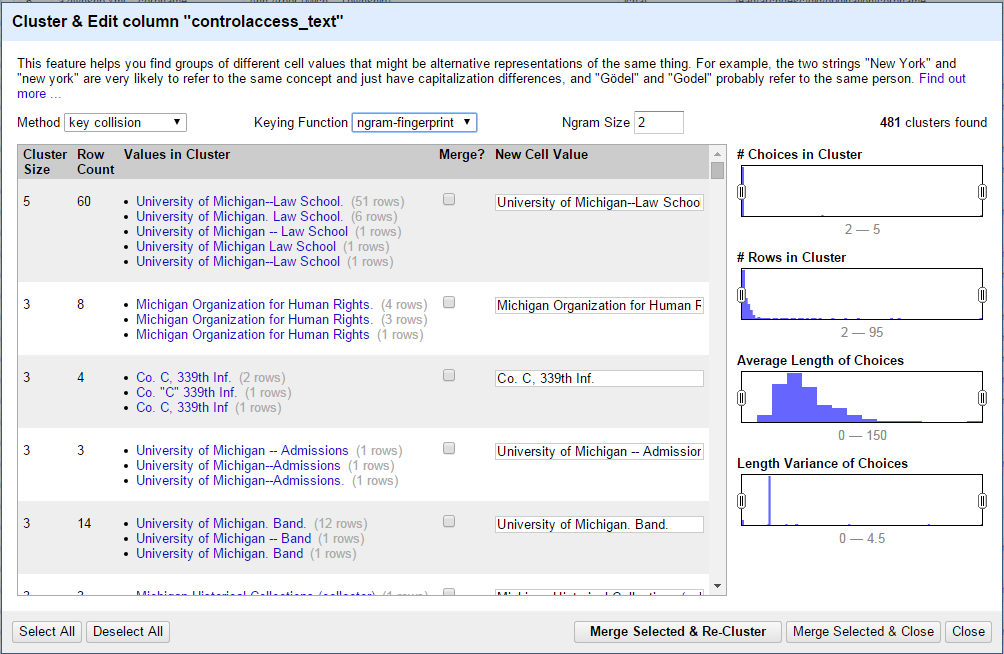
And it's super simple to use: select "Edit cells" -> "Cluster and edit") from the file menu of the column you want to edit, and choose which clustering method to use (we've found "ngram-fingerprint" with an Ngram size of 2 works best for our data, but it's worth exploring the other options). Once the clusters have been calculated, you just go down the list choosing which groups to merge into a chosen authoritative version, and which to leave alone. Once you're satisfied with your decisions, click the "Merge selected and re-cluster" button, and you're done!

Clustering in OpenRefine

To re-insert the changed values into our EADs, we just iterated through the normalized csv data, reading the original xml path for each item and telling lxml to assign the new text to that tag (you can see our exact implementation here). One git push later, we were done. The whole process took all of an afternoon. In just a few hours, we were able to normalize the entirety of our control-access terms: some 61,000 names, corporations, genre-forms, locations, and subjects. That's pretty incredible.

  3. Running the Normalized Versions through the LCNAF-Named-Entity-Reconciliation Process (Should Have Been the First Step, Oh Well)


From there, it was just a matter of exporting the CSV, creating a dictionary using the Name and LC Record Link columns, like so:


And reincorporating them back into the EAD, like so:


Zlonk! We were reconciled! Again, we were feeling pretty good...

But again we realized that we had gotten a little ahead of ourselves (or at least I did). After some sober reflection after the high of reconciliation, there were still a couple of things wrong with our approach. First, there were a lot of "matches" returned from VIAF that weren't actual matches. Some of these were funnier than others, and we tweeted out one of our favorites:

No, VIAF. Wonder, Stevie, 1950- is NOT the same as Jackson, Michael, 1958-2009. https://t.co/Wa9EzLG2in
— UM BHL Curation (@UMBHLCuration) July 9, 2015

Long story short, we needed a way to do better matching.

  4. Enter FuzzyWuzzy


No, not the bear. FuzzyWuzzy is a Python library to which Walker introduced us. It allows you to string match "like a boss" (their words, not mine)! It was developed by SeatGeek, a company that "pulls in event tickets from every corner of the internet, showing them all on the same screen so [buyers] can compare them and get to [their] game/concert/show as quickly as possible."

The following quote would make Arkheion proud:

Of course, a big problem with most corners of the internet is labeling (sound familiar catalogers and linked data folks?). One of our most consistently frustrating issues is trying to figure out whether two ticket listings are for the same real-life event (that is, without enlisting the help of our army of interns).

That is, SeatGeek needs a way to disambiguate the many ways that tickets identify the same event (e.g., Cirque du Soleil Zarkana New York, Cirque du Soleil-Zarkana or Cirque du Soleil: Zarkanna) so that in turn buyers can find them, identify them, select them and obtain them.

We employed FuzzyWuzzy's "fuzzy" string matching method to check string similarity (returned as a ratio that's calculated by how many different keystrokes it would take to turn one string into another) between our headings and the headings returned by VIAF. Walker will talk more about this (and how he improved our efforts even more!) next week, but for now, I'll give you a little taste of what FuzzyWuzzy's "fuzz.ratio" function is all about.

FuzzyWuzzy's fuzz.ratio in action.

As you can see, the higher the ratio, the fewer the number of <persname> and <corpname> elements to which we get to add an authfilenumber attribute (certainly fewer than just blindly accepting what VIAF sent back in the first place!). In the end we decided that it was better to have fewer authfilenumber attributes and fewer mistakes than the opposite! You're welcome future selves!

  5. The Grand Finale


Tune in next week for the grand finale by Walker Boyle!

**UPDATE!**
Check out the exciting conclusion... Order from the chaos: Reconciling local data with LC auth records

Conclusion

This has been an exciting process, and, for what it's worth, easier than we thought it would be.

While we originally started doing this to be able to get Authority IDs into ArchivesSpace, we have been getting really exciting thinking about all the cool, value-added things we may be able to do one day with EADs whose controlled access points have been normalized and improved in this way. Just off the top of my head:

  • facilitating future reconciliation projects (to keep up with changes to LCNAF);
  • searching "up" a hierarchical subject term like Engineering--Periodicals;
  • adding other bits from VIAF (like gender values, citation numbers, publication appearances);
  • interfacing with another institution's holdings;
  • helping us get a sense of what we have that's truly unique;
  • making linked open data available for our researchers; and
  • of course, adding Wikipedia intros and pictures into our finding aids! That one hasn't been approved yet...


Can you think of more? Have you gone through this process before? Let us know!

[1] "Marduk and the Dragon" by Prof. Charles F. Horne - Sacred Books of the East *Babylonia & Assyria* 1907. Licensed under Public Domain via Wikimedia Commons - https://commons.wikimedia.org/wiki/File:Marduk_and_the_Dragon.jpg#/media/File:Marduk_and_the_Dragon.jpg
[2] "Lucas Cranach (I) - Adam and Eve-Paradise - Kunsthistorisches Museum - Detail Tree of Knowledge" by Lucas Cranach the Elder - Unknown. Licensed under Public Domain via Wikimedia Commons - https://commons.wikimedia.org/wiki/File:Lucas_Cranach_(I)_-_Adam_and_Eve-Paradise_-_Kunsthistorisches_Museum_-_Detail_Tree_of_Knowledge.jpg#/media/File:Lucas_Cranach_(I)_-_Adam_and_Eve-Paradise_-_Kunsthistorisches_Museum_-_Detail_Tree_of_Knowledge.jpg
[3] I know what you're thinking. If Arkheion is omniscient, omnipotent and omnipresent (even omnibenevolent!), how could this be so? Perhaps that's a topic for a future blog post. Also, Arkheion is not real; this whole story is made up.

Tuesday, July 7, 2015

Git-Flow for Archival Workflows

We here at the Bentley Historical Library have been using GitHub for quite some time now. (Really, it's only been since May 19th of this year, so not even two months, but who's counting?) Since we have so much experience, we figured it was about time for a post on how we handle version control for our project to migrate all of our legacy EADs into ArchivesSpace using Git and GitHub (and no, they're not the same thing).

Git is not the same as GitHub. [1] Also, I also just learned that "git" is English slang for "unpleasant person."

GitHub is not the same as Git. [2] It turns out that GitHub is not a center for unpleasant people.

The Problem: Version Control

The following transcript is adapted from an actual four-minute chat conversation I may or may not have had with a colleague (who may or may not be Dallas). I think it describes our frustrations better than a narrative description could.

**Disclaimer!**
Names have been changed to protect the innocent (and the guilty, i.e., me!). Also, I'm just back from a vacation where I spent some time at the beach, so ocean animals are on my mind.

Anonymous White-Spotted Puffer [3]
10:45 AM
so, it sounds like anonymous red lion fish's thing got added to real_masters_all.
10:46 AM
that's probably my fault. if there are any big mistakes anonymous red lionfish can just fix those, maybe using a backup
has anonymous great white shark replaced the ead masters yet?


Anonymous Atlantic Ghost Crab [4]
10:47 AM
ugh
umm, yeah i dunno


Anonymous White-Spotted Puffer
i didn't realize anonymous red lionfish had done it to real_masters_all
10:48 AM
because anonymous red lionfish was working form a copy anonymous red lionfish had made


Anonymous Atlantic Ghost Crab
anonymous great white shark has not replaced ead masters yet but anonymous goldband fusilier and i have probably made our own changes already
but maybe anonymous red lionfish could take a copy of just the things in a csv
10:49 AM
and we could fold those back into the real masters. hopefully there won't be too much that needs to be fixed.


Anonymous White-Spotted Puffer
yeah


The problem was that there were too many people trying to do too many things at once to the same version (or two, or three) of our EADs; the problem was version control!

Even though, as I mentioned, we had been using GitHub for quite sometime to showcase and share our custom ArchivesSpace EAD Importer and the tools we've developed to clean or prep our legacy EAD and MARC XML for migration to ArchivesSpace, as well as to make changes to the Archivematica documentation (yes, I'm rather proud of this and this contribution--thanks again for showing us the ropes, Justin and Sarah!), we hadn't been using Git and GitHub the way they were intended to be used: to solve the problem of version control when working in teams whose members may or may not be working right next to each other everyday (or in our case, even on the same computers everyday).

After some discussion about the suitability of GitHub for this project (while we know a number of libraries and archives use GitHub for a variety of purposes, we're still not sure if there is any precedence for putting EADs on GitHub--maybe we're the first!), we decided to move forward with creating a "repo" for our working copy of the EADs. To fit in with the A-Team theme, we went with the name vandura, after the model of the GMC van used in the show.

We even figured out how to add a picture to our README file in Markdown:

Classy.

We decided to retain the "Real_Masters_all" directory name (because that is so different from "Real_Masters" and "FindingAids/EAD/Master"--all actual directory names!) for our EADs to serve as a reminder of those dark times, in the not too distant past, when things seemed simple, and when we just made changes to our version of record as we pleased, without thought to the hard work of our colleagues that we may or may not have been overwriting (because hey, we'll never know, and there would be no way to prove it anyway!).

Wait, I've Heard of GitHub...What's Git?


Before we go on...

If you're like me (an archivist, not a programmer!) you may or may not have known that Git and GitHub are actually two different things. Git is a distributed version control system (that is, it does not work like a shared network drive does--neither copy of a project directory is any better or more 'authoritative' than any other, and team members collaborate on identical copies). GitHub is a web-based Git repository hosting service (which is why it is so popular with open source software like Archivematica and ArchivesSpace), which also offers it's own features (like forks and pull requests). Git is a tool that you mostly use in the terminal on your local computer, while GitHub is a service that you mostly use with a graphical user interface on the Internet.

Why Use Git and/or GitHub?


So Git is a version control system, and GitHub is used in conjunction with it for work in teams. Why use them?


  • Git and GitHub are not just for software, or for people with l337 h4x0r s|<1llz. In fact, both of these work extremely well for anything that is primarily text, whether that is your EADs in XML, your catalog records in MARC, your website in HTML or even your blog written in Markdown.
  • All the cool kids are doing it. Whether it's companies like Artefactual Systems, Inc. (Archivematica) or Lyrasis (ArchivesSpace), or any of the institutions on this list, GitHub has become the place that open source software is shared with others.
  • It's better than regular old backups. With Git, you make what are called "commits" (more on that later) with meaningful messages (e.g., "correcting spelling mistakes" or "changing id attribute to authfilenumber"). You can then go back and look at all of your commits, remember why you made a particular change you made, and even revert back to a version of a project before a particular commit. All of that is much more useful when looking back on the work you've done than seeing a backup of your project made at an arbitrary time by a computer.
  • It is distributed. Everything is local. See comment above about difference between this process and using a shared network drive.
  • Interns have a place where they can point to the work they've done. With GitHub, since interns have their own accounts and since there is an online, public record of every change they have ever made, interns can point to a place online where they can showcase their work for potential employers.
  • You don't have to be at the Bentley or using any particular computer to do some work. That's handy.
  • Everything that happens gets recorded. Check this out. That's right, all 418 changes we've made in the 27 days we've used Git and GitHub for our EADs. It's like an audit trail. And you know we digital preservation types like our audit trails.
  • Management of the whole process is much easier. While there are many hands working on the same set of files, only a few hands get to accept and merge what are called "pull requests" (again, more on that later) into the Bentley's repository.
  • GitHub will tell you when you're going to overwrite someone else's work! That's probably my favorite benefit. While this doesn't make the process of figuring out what to do about conflicts any easier, at least we know about them!


Convinced? I am.

And the How: How We're Using Git and GitHub for Curation Workflows


While we haven't even begun to scratch the surface of all the different operations you could do with Git and GitHub, here's the handful that we've found helpful so far, broken down into three stages: 1) the initial, project and daily setup; 2) the process for making changes; and 3) and the process for merging those changes with the Bentley's version.

Say what you want about my handwriting, but I think that's a pretty good rendering of a laptop, if I do say so myself.

The Setup (with Git and GitHub)


While Git comes standard Linux operating systems, it doesn't on Windows or Mac. We're a Windows shop, so there was some setup involved.

Once Per Lifetime


If you haven't already, join GitHub. The instructions are here. If you're using Windows like us you'll also need to download and install the latest version of GitHub for Windows.

Once Per Project


Fork the vandura (or any other) repository to your account online. This basically means make a copy of the repository on your account. Note that "repo," which you'll hear people say sometimes, is short for "repository" and is just a fancy word for folder with files or other folders in it, or a project directory. On GitHub, you can do this by navigating to the repository you want to fork and clicking Fork in the top-right corner of the page.

Create a local clone of your fork on your computer. In other words, make a copy of the repository on your local computer. You can do this by navigating to your fork of the repository on GitHub and copying the HTTPS clone URL in the right sidebar to your clipboard. Then, open the Git Shell application and type:

git clone https://github.com/YOUR-USERNAME/vandura.git 

Next you'll need to configure a remote for your fork (so it knows where it came from). Move into the project directory by typing:

cd vandura

Then check to see what the current remote is by typing:

git remote –v

Specify a new upstream remote repository by typing (pointing it to its origin):

git remote add upstream https://github.com/bentley-historical-library/vandura.git

Finally, verify the new upstream remote repository by typing:

git remote –v

Once (or Twice...) Per Shift (with Pictures!)


The rest of these instructions detail our day-to-day work, starting with syncing a local version of the files with the Bentley's master version. So here we go (with pictures--thanks, Devon! [5])...

It starts with syncing your fork, ensuring that what you have on your local computer matches what the Bentley has online (which may have been updated since you last sat down to do some work). After ensuring that you're in the appropriate directory, you do this by...

Using git fetch upstream to fetch new commits from the upstream repository.

Using git merge upstream/master to merge the changes from upstream/master into your local master branch.

Or, if changes were made to the upstream repository while you were making changes to your fork, you can apply those changes to your local version before applying your changes by...

Using git rebase upstream/master to "rebase" or merge the upstream repository with your fork and replay your changes on top of the upstream version before pushing your changes (I know, it's getting complicated).

Making Changes (with Git)


Now it's time to make changes! This happens the same way you'd make any other change to a file on your local computer--by opening the XML editor of your choice, for example, and making a change, or running a Python program. Git only gets involved when you are ready to "snapshot" files and record these snapshots on your local machine in preparation for version control (and Git, by the way, only gets involved on your local machine). 

Note: For those with some experience with GitHub, you'll notice that we aren't using different branches (e.g., a development branch and a master branch). This is because we are already using a working copy of our EADs to make changes (not the master). No branch needed! Plus, this makes the process that much easier to teach to others.

Sometimes we make small changes (such as correcting spelling mistakes, or adding or deleting boxes from a boxlist, &c., all of which happen to a single XML file). After making changes to a single we snapshot that file by...

Using git add [filename] to snapshot a single file in preparation for versioning.

Sometimes we make big changes (for example, adding an Authority ID attribute to <persname> elements, which changed 1386 files and 11761 <persname> elements at once) to multiple files. You can snapshot these by...

Using git add . to snapshot all files in a directory that have changed since the last commit in preparation for versioning.

Then we get them ready for versioning by...

Using git commit -m "[meaningful message]" to record file snapshots permanently in your version history.

Note: These steps for making changes can be repeated ad nauseam. You make commits as often as you think you make a meaningful change (that you may want to go back to later). Also, those messages are important! "updates" is not nearly as helpful as "separated boxes for use with aeon".

The Finish (with GitHub)


Now it's time to get GitHub involved, both your associated personal account and our team or institutional account.

For a Team Member


Upload all local commits to your account on GitHub in order to be able to merge them with the Bentley's account by...

Using git push to "push" those commits to your online account.


Finally, merge your account's version with the Bentley's version online by...

Making a pull request using GitHub.

For the Team


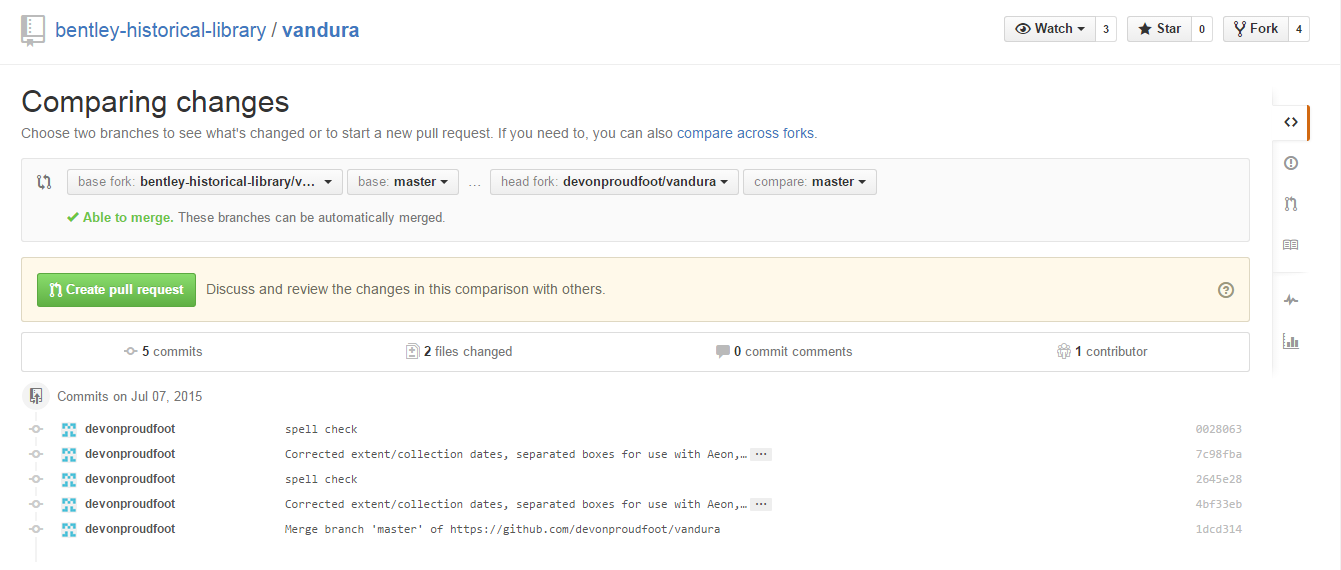
One of the adminstators for the Bentley account will then get a notification that a pull request (so called because Devon, for example, as an intern, does not have the ability to push to the main Bentley account, instead requesting that an administrator pull his changes instead) has been made. One of the administrators compares the changes that need to be made...

Comparing the changes that need to be made. This is incredibly helpful.

Based on that comparison, they either accept the changes or, if there is some sort of conflict, give him instructions (again, all online out in the open) to, for example, rebase to get the latest version of the EADs before making his pull request, and then accept...


Devon's changes have been merged with the Bentley's account. Notice that we're told that the latest change was Dallas merging Devon's pull request, and his meaningful commit message is shown next to the Real_Masters_all folder.

Kapow! Version controlled.

So Far, So Good


While there is a bit of a learning curve to using Git and GitHub (thanks again, Justin and Sarah, as well as Greg and Fiona, the Software Carpentry folks at HASTAC who taught Dallas and I Version Control with Git!) and teaching it to others, implementing a version control system has been great! We are now able to see every change that has been made. We know who did it and when (and, ideally why!). We even know when we're about to overwrite someone else's changes. Life is good!

All that being said, we've experienced a few hiccups along the way and we're still working out our Git-flow. We'd love to hear what you're doing for version control or your experience with Git and/or GitHub. Let us know by leaving a comment or getting in touch via email or Twitter!

[1] "Git-logo" by Jason Long - http://git-scm.com/downloads/logos. Licensed under CC BY 3.0 via Wikimedia Commons - https://commons.wikimedia.org/wiki/File:Git-logo.svg#/media/File:Git-logo.svg
[2] "GitHub logo 2013" by GitHub - https://github.com/logos. Licensed under Public Domain via Wikimedia Commons - https://commons.wikimedia.org/wiki/File:GitHub_logo_2013.svg#/media/File:GitHub_logo_2013.svg
[3] "Puffer Fish DSC01257" by Brocken Inaglory - Own work. Licensed under CC BY-SA 3.0 via Wikimedia Commons - https://commons.wikimedia.org/wiki/File:Puffer_Fish_DSC01257.JPG#/media/File:Puffer_Fish_DSC01257.JPG
[4] "Ocypode quadrata (Martinique)" by Free On Line Photos. Licensed under No restrictions via Wikimedia Commons - https://commons.wikimedia.org/wiki/File:Ocypode_quadrata_(Martinique).jpg#/media/File:Ocypode_quadrata_(Martinique).jpg
[5] Since these screenshots were done as Devon worked, they sometimes get a bit out of order...