Showing posts with label Feature development. Show all posts

Friday, November 4, 2016

The End is Just a New Beginning!

Greetings, all; as hard as it is to believe, the Bentley Historical Library's ArchivesSpace-Archivematica-DSpace Workflow Integration project has come to a close.

October 31 marked the end of two and a half years of intense planning, development, and testing but it also signaled the beginning of a new phase as we here at the University of Michigan begin to implement the project outcomes in a full production environment.

While this development work won't be available until version 1.6 of Archivematica (release date forthcoming), we wanted to take this opportunity to glance backward and also look ahead...

Project Outcomes

In our inaugural blog post back on April 8, 2015, we identified three major development objectives for the project:
1. Introduce functionality into Archivematica that will permit users to review, appraise, deaccession, and arrange content in a new "Appraisal and Arrangement" tab in the system dashboard.
2. Load (and create) ASpace archival object records in the Archivematica "Appraisal and Arrangement" tab and then drag and drop content onto the appropriate archival objects to define Submission Information Packages (SIPs) that will in turn be described as 'digital objects' in ASpace and deposited as discrete 'items' in DSpace.  This work will build upon the SIP Arrangement panel developed for Simon Fraser University and the Rockefeller Archives Center's Archivematica-Archivists' Toolkit integration (as demonstrated around the 12 minute point of the first video here).
3. Create new archival object and digital object records in ASpace and associate the latter with DSpace handles to provide URIs/'href' values for <dao> elements in exported EADs.

 I am extremely pleased to announce that we have achieved each of these outcomes in the development work that concluded on October 31.  More specifically, the project has resulted in:

1. The creation of a new Appraisal and Arrangement tab in Archivematica that will permit users to characterize, review, arrange, and describe digital archives with such features as:

  • Browsing the folder hierarchies of transfers in the "Backlog" pane.

  • Identifying file format distributions (in both tables and pie charts) and sensitive personal information (Social Security and Credit Card numbers) in the "Analysis" pane.

  • Displaying items in a "File List" pane, with contents updated based upon selections in the Backlog and Analysis panes.

  • Previewing content (using available web browser plugins) within the Analysis pane (with the ability to download and locally render other file types).

  • Tagging content (to aid in archival description, the identification of sensitive information, deaccession decisions, etc.) with the added ability to facet by tags in both the Backlog and File List panes.

Archivematica Appraisal and Arrangement Tab
What's in your transfer?


2. The integration of Archivematica and ArchivesSpace, so that users can:

  • Review, create, and edit archival description from ArchivesSpace directly within Archivematica (with information being written back to ASpace via its API) without having to switch between applications/browser windows.

  • Drag and drop content from the Backlog pane onto archival description in the ASpace pane, thereby associating data with metadata (and also establishing a Submission Information Package ready to undergo Archivematica's Ingest procedures).
  • Elect to use the ArchivesSpace functionality (or simply arrange content into Submission Information Packages without employing ASpace) whether or not they have a DSpace repository.
Associating digital content with archival description
Hey, you got your digital content in my archival description!

3. The integration of Archivematica and DSpace so that:

  • Users select a DSpace collection from available Storage Service locations during the 'Store AIP' microservice.

  • The Archivematica Storage Service splits the AIP into two archive files (one for the digital content, which will be publicly accessible by default, and the other for administrative metadata and log files, which will be restricted from public access by default) and automatically deposits them as a new item to the selected DSpace collection.

  • Upon successful deposit, a new digital object record (with the unique DSpace handle URL for the item) will be created in ASpace and associated with the appropriate archival object.
Content in DSpace
My repository has a first name, it's D-S-P-A-C-E...


4. Documentation related to the use of the Appraisal tab.

Max Eckard has produced a manual for use by the Bentley's archivists and student employees and he's looking to contribute to the documentation of the Appraisal tab in the Archivematica version 1.6 user manual.

Bentley Historical Library digital processing manual
It's just a jump to the left, and then a step to the right...

Because a (moving) image is worth a thousand words, I invite you to feast your eyes (and ears) on this rather brisk demo performed by Max:


Next Steps

As mentioned above, with the grant's conclusion we're moving forward with getting these new features implemented in a production environment.  This work is going to proceed on several fronts:

1. Configuring Archivematica to work with our local, highly customized version of DSpace ("Deep Blue").  

The developers at Artefactual Systems worked with an out-of-the-box copy of DSpace (version 5.5); UM's instance (around since 2006) has had a fair number of bells and whistles added to it over the years.  As a result, Max is spending a lot of quality time on Slack with colleagues in Michigan's Library Information Technology group.

2. Customizing metadata fields to be used in Deep Blue to accommodate our qualified Dublin Core (i.e., dc.contributor.author as opposed to dc.creator).


3. Establishing workflows to streamline the deposit of restricted content to the repository.

While our default workflow involves content that will be publicly accessible via DSpace, the Bentley also encounters a decent amount of material that must be restricted from the general public (due to sensitive information, regulations such as FERPA or HIPAA, donor requests, etc.) or that can only be accessed in our reading room (due to copyright issues).  We've established some semi-automated strategies for dealing with these materials and will look at trying to streamline this process.

4.  Identifying and addressing bugs in advance of going live (and the release of Archivemcatica 1.6 release).  

As we've been testing the Appraisal tab, we've reported a number of bugs to Artefactual Systems and also identified some enhancements related to local practice that we will contract with Artefactual Systems to address independently of our grant project.

5.  Training additional staff so that all of our processing archivists and graduate students are using Archivematica to arrange and describe digital archives in addition to their work with physical and analog materials.


Thank you!!!

Finally, we'd like to thank all the following organizations and individuals for their steadfast support and ample contributions to this project!
  • The Andrew W. Mellon Foundation
    • Donald J. Waters, Senior Program Officer
    • Kristen C. Ratanatharathorn, Senior Program Associate
  • The Bentley Historical Library
    • Terrence J. McDonald, Director
    • Nancy Bartlett, Associate Director
    • Angela Clark, Business Administrator
    • Kellie Carpenter, Administrative Assistant
  • The University of Michigan Library
    • John Weise, Associate Director of Library IT and Head, Digital Library Platform & Services
    • Aaron Elkiss, Systems Programmer/Analyst Senior
    • Jose Blanco, Applications Programmer/Analyst Senior
  • Everyone at Artefactual Systems (especially Evelyn, Justin, Sarah, Nick, Holly, Dan, and Radda as well as Misty and Courtney)
  • The readers of this blog and everyone who reached out to us through comments, emails, tweets, and professional meetings. Thank you!!!!  Your questions, comments, and overall interest in the project were profoundly valuable!

We plan to continue blogging about our engagement with innovative archival practice and technology—so please continue to stop by to see what's new here on Beal Avenue.  Until next time, keep on keeping on!

Friday, September 18, 2015

What We Talk About When We Talk About Access

With a tip o' the hat to Raymond Carver, I want to use this post to try to and illuminate (for myself, if nothing else) some of the angles and issues surrounding 'access' to digital archives.

On the surface, the topic appears simple: I have some stuff that I want people to see, so I put it online or provide a dedicated terminal in my reading room and—voila!—access!

Made available by Flickr user Steve Rhode under a CC Attribution-NonCommercial-NoDerivs 2.0 Generic License
But even in this rosy scenario, there are a lot of questions: what platform would you use to host things online?  Will access copies (i.e., DIPs) differ from preservation copies (AIPs)?  If using a dedicated terminal, how will content be organized and how will researchers find desired materials? If copying files to a terminal or removable media, will staff be able to respond to researcher requests in a timely fashion? And what about rights?

Now, I certainly don't want to be like a certain you-know-who...


...but there are a lot of considerations here. Complex ones, too.  At the same time, simply waiting around for the stars to align and the *perfect* solution to emerge won't cut it, either.  Therefore, inspired by the various presentations on access that I saw last month at SAA, I'd like to give a brief overview of our current approach to access and then lay out some of the questions and challenges we're starting to explore here at the Bentley.

Just Dropped In (To See What Condition My Condition Is In)

The Bentley Historical Library has taken a fairly aggressive (progressive?) approach to providing access to our 'open' or unrestricted digital archives.  All such content is freely available for download and use via our archival community in Deep Blue, the University of Michigan's DSpace repository:


Deep Blue is managed by staff in the University of Michigan Library Information Technology division and we considered ourselves to be very fortunate when we started using it as both a preservation repository and access portal in 2008.  Prior to that (and not having any in-house IT), digital materials were either placed on optical disk and brought out to patrons in our reading room or hung off of our website and linked to from finding aids.

Moving to Deep Blue/DSpace was clearly a step forward, but the change brought about some additional challenges due to the basic structure (dare I say data model?) of the repository:

  • A 'community' contains 'collections' (which may be grouped together in sub-communities, we've formed one of these for university faculty papers)
  • A collection in turn contain 'items' (which may be associated with one or more files or 'bitstreams').
  • The default metadata schema is Dublin Core (which makes crosswalking from EAD ...interesting...)
While this relatively flat structure works great for traditional institutional repository fare (white papers, articles, and discrete digital objects), it really isn't suited for the complex intellectual hierarchies of archival collections.  So we've had to make do...

As with our physical and/or analog record groups and manuscript collections, our materials in Deep Blue are organized by the principle of provenance (and are often extensions of existing collections):


Within a collection we have our items—and here's where we've had to get creative:


Given the flat structure of DSpace, we are using the title metadata to help group related content together and preserve the hierarchical intellectual arrangement of materials.  As a result, the following description from our Jennifer Granholm finding aid...
...becomes the following item title in Deep Blue:
We also package materials in .zip files so that we only have to manage one file and our users don't have to download hundreds or even thousands of files.  Because content must actually be downloaded to a local machine to be used or rendered (unless a particular file format renders with a browser plugin), we have taken to chunking content across multiple .zip files when it gets to be above 2 GB:


The above digital object represents speeches, addresses, and other audio recordings from former Michigan Governor Jennifer Granholm for the year 2010.  All together, there's about 20 GB of content; by dividing this body of content into smaller chunks representing each month of the year, we've made it a bit easier for folks to download content.  And while I certainly don't think this solution is ideal, it's still a lot better than bringing a stack of CDs out to folks in our reading room.

Earlier in this post, I alluded to open or unrestricted content; we actually have three access profiles based upon rights and restrictions:
  • Open materials may be accessed by anyone anywhere at any time.
  • Restricted materials are only available to system administrators and digital curation staff; the items are not visible to other users nor is the metadata searchable.  Content is restricted for a number of reasons, including specifications in a gift agreement; the presence of sensitive personal data (related to HIPAA or FERPA as well as credit card numbers and Social Security numbers); and internal policy (for example, all executive records of the University of Michigan, while FOIA-able, are restricted for 20 years from the date of accession).
  • Reading-room only materials may only be accessed by computers within the IP address range of the library itself (and are not accessible by patrons using university wifi). This class is primarily composed of content where we do not hold copyright or donors have requested more restricted access. Our reading room rules, which all researchers must agree to follow, stipulate that these items "may not be copied, emailed or transferred in any way."  (While placing the burden on the researcher is by no means foolproof, it's much easier to implement and maintain than the locked-down computer terminals with which we earlier experimented.)
In addition to having the metadata and text-based file contents (when not packaged in .zip files) indexed by Google and other search engines, all materials are linked from online finding aids and/or catalog records.   People certainly seem to be finding our content, too: from 2008 through last month, we've registered 620,375 downloads (a figure that excludes downloads from robots or web crawlers).

Access: the Final Frontier

As we enter the final six months of our Mellon grant (and prepare to kick off a Hydra development project with colleagues at the University of Michigan Library), we have returned, time and again, to the challenge of providing access to digital archives.

There are a lot of great access portals to collections out there!  Some of the ones we've been particularly impressed with include those of:

Those are just a few of the many examples out there (and we meant to include your digital collections, but ran out of time...), but we've noticed that while these (and other innovative solutions) are vast improvements over an off-the-shelf option like CONTENTdm, they seem pretty unique to their local institutional context and IT environment.


The work we've been doing with Archivematica and ArchivesSpace has made us firm advocates of community-based approaches where folks at different institutions can share and contribute to common solutions, without having to reinvent the wheel (and continue to support and maintain that reinvented wheel. Indefinitely. All by themselves.).

This community interest recently led us to contribute user stories to the ArcLight project, "an effort to build a Hydra/Blacklight-based environment to support discovery (and digital delivery) of information in archives, initiated by Stanford University Libraries."  Likewise, we were excited to hear about the DPLA Archival Description Working Group and its implications for describing—and searching for and retrieving—digital archives.

Beyond the above, we've also been trying to articulate the different aspects or considerations related to access that could be common to cultural heritage institutions of all sizes and shares.  These are some very, very rough ideas, but we're interested in how we can:

  • Explore and better understand the challenges and opportunities surrounding OAIS functional entity of ‘access’
    • Present (and make understandable) the context/content of archival materials (including the relationships between digital, physical, and analog materials)
    • Enable search and retrieval of information while balancing item-level, aggregate, and collection-level description
    • Provide tools and functionality to view/render various formats (born-digital and digitized), including images, text, audio and moving image, web archives, and disk images 
    • Facilitate the analysis and reuse of data (including visual representations of metadata/data and tools or functionality that would facilitate distant reading of materials and other digital scholarship techniques)
    • Increase engagement with users (crowdsourcing or feedback)
  • Manage rights and enforce restrictions/permissions
  • Establish use metrics and collect quantitative data regarding impact of our collections and outcomes of curation activities
  • Permit users a more seamless experience using materials in searching for and using materials that are in disparate/siloed locations: online catalogs, HathiTrust, digital repositories, web archives, etc.
  • Leverage linked data: facilitate research across collections and institutions
At this stage in the game, we aren't even thinking about specific implementation strategies, as it seems there could/should/might/shall/will be a core set of features or functional requirements that could exist independent of any particular repository platform.  Having said that, it seems to us that an access portal should:
  • Emphasize on Interoperability: 
    • Create connections between tools and services
    • Permit us/other institutions to broaden current work and ‘plug in’ to larger framework
    • Avoid siloed/local solutions 
  •  Employ open source software:
    • There is a “need for engagement beyond simply making source code available, including supporting the development of user communities, creating adequate documentation, and cultivating relationships between developers working in libraries around the country.” (IMLS National Digital Platform)
  • Focus on end users
    • Meet needs within LAM communities for common solutions and interoperability as well as those of end users related to the access and use of digital archives.
    • End users are creating, accessing, and organizing content in ways that were never before possible and, in many cases, without the support of a knowledge professional.  The user should figure prominently in our strategy. How do we bring in their views, and identify the missing voices? (IMLS National Digital Platform)
So that's what we've been thinking about and pondering as of late... What are we missing?  What seems unnecessary?  What do you talk about when you talk about access?

Monday, July 13, 2015

Separation Anxiety!

To Save or Not to Save...

My old mentor, Tom Powers, used to say that the business of archives is not just about saving things, but also throwing them away--whether to adhere to collecting policies, conserve resources, or to help researchers identify truly essential records.  Identifying 'separations' is therefore an essential part of the appraisal process here at the Bentley Historical Library.  While your institution might refer to this process as 'weeding' or 'deaccessioning', I'm willing to bet that our goals are the same: removing out-of-scope or superfluous content from accessions before they become part of our permanent collections.

Of course, with this great power comes great responsibility, which leads to what my good friend David Wallace refers to as the 'dark night of the (archival) soul': can we fully anticipate future uses? Are we getting rid of things that some researcher, somewhere, at some time, might find truly useful?

Clearly, it's possible.

At the same time, we're in this for the long-haul, not a sprint; the overall sustainability of our collections (and institutions) furthermore demands the strategic use of our limited resources.  Saving everything "just in case" isn't good archival practice: it's hoarding.  We're also keenly aware that having staff review and weed content at the item-level is neither efficient nor sustainable (and certainly not the best use of staff time and salaries).  Balancing available resources and staff time with the widest possible (and practical) future uses of digital archives thus becomes the crux of the matter (and something we'll no doubt continue to wrestle with for many moons to come)...

Documenting our Policies

No matter what course of action we take, it remains important to make our thoughts and reasoning available if for no other reason than to manage stakeholder expectations.  Since revamping our processing workflows for physical and digital materials last year, we've put renewed emphasis on 'MPLP' strategies, especially the idea that any kind of weeding or separations should occur at the same level (i.e., folder or series) as the arrangement and description.  Item-level weeding is strictly avoided unless there are particularly compelling reasons to remove individual items (such as extremely large file sizes or the presence of sensitive personal information).

To ensure consistency (and transparency for donors and researchers), we apply the same criteria for separations to digital and physical items, as outlined in our processing manual.  The following categories of materials are thus typically not retained:
  • Out of scope material that was not created by or about the creator or items that fall outside of the Bentley's collecting priorities.
  • Non-unique or published material that is readily available in other libraries, another collection at the Bentley, or in a publication.  
  • Non-summary financial records such as itemized account statements, purchase orders, vouchers, old bills and receipts, cancelled checks, and other miscellaneous financial records.
  • "Housekeeping" records such as routine memos about meeting times, reminders regarding minor rules and regulations, or information about social activities.
  • Duplicate material.
During our review and appraisal of digital archives, we thus keep an eye out for entire directories that contain the above categories of materials.  Given the impracticality of looking at every file, we rely upon reviewing directory and filenames and then viewing/rendering a representative sample of content as needed (using tools mentioned in my previous post on appraisal).  The goal here is not to search for individual files that meet the above criteria, but to catch larger aggregations of content that are simply not appropriate for our permanent collections.

Automation Alley

As with other aspects of our ingest and processing workflows, we've tried to automate (or at least semi-automate) aspects of our separations/deaccessioning efforts.  Two examples of this were discussed in that aforementioned entry on appraisal: scanning for sensitive personal information with bulk_extractor (which still requires the manual review and verification of results) and the identification of duplicate content.

As I discussed our approach to separating duplicate content in that piece, I won't rehash it here (short version: we don't weed individual files, but will deaccession an entire 'backup' folder if it mirrors content in another directory.  Wait--was that a rehash? Sorry...).  I will, however, note that there have been some informative discussions on the topic of duplicates on the 'digital curation' Google group, including this thread on photo deduplication which has some great links...

Another strategy that we've employed in our current workflows and are developing with Artefactual Systems for inclusion in Archivematica's new appraisal and arrangement tab is functionality to separate all files with a particular extension.  Our primary use case has been to remove system files (such as thumbs.db, temporary or backup files, .DS_Store and the contents of __MACOSX directories, including resource forks) that we've considered to be artifacts of the operating system rather than the outcome of functions and activities of our collections' creators.

On this score, some recent discussions from the Digital Curation and Archivematica Google groups have been relevant.  Jay Gattuso, Digital Preservation Analyst at the National Library of New Zealand notes that their "current approach is to not ingest the .DS_Store files, as they are not regarded by as an artefact of the collection, more as an artefact of the system the collection came from."  This represents our general line of thinking, which has also influenced our approach to migrating content off of removable media and disk imaging: we are devoting our resources to the preservation of content rather than the preservation of file systems and storage environments (except in cases where the preservation of that file system or environment is essential to maintaining the functionality and/or accessibility of important content).

Chris Adams adds some important nuances to the same thread, reporting that .DS_Store files are "only used to store custom desktop settings and the most which would happen without them is that you'd lose a custom background or sort order" and noting that "Resource forks (i.e. ._ files on non-HFS filesystems) are far more of a concern because classic Mac applications often stored important user data in them – the classic example being text documents where the regular file fork had only plain text but the resource fork contained styling, images, etc. which are critical for displaying the document as actually authored."

Knowing that there could be important information in legacy resource forks reinforces the need to discuss record creation and management practices with donors as part of the accession process.  In many cases, however, these conversations aren't convenient or even possible (as when we deal with the estate of a deceased creator).  What do we do then?  A quick Google search reveals several tools to view/extract the contents of resource forks...it strikes me that it might be possible to put together a script that could cycle through resource forks and flag any that contain additional information and should thus be preserved.  Not having really worked with resource forks or (to my knowledge) encountering one that stored the kind of additional information Adams mentions, I don't know how feasible this would be.

Whence?

So...where does this leave us?  

As part of our grant we want to be able to separate/deaccession material from within Archivematica by applying tags to specific folders/files or by doing a bulk operation based upon file format extension.  Once the deaccession is finalized, Archivematica would query the user for a description and rationale for the action and create a deaccession record in ArchivesSpace:


Beyond this development work, we're trying to inform our decision-making process for separations/deaccessions by better understanding researcher needs and expectations.  Our archivists have participated in HASTAC 2015 up at Michigan State University in addition to various digital humanities events here at the University of Michigan.  Knowing what kinds of data, tools, and procedures are gaining popularity will hopefully help us save more of the materials (and metadata) that researchers want and need.  Of course, there are still the Rumsfeldian unknown unknowns to contend with....

In any case, your input and feedback (and/or scalable solutions for what to do with those Mac resource forks) would be most gratefully appreciated: let us know what you think!

Friday, May 1, 2015

As a Blogger, I Need a Post on User Stories!

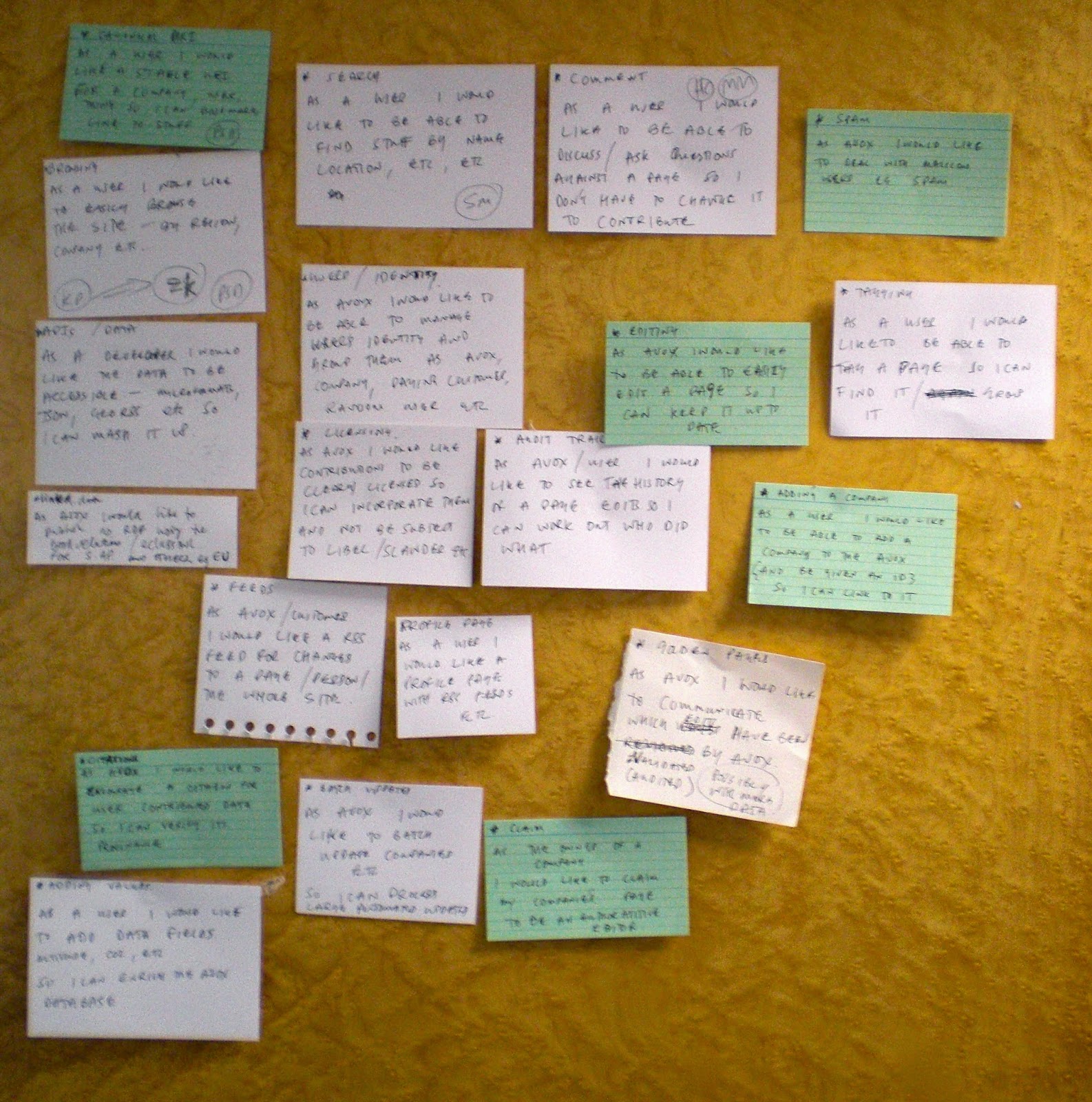
OK, I have to admit that I borrowed (stole?) the idea for this title from a webinar by Rose Pruyne, Project Manager at Penn State, on how to craft user stories. We've been "crafting" (and I think there's a bit of an art to it, so "crafting" is appropriate) user stories a lot lately (I mean, a lot) as part of our development work with the Artefactual Systems, Inc. folks. They've been very helpful for thinking about and communicating our ideas to the developers there. As such, we thought it was about time for a post on user stories!

User Stories


WikiData User Stories, https://www.flickr.com/photos/psd/3731275681, CC:BY 2.0, http://creativecommons.org/licenses/by/2.0/

For those of you who've never heard of them, user stories come out of the agile software development world, in particular, a methodology called extreme programming. A means to improve software quality and responsiveness to changing customer requirements, user stories are "...a description...in the everyday...language of the end user or user of a system that captures what a user does or needs to do as part of his or her job function." [1]

Let's unpack that a bit:

  • User Stories are written in "everyday language."


This is important because the language that developers use ("batch-upload .png needs image size range," to use the example from Rose Pruyne's webinar) is anything but everyday language. User stories are about communication. They are a way for lay, even non-technical users of a system to communicate their ideas about a it, even if they don't speak the language of its developers. They're also a way to give broader context to developers who are often given a discrete, technical task (like "batch-upload .png needs image size range"); they ensure that a developer knows why it is they're doing what they're doing (in this example, I'm thinking that has something to do with not wanting to upload images one-by-one, and wanting to do it efficiently).

  • User stories are written from the perspectives of "users" and "end users."


Perhaps they are even written by the "user" or "end user" of a system. While this builds on the point above, it's important to point out with the power to define the user story for a particular system or feature comes great responsibility.

As an archivist, I tend to think of myself and other archivists as "users" of a particular system, and the researchers we serve as the "end users." Even though in the case of Archivematica at the Bentley Historical Library only archivist "users" (and even then only a subset of archivists, curation archivists) will actually be interacting with the system, we have to keep in mind that any decisions we make as part of this development work are not made in a vacuum. Whatever final product is produced will inevitably affect other "users" here (such as project and reference archivists), other "users" at other institutions (that's why we're taking this show on the road!), and even current and future (Woo-hoo! Digital preservation!) "end users" of the Archival Information Packages (AIPs) we produce.

  • User stories capture "what a user does or needs to do as part of his or her job function."


User stories, even though they don't have an exposition, rising action, climax, falling action and denouement, and even though the're not the same kind of stories you'd tell your children at bedtime (unless you really wanted to put them to sleep), are, first and foremost, stories. Moreover, they are descriptive stories that communicate who a user is and what that user does or needs to do (and, optionally, why), in very high-level terms. They are not prescriptive imperatives about how this gets done (although if you have an informed opinion, that's worth mentioning). I think this is most applicable in a web design context, although it obviously applies here as well. You may want to draw attention to your site (that's the descriptive story part, and that's OK), for example, with constantly running animations and music (prescriptive imperative, and that's not OK. That doesn't mean that you should! Trust the developers on this one--they'll draw attention to your site without annoying end users; that's their "job function."

I should also mention that user stories are supposed to be short, even short enough to fit on an index card (although we don't always follow that rule), and that they should generate conversation and as a result, get refined over time. There are also bad user stories, but I won't get into those here (see the webinar by Rose Pruyne for more information on common user story mistakes).

The Template


There are a couple of these out there, but here's the basic template for a user story:

User Story


Importantly, it communicates the who, the what and the why (but not the how!) in simple, concise terms.

Our Archivematica > ArchivesSpace Workflow User Stories


You can take a look at all of the user stories we've created for the Archivematica feature development here. They are designed to start to take us from general to particular, from "We want to integrate Archivematica and ArchivesSpace!" to something that can actually be developed. User stories are commented on by both us here at the Bentley Historical Library and the folks at Artefactual Systems, Inc. They get refined over time, and at our weekly meetings we classify user stories by priority ("Critical", "Major", "Minor" or "Trivial") and then organize them into development sprints (e.g., aaswf_sprint1). They eventually get turned into requirements, which are recorded on the wiki, and broken up into discrete [billable] development tasks on Artefactual System, Inc.'s project management web application.

Here are a couple of representatives examples...

Tag content during appraisal (AASWF-52)


As an archivist, I would like the functionality to apply one or more tags to content (files/folders) during the appraisal process. These tags could be used for:

  • preliminary arrangement or identification of functional groups/categories of content (to be associated with AS archival objects)
  • marking content for future deaccession
  • identifying content to apply access/use restrictions
  • other?


I would also like to be able to edit or delete tags and to search for them with facets.

This may be getting a little prescriptive at the end, but you get the picture. The comments below this example are also illuminating--we all bring our assumptions to the table that we may or may not be aware of. You'll note that this user story has been marked "Major," and will get taken care of in the first sprint. It's definitely one of our favorites!

Bulk Extractor (BE) Viewer (AASWF-35)


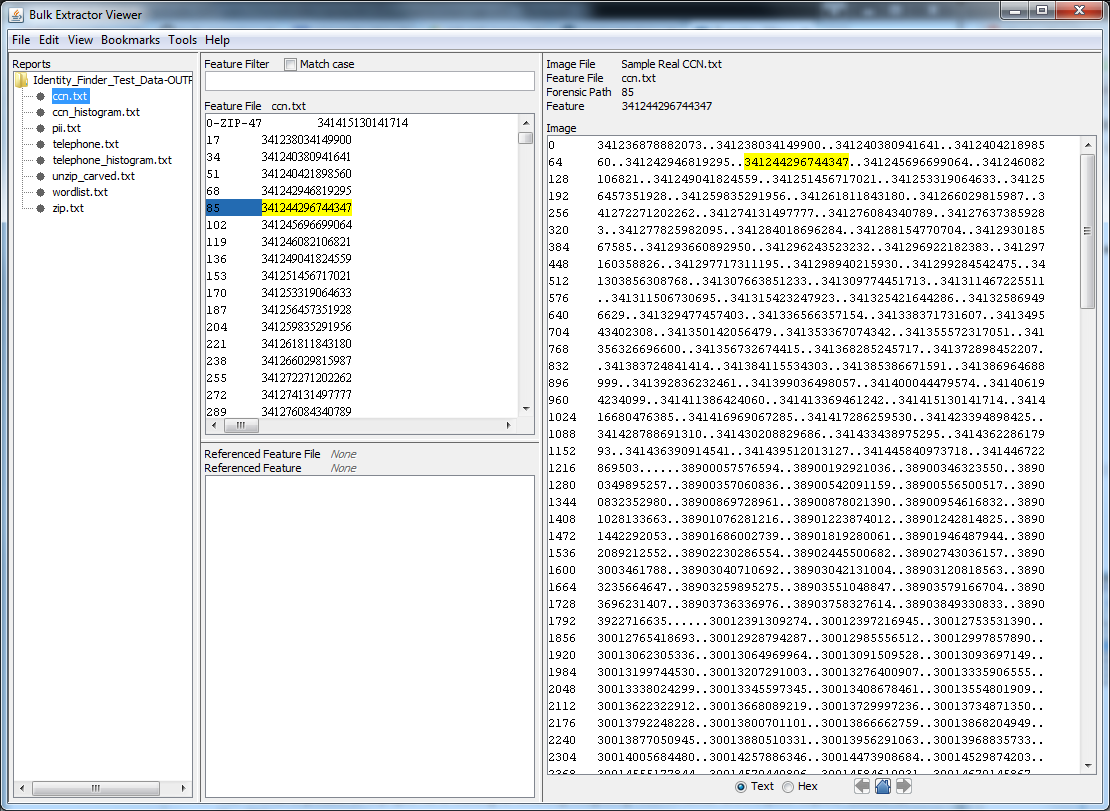
As an archivist, I'd prefer to use something like BEViewer to view Personally Identifiable Information (PII) hits in context in documents so that I don't have to open every single document separately to confirm the existence of PII.

When we discovered that our Identify Finder license expired, we took a look at a couple other tools to scan for PII. All of the tools would sometimes pick up false positives. Bulk Extractor's clear advantage was the viewer, which allows you to see PII matches in context without being forced to open individual files:


You'll notice that this user story hasn't [yet] been organized into a sprint (Artefactual Systems, Inc. is focusing on Archivematica enhancements first), but it has been marked as "Major." You may also note the language "I'd prefer," instead of "I need"--this is not core functionality (simply identifying the files is core functionality), but it would definitely make our lives easier.

Zipping SIPs (AASWF-21)


As an archivist and user of DSpace, I need to be able to zip up 1+ files or folders that are associated with an AS Resource component, and know which ones I've zipped up, so that I can get digital content to DeepBlue in a form that it understands.

I decided to include this example because it has demonstrates that the "who" of a user story might be complex. While we, as archivists, would like this functionality, really this user story comes from the fact that we use DSpace as our digital repository. This also gets at the tension between defining user stories from the perspective of us as "users" at the Bentley Historical Library versus us as "users" in a broader, archival context.


Conclusion


Once you get started with user stories, you can't stop! Since starting our work with Artefactual Systems, Inc. we've used them to feel out another feature request in ArchivesSpace, and we've even used them internally to figure out what we're going to do with <extent> statements that we're cleaning (As it turns out, DACs is pretty loosey goosey when it comes to extents, and ArchivesSpace is the opposite. But don't worry, much, much more on that to come...).

As a reminder, you can view the rest on the ArchivesSpace JIRA project site here. See you next time!

[1] User story (this version)

Friday, April 24, 2015

Implementing Archivematica

My last post detailed our work to implement ArchivesSpace, the open source archives information management application for managing and providing web access to archives, manuscripts and digital objects. Today's post is an overview about implementing Archivematica (don't worry, much more on our feature development work with Artefactual Systems, Inc. to come) here at the Bentley Historical Library:


Known for their active community and catchy slogans, Archivematica is a “web- and standards-based, open-source application which allows your institution to preserve long-term access to trustworthy, authentic and reliable digital content.” [1]

Archivematica Kick Off


Mike has already mentioned the Artefactual Systems site visit we hosted in January of this year. It was during this site visit that folks from the Library Information Technology division and Artefactual Systems, Inc. installed Archivematica and the Archivematica Storage Service. Unlike our installation of ArchivesSpace, our installation of Archivematica is currently hosted, maintained and supported (thanks, Aaron!) by the Library Information Technology division. When I started in late February, one of my initial work priorities was testing this local implementation in order to determine how Archivematica might "replace and extend" existing workflows and procedures.

Background


Note: Our proposal to the Andrew W. Mellon Foundation gave a great background to the problem that the ArchivesSpace-Archivematica-DSpace Workflow Integration project is trying to solve. That document isn't public, but much of this introduction is gleaned from that portion of the proposal which details our institutional context.

A previous post detailed the history of digital curation at the Bentley Historical Library. Relevant to our immediate conversation is Automated Processor (AutoPro), a homegrown tool that--if you couldn't guess from its name--automates digital processing from "Initial Survey" through "Deposit Content in Deep Blue" using 33 Windows CMD.EXE shell scripts that control more than 20 applications and various command line utilities:

Windows Command Prompt Interface

I know from personal experience that AutoPro has been, and continues to be, an effective processing tool. In fact, it has received a number of accolades, being recognized by conference reviewers at iPRES 2012 as:
  • "[A] successful implementation of various tools into a a successful institutional workflow [...that] will be relevant to other implementers."
  • "[A] useful breakdown of the workflow steps used to process unstructured documents for ingest into an archival repository."
  • "[A] sound methodology including automated metadata generation following the EAD and PREMIS standards and creation of an audit trail."

A recent review of how to more efficiently process and deposit unstructured archival content (Microsoft Office documents, images, audio, video, &c.) in Deep Blue, however, determined that while AutoPro has been an effective processing tool, it is not an ideal solution, as:
  • Component programs installed on individual workstations must undergo frequent updates.
  • Windows CMD.EXE scripts have a limited capacity to handle errors and exceptions and little text-processing capabilities.
  • Scalability becomes an issue, as very large files or large collections can require a large amount of workstation resources.

This review just happened to coincide with enhancements to the University of Michigan Library's repository infrastructure and an increased budget for digital archives storage at the Bentley Historical Library. As a result, the Library Information Technology division recommended that we investigate Archivematica as an alternative to AutoPro, citing the following advantages:
  • A graphical user interface available via a web-based dashboard.
  • A "client/server processing architecture [that] allows it to be deployed in multi-node, distributed processing configurations."
  • Support for "large-scale, resource-intensive production environments" that would permit archivists to ingest and process simultaneously multiple large deposits of digital archives.
  • "Highly scalable configurations" that would permit granular control of settings for individual Virtual Machines (VMs) according to the size or contents of given Submission Information Packages (SIPs).
  • Ability to "control and trigger specific micro-services."
  • Improved exception handling and various notifications, "includ[ing] error reports, monitoring of [system] tasks and manual approvals in the workflow."
  • Simplified "alteration of preservation plans and user access levels." [2]

Initial Testing


Archivematica Dashboard

Using relevant procedures and workflows from Archivematica’s Testing page, I ran a number of representative transfers through Archivematica’s transfer and ingest micro-services using a variety of processing configurations. 

In addition to the sample transfers provided by Artefactual Systems, Inc. (some of which were intentionally designed to trigger Archivematica failures, such as the "Scan for viruses" micro-service), I tested a number of in-house transfers that had been previously run through AutoPro. These included all types of digital objects: 
  • websites;
  • text(ual) materials like PDFs and Word documents;
  • spreadsheets;
  • images;
  • email; and
  • audio/video files.

Some of these were hierarchical in nature, and some were flat. One transfer that was exceptionally large (about 10.7 GB, although that's only a small percentage of the total SIP). I also experimented with a disk image to test the new Forensic disk image ingest feature of Archivematica (released in September 2014) and a collection of sample files with personally identifiable information intended to test Archivematica’s existing integration with bulk_extractor.

Findings


Our main interest in all this testing was to find out if and how Archivematica would "replace and extend" the Bentley Historical Library's existing procedures (i.e., AutoPro).

Replacing AutoPro


After some initial trial and error (we've had some permissions-related trouble related to indexing and storing transfers and Archival Information Packages (AIPs), but I believe most of that is related to the way we have our server set up here) and communication with the Library Information Technology division, nearly all transfers were able to be ingested (I'll get to the one exception in a bit).

Most of the steps in the Bentley’s current digital processing workflow utilizing AutoPro can be replaced by one of Archivematica’s micro-services:

AutoPro Workflow Step
Archivematica Micro-Service
Virus scan
Scan for viruses
Create temporary backup
Create transfer backups
Open archive files (.ZIP, .TAR, etc.)
Extract packages
File and folder name normalization
Clean up names
Identify missing file extensions
Characterize and extract metadata
Create preservation copies
Normalize (Normalize preservation)
PII (credit care and Social Security number) scan
Examine contents*
Appraisal and arrangement
[Appraisal and Arrangement tab]
Descriptive and administrative metadata creation
Metadata
Extract technical metadata
Characterize and extract metadata
Transfer content (with metadata) to long-term storage
Store AIP
Clean up
Store AIP (Remove processing directory)

There are two notable exceptions (in red).

Notable Exception #1: Appraisal and Arrangement

The notable exception is AutoPro’s “Appraisal and arrangement” step, for which there exists no comparable Archivematica micro-service. This functionality is very important to us. While it's true that additional steps are needed in the digital world to ensure the authenticity, integrity and security of content, digital processing is first and foremost traditional processing (this is also why we have one Curation division here at the Bentley Historical Library, not two). Traditional archival functions like appraisal, arrangement and description are just as important in the digital world as they are in the paper world.

This is why we are partnering with Artefactual Systems, Inc. to develop an Appraisal and Arrangement tab in Archivematica. We consider this functionality a high priority, and as such it is part of the first phase of development. The mockup below is what we're working on during the first sprint; it's the Transfer Backlog pane (the "appraisal" part). The final product will also include an ArchivesSpace pane (the "arrangement" part).

Be sure to keep an eye out on this page of the Archivematica wiki for the latest and greatest version of the Appraisal and Arrangement tab.

Notable Exception #2: PII

A second exception has to do with Personally Identifiable Information (PII). While the “Examine contents” micro-service of Archivematica does replicate AutoPro's functionality to identify documents that may contain PII, it does not replicate its ability to redact PII (via Identify Finder's “Scrub” functionality), and it does not currently replicate its ability to “Shred” or securely delete files containing PII.

As it turns out, the University of Michigan has decided to pull support for Identify Finder, so this is a bit of a moot point. However, part of our proposed feature development with Artefactual Systems, Inc. also includes introducing functionality in Archivematica to act on some of the bulk_extractor reports it is currently running on transfers. For example, we hope to be able to apply machine-actionable PREMIS rights statements to files and folders identified using the accounts scanner (or others) in bulk_extractor, which looks for credit card numbers, credit card track 2 information (the magnetic stripe data track read by ATMs and credit card checkers), phone numbers, and other formatted numbers. We would then use this metadata to automatically embargo or restrict access to content in Deep Blue.

Extending AutoPro


A number of Archivematica micro-services would actually extend the functionality of AutoPro, giving the Bentley the ability to:
  • automatically create UUIDs for transfers, SIPs and files, uniquely identifying and directly associating transfers and SIPs, as well as files and metadata, and, as part of the proposed development work, directly associating that with the DSpace Handle System;
  • create workflow “pipelines,” pre-configuring processing decisions for transfers and SIPs for groups of like material (i.e., born-digital acquisitions, digitization projects, audio/video, disk images vs. logical copies of directories, web archives, etc.);
  • automatically generate a robust METS.xml document, which is automatically added to any SIP generated from a transfer;
  • verify transfer checksums to compare data inside of Archivematica with data as it existed outside of Archivematica;
  • quarantine a transfer for a set period of time, until virus definitions update;
  • remove cache files;
  • automatically normalize files to create Dissemination Information Packages and thumbnails, if desired;
  • set permissions using PREMIS rights metadata, which, as part of the proposed development work, would also be recorded in ArchivesSpace and would carry over to the ability to embargo collections in DSpace; and
  • interact with AIPs and their METS files via an API.

Improving AutoPro


The original Mellon proposal noted that AutoPro is not an ideal solution because component programs installed on individual machines must undergo frequent updates, because Windows CMD.EXE scripts have a limited capacity to handle errors and exceptions and little text-processing functionality, and because scalability becomes an issue. 

Archivematica addresses some of these limitations:

Web-Based

Because Archivematica is web-based, there is no need to install clients on individual machines, and system updates only need to happen once.

Better Error-Handling

Archivematica was designed to anticipate a wide variety of processing errors. As a result, it also improves upon AutoPro’s ability to handle them. While some errors result in a process being halted and the transfer or SIP being moved to the failed directory, for others, processing can continue. Both types of errors were encountered and corrected during testing, as you can see in this typical "Archivematica Fail Report":

Type
Status
Started
Index AIP
Failed
2015-03-16 17:26:35
Store the AIP
Completed successfully
2015-03-16 16:53:27
Verify AIP
Completed successfully
2015-03-16 16:52:17
Move to processing directory
Completed successfully
2015-03-16 16:52:17
…
Move to processing directory
Completed successfully
2015-03-16 15:00:38
Normalize
Completed successfully
2015-03-16 15:00:38
Resume after normalization file identification tool selected.
Completed successfully
2015-03-16 15:00:38
Identify file format
Failed
2015-03-16 14:42:38
Select pre-normalize file format identification command
Completed successfully
2015-03-16 14:42:38
Move to select file ID tool
Completed successfully
2015-03-16 14:42:37
Set resume link after tool selected.
Completed successfully
2015-03-16 14:42:37
…
Set file permissions
Completed successfully
2015-03-16 14:37:09
Create removal from backlog PREMIS events
Completed successfully
2015-03-16 14:37:09
Approve SIP Creation
Completed successfully
2015-03-16 14:18:16

As you can see, that's a lot of green (actually much more than is displayed here, hence the ellipses); the majority of these micro-services worked just fine. "Identify file format" is an example of an Archivematica error for which processing can and did continue. "Index AIP" is an example of an error for which processing is halted.

Scalability (To Be Determined)

Unfortunately, I'm not able to report out yet on how Archivematica does with scalability. We've heard tell that Archivematica can work on packages as large as one TB. However, I've attempted the 10.7 GB transfer twice, with no luck yet. Artefactual Systems, Inc. is currently working with the Library Information Technology division to get this resolved. Stay tuned for an update to this post.

Conclusion


While we did encounter some issues during Archivematica testing, for the most part it seems that Archivematica (or the proposed feature development) does indeed replace and extend the functionality of AutoPro. We're excited to start using it in production!

[1] https://ww.archivematica.org/en/
[2] Quotations in this section are from https://www.archivematica.org/wiki/Overview.
[3] Curse you, thumbs.db!

Saturday, April 18, 2015

One Year In: a Retrospective

Welcome back, readers! Previous posts have provided an overview of the Bentley Historical Library and University of Michigan Library's "ArchivesSpace-Archivematica-DSpace Workflow Integration" project and given some background on digital preservation and curation efforts at the Bentley.  In this post, I would like to give an update on what's been accomplished thus far and where we're going.

Unexpected Challenges

As with most endeavors, our project has faced some unexpected challenges, the first of which related to staffing.  Per our proposal, we originally intended to hire a software developer for a two-year term position at the University of Michigan Library to handle the technical aspects of integrating ArchivesSpace, Archivematica, and DSpace in a digital archives workflow.  This approach was selected during the planning phase so that the developer could share knowledge and expertise with other Library Information Technology (LIT) staff through daily interactions.  However, given the improving economy and the unique 'chaos to order' skills/experience required by the position, we were unable to secure any candidates after three months of intensive recruiting.

Rather than extend the posting for a fourth month and risk further delays, our team began to explore the possibility of contracting directly with Artefactual Systems Inc. for the necessary development work.  We soon realized this strategy would reap immense benefits for the project, due to the company's expert knowledge of Archivematica, extensive experience with the agile development of open source software  for libraries and archives, and large network in the archival and digital preservation communities.  Staff members at Artefactual Systems were also highly familiar with the project, as President Evelyn McClellan and Director of Archivematica Technical Services Justin Simpson were in regular communication with us since the planning stages of the grant in the summer of 2013 and staff had already been tapped to provide consulting services for LIT developers.  After completing the budget reallocation process, we finalized this arrangement in December 2014.

We faced even greater adversity with the illness and loss of our dear friend and colleague Nancy Deromedi.  The grant's original Principal Investigator, Deromedi pioneered the collection and preservation of digital and web archives at the Bentley, as outlined in my previous post.  As head of the library's Digital Curation Division from 2011-2014, she was incredibly supportive of my work developing the AutoPro ingest and processing tool and was a great advocate for open access to born-digital archives.  Upon being named Associate Director for Curation during the Bentley's 2014 reorganization, Deromedi asked me to unify our paper and digital processing procedures to ensure the standardization of descriptive practices and empower processing staff to handle all types of archival materials, regardless of format.  The move was typical of her progressive vision, dynamic leadership, and willingness to take risks.

Deromedi had been diagnosed with esophageal cancer in late 2013, but continued to work on the grant proposal and numerous other projects while undergoing rounds of treatment through early 2014.  In March 2014, she underwent major surgery, but after only three months of recovery and rehabilitation she was back at the Bentley, full of enthusiasm and determination to see the grant project to a successful outcome.  She provided leadership on the early stages of the budget reallocation process, but doctors discovered a recurrence of her cancer in September and on October 13, 2014 she passed away.
Nancy M. Deromedi
Nancy Deromedi was a skilled and knowledgeable archivist, a great mentor and leader, and a dear colleague and friend.  Our work on this grant is very much a tribute to her vision and record of achievement.

Moving Forward

While the delay in hiring a developer was vexing, Nancy Deromedi's illness and death posed very serious obstacles to progress.  Nevertheless, project staff made steady (albeit slow) progress on a number of fronts through 2014 to the present. These include:

  • Digital preservation policy review: Archivists undertook a review of current digital preservation policies and procedures.  While a final document is still in draft form, the exercise helped confirm preservation strategies (such as the creation of preservation copies of content in at-risk file formats) as well as approaches for handling sensitive personal information.
  • Software review and evaluation: While archivists had experimented with sandbox versions of Archivematica and ArchivesSpace, a more thorough review of each system was undertaken, which included local implementations of each platform.  In addition to understanding basic features and functionality, this work helped project staff identify development needs.  Future posts will provide more information about these undertakings.
  • Hiring additional staff: In January 2015, the Bentley hired Assistant Archivist for Digital Curation Max Eckard and Project Archivist Dallas Pillen.  Max currently devotes 100% of his time to the grant and Dallas is likewise fully engaged with the project, with exceptions for some weekly reference shifts and technical support for the Bentley's implementation of the Aeon registration and circulation management system.  Look for future posts from both Max and Dallas!
  • Artefactual Systems site visit: The Bentley hosted Evelyn McLellan and Justin Simpson from Artefactual Systems from January 13-15, 2015.  These were three days of nearly nonstop activity, which included:
    • An overview of the Bentley's existing digital backlog and its collections in Deep Blue, the University of Michigan's DSpace repository.
    • A thorough review of current Bentley procedures and workflows for the accession, ingest, and description of digital archives.
    • Analysis of current features and functionality of ArchivesSpace and Archivematica, with discussion of areas for future development and integration.
    • Meetings with LIT systems administrators about Michigan's current DSpace implementation and plans for the move to Hydra.
    • Archivematica demonstration for archivists, librarians, administrators, and IT staff from the Bentley Historical Library, University of Michigan Library, Clements Library, and Gerald R. Ford Presidential Library.
    • Review of Archivematica installation and maintenance for LIT staff and installation of a local Archivematica instance.
  •  UML workflow diagrams: Artefactual Systems prepared a basic workflow diagrams that were reviewed by project staff at the Bentley Historical Library and University of Michigan Library.  After five revisions, staff at Artefactual Systems and Michigan arrived at a version that will serve as a foundation for development work (but which will continue to be refined).  While a better version will be made available on the Archivematica wiki, a copy of version 4 is available here.
  • Consultation Final Report: Based upon the site visit and follow up telecons , Artefactual Systems prepared a final consultation report for the Bentley, which identified key development tasks and time estimates, an updated workflow diagram, and suggested strategies for moving forward with the integration work.  The main areas of development will include:
    • Developing a new appraisal/arrangement dashboard tab in Archivematica.  Here's a mockup of this tab, displaying the transfer backlog and associated reports (an additional ASpace archival object pane would also be available in the finished tab).
    • Archivematica-ArchivesSpace integration:​ notably the ability to create archival object records associate content, thereby creating Archivematica SIPs and ArchivesSpace digital objects.
    • AIP repackaging​: the Bentley will be providing access to AIPs (as opposed to DIPs) in its repository, to avoid redundant storage of content and ensure that researchers have access to original materials.  As part of this approach, the Bentley needs to be able to package multiple files and/or folders into zip files to simplify patron access to and archival management of content.  See an example of how we do this with our A. Alfred Taubman collection.
    • DSpace/Deep Blue integration​: including the ability to automatically upload data and administrative/descriptive metadata from ArchivesSpace as well as the ability to update file URIs in ASpace digital object records with DSpace handles.
    • External tools integration​: integration​: Ability to review transfer contents using BulkExtractor; ability to generate PREMIS rights information from BulkExtractor reports; addition of other external tools for analysis and file viewing.
  • Agile development sprints: After prioritizing and refining the proposed development tasks, we recently kicked off agile development cycles, in which we will use weekly telecons to identify priorities, review current work, and plan next steps.  As part of this effort, Bentley archivists are creating user stories to identify potential features and functionality.  In addition, the Archivematica wiki will feature development requirements, images of design features, our telecon meeting agendas, and other relevant information.  A page for the appraisal and arrangement tab is currently up.
Suffice it to say, a lot has been going on!  Stay tuned for more news and updates and, as always, feel free to drop us a line or leave a comment.