Wednesday, October 21, 2015

Methods and Tools for Characterizing and Identifying Records in the Digital Age

Consider this a follow-up to The Work of Appraisal in the Age of Digital Reproduction, one of our most popular blog posts by Mike. According to an extensive review of emerging professional literature, e-discovery search and retrieval in this era of rapid inflation in the amount of electronically stored information is, in short, a challenge. [1] "Traditional" keyword searching, even it's "semantic" variety, has real disadvantages in this environment. Without advanced techniques, keyword searching can be ineffective and often retrieve unrelated records that are not on your topic.

So what's an archivist and/or researcher to do?

According to some, assigning and then browsing by subject headings is the solution to this challenge. [2] Before we all jump on that bandwagon, though (how do you even get to meaningful subject headings in the first place when you have regular born-digital accessions that are many GBs to TBs in size, containing tens of thousands, if not hundreds of thousands, of individual documents), let's walk through a couple of exercises on methods and tools that can be used for characterizing and identifying records in the digital age:
  • Analysis of Drives
  • Digital Forensics
  • Digital Humanities Methods and Tools
    • Text Analysis with Python
    • Named Entity Recognition
    • Topic Modeling

Analysis of Drives

This is a good place to start when you don't know anything at all about what it is you've got. The size of the squares indicates the size of the files and folders in a given drive, while the colors indicate the file type. 

Tool

WinDirStat
WinDirStat is a disk usage statistics viewer and cleanup tool for various versions of Windows.

Exercise

Examining and considering the files in ES-Test-Files or on your computer.

  1. Download and install WinDirStatNote: If you are looking for an alternative for Linux, you are looking for KDirStat and for Mac it would be Disk Inventory X or GrandPerspective.
  2. Open windirstat.exe.
  3. Examine and consider the files in ES-Test-Files (these were assembled for a guest lecture on this topic) or on your computer.
    1. When prompted to Select Drives, select All Local Drives, Individual Drives, or A Folder.
    2. Take a look at the Directory List.
    3. Take a look at the Extension List.
    4. Take a look at the Treemap.
    5. Try coupling the views:
      1. Directory ListTreemap.
      2. TreemapDirectory List.
      3. Directory List | TreemapExtension List.
      4. Extension ListTreemap.
  4. Play around some!

Digital Forensics

Digital forensics encompass the recovery and investigation of material found in digital devices.

Tools
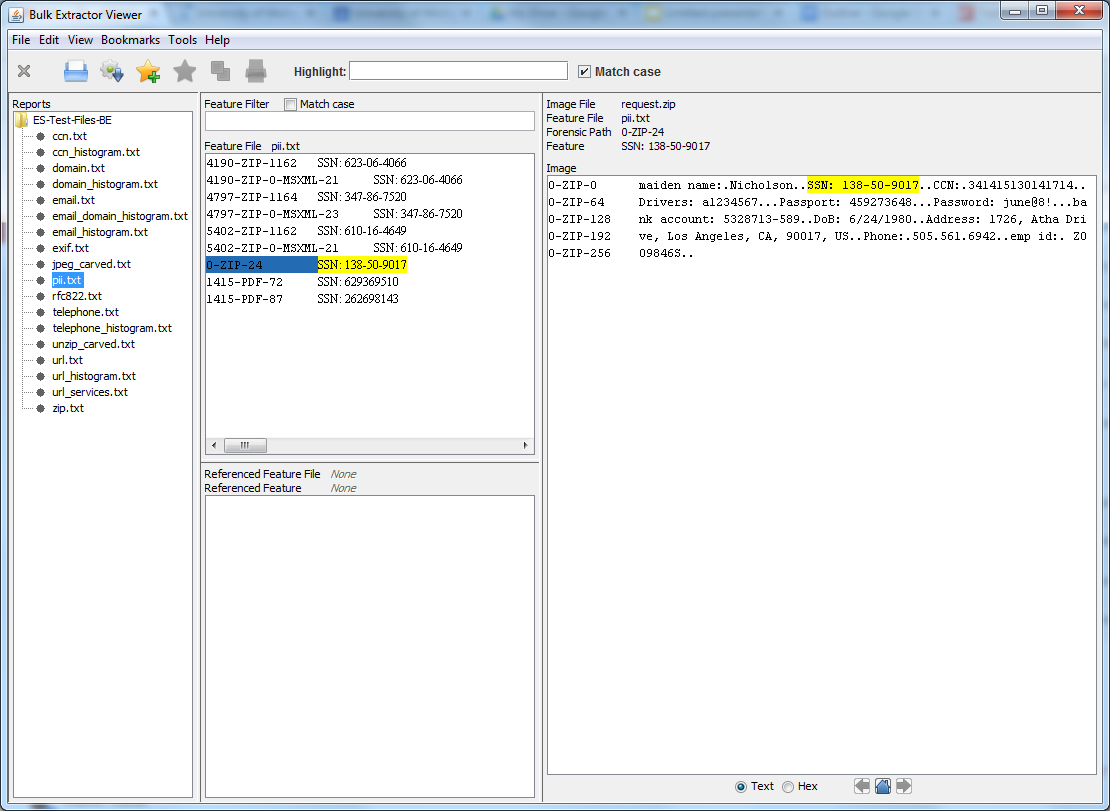
Bulk Extractor Viewer

Bulk Extractor is a program that extracts features such as email addresses, credit card
numbers, URLs, and other types of information from digital evidence media. 

Bulk Extractor Viewer is a user Interface for browsing features that have been extracted via the bulk_extractor feature extraction tool. 

Exercise

Examine the contents of Identity_Finder_Test_Data and identify sensitive data, like social security numbers and credit card numbers. You can also use it to find out what e-mail addresses (correspondence series, anyone?), telephone numbers and website people visit (or at least show up in text somewhere), and how often.

  1. Download and install Bulk Extractor. Note: Windows users should use the development build located here.
  2. Open BEViewerLauncher.exe.
  3. Under the Tools menu, select Run bulk_extractor…, or hit Ctrl + R.
  4. When prompted to Run bulk_extractor, scan a Directory of Files and navigate to Identity_Finder_Test_Data.
  5. Create an Output Feature Directory such as Identify_Finder_Test_Data_BE_Output.
  6. Take a look at the General Options.
  7. Take a look at the Scanners. Note: More information on bulk_extractor scanners is located here.
  8. Submit Run.
  9. When it’s finished, open the Output Feature Directory and verify that files have been created. Some will be empty and others will be populated with data.
  10. In Bulk Extractor Viewer select the appropriate report from Reports.
  11. Take a look at the Feature Filter.
  12. Take a look at the Image.
  13. Play around some!
And there's more! This tool is used in BitCurator and we're incorporating this tool and related functionality into the Appraisal and Arrangement tab:
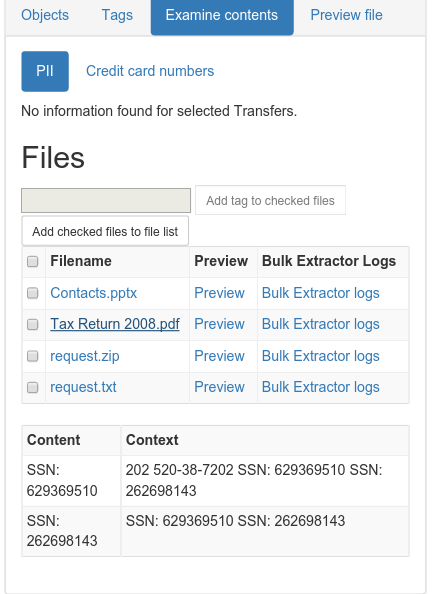
File:ATab-PII.png
SSNs identified!

Digital Humanities Methods and Tools

These, arguably, are emerging tools for characterizing and identifying records. Still, whether they are used in conjunction with researchers to answer new and exciting research questions or to create new interfaces to collections, or to decrease the amount of time between accession and access (with the obligatory note that they don't replace trained, human effort to do the work of description) for gigantic collections of born-digital material that you know next to nothing about, these methods and tools are worth a look.

Text Analysis with Python

Method

Text Analysis is automated and computer-assisted method of extracting, organizing, and consuming knowledge from unstructured text.

Tools

Python is a widely used general-purpose, high-level programming language.

The Natural Language Toolkit (NLTK) is a leading platform for building Python programs to work with human language data.

Exercise

  1. Download and install Python. Note: Mac users, Python will be pre-installed on your machines. You may also choose to install Python's NumPy and Matplotlib packages (and all their dependencies). This isn't strictly necessary, but you’ll need them in order to produce the graphical plots we'll be using.
  2. Download and install NLTK.
  3. Open Interactive DeveLopment Environment (IDLE), or any command line or terminal.
Getting started with NLTK:
    1. Type: import nltk
    2. Type: nltk.download()
    3. At the NLTK Downloader prompt, select all (or book, if you are concerned about size) and Download.
    4. Exit the NLTK Downloader.
    5. Type: from nltk.book import *
    6. Type: text1, text2, etc. to find out about these texts.
Searching text:
    1. Type: text1.collocations()to return frequent word combinations.
    2. Type: text1.concordance(“monstrous”)
    3. Play around some! For example, look for nation, terror, and god in text4 (Inaugural Address Corpus) and im, ur, and lol in text5 (NPS Chat Corpus).
    4. Type: text1.similar(“monstrous”)
    5. Type: text2.similar(“monstrous”)
    6. Observe that we get different results for different texts. Austen uses this word quite differently from Melville; for her, monstrous has positive connotations, and sometimes functions as an intensifier like the word very.
    7. Type: text2.common_contexts([“monstrous”, “very”])
    8. Play around some! Pick another pair of words and compare their usage in two different texts, using the similar() and common_contexts() functions.
    9. Type: text4.dispersion_plot([“citizens”, “democracy”, “freedom”, “duties”, “America”])

    ../images/inaugural.png
    Lexical Dispersion Plot for Words in U.S. Presidential Inaugural Addresses: This can be used to investigate changes in language use over time.
Counting vocabulary:
  1. Type: len(text3) to get the total number of words in the text.
  2. Type: set(text3) to get all unique words in a text.
  3. Type: len(set(text3)) to get the total number of unique words in the text, including differences in capitalization.
  4. Type: text3_lower = [word.lower() for word in text3] to make all words lowercase. Note: This is so that capitalized and lowercase versions of the same word don't get counted as two words.
  5. Type: from nltk.corpus import stopwords
  6. Type: stopwords = stopwords.words(“english”)
  7. Type: text3_clean = [word for word in text3_lower if word not in stopwords] to remove common words from text.
  8. Type: len(text3_clean) / len(set(text3_clean)) to get total words divided by set of unique words, or lexical diversity.
And there’s more! Here's a couple of examples of lexical diversity in action:
This plot shows lexical diversity over time for the Michigan Technic, a collection we've digitized here at the Bentley, using Seaborn, a Python visualization library based on matplotlib. Not much of a trend either way, although I'm not sure what happened in 1980.

Not exactly an archival example, but one of my favorites nonetheless. The Largest Vocabulary in Hip Hop: Rappers, Ranked by the Number of Unique Words in their Lyrics. The Wu Tang Association is not to be trifled with.
Frequency distributions:
  1. Type: fdist1 = nltk.FreqDist(text1)
  2. Type: print fdist1
  3. Type: fdist1.most_common(50)
  4. Type: fdist1.[“whale”]
  5. Type: fdist1.plot(50, cumulative=True)
  6. Play around some! Try the preceding frequency distribution example for yourself.
  7. Type: fdist1.hapaxes() to view the words in the text that occur only once.
../images/fdist-moby.png
Cumulative Frequency Plot for 50 Most Frequently Words in Moby Dick: these account for nearly half of the tokens.
And there's more! Here's an example of a frequency distribution in action:
A word cloud (an alternative way to visualize frequency distributions), again for the Michigan Technic. If you couldn't tell from "engineer" and "engineers" and "engineering" (not to mention "men" and "man" and "mr."), this is an engineering publication.

Named Entity Recognition [3]

Method

Named Entity Recognition (NER) seeks to locate and classify elements in text into predefined categories such as the names of persons, organizations, locations, expressions of times, quantities, monetary values, percentages, etc.

Tool
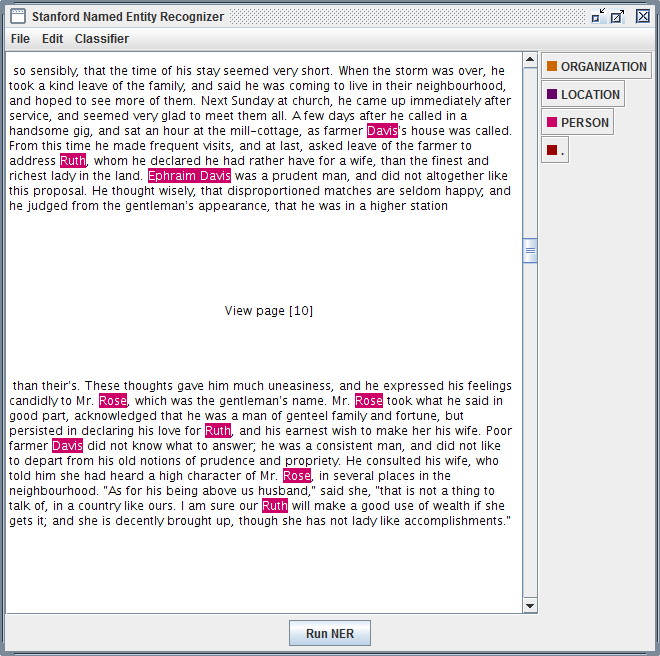
Stanford Named Entity Recognizer
Stanford Named Entity Recognizer (Stanford NER) is a Java implementation of Named Entity Recognizer. Named Entity Recognition (NER) is method that allows automatic labeling of things like people, organizations, and geographic locations in unstructured text.

Exercise

  1. Download and unzip Stanford NER.
  2. Download and unzip looted_heritage_reports_txt.zip.
  3. Open stanford-ner.jar.
  4. Under Classifier click Load CRF From File.
  5. Navigate to Stanford-ner-2015-04-20/classifiers/english.all.3class.distsim.crf.ser.gz.
  6. Under the File menu, click Open File.
  7. Navigate to any file in the unzipped looted_heritage_reports_txt folder (or use any text file).
  8. Click Run NER.
  9. Observe that every entity that Stanford NER is able identify is now tagged. 
  10. Under the File menu, click Save Tagged File As …
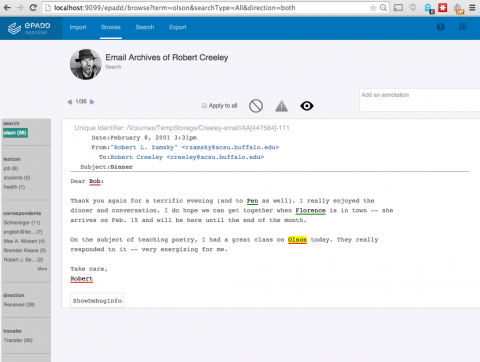
And there's more! No one's arguing that this is perfect, but I think it does a fairly good first pass at identifying the people, places and organizations mentioned in a piece of text. It wouldn't take much to take those tagged files, create lists of unique people, places, and organizations, and do stuff like this:
ePADD, a software package developed by Stanford University's Special Collections & University Archives, supports archival processes around the appraisal, ingest, processing, discovery, and delivery of email archives. This image previews it's natural language processing functionality.
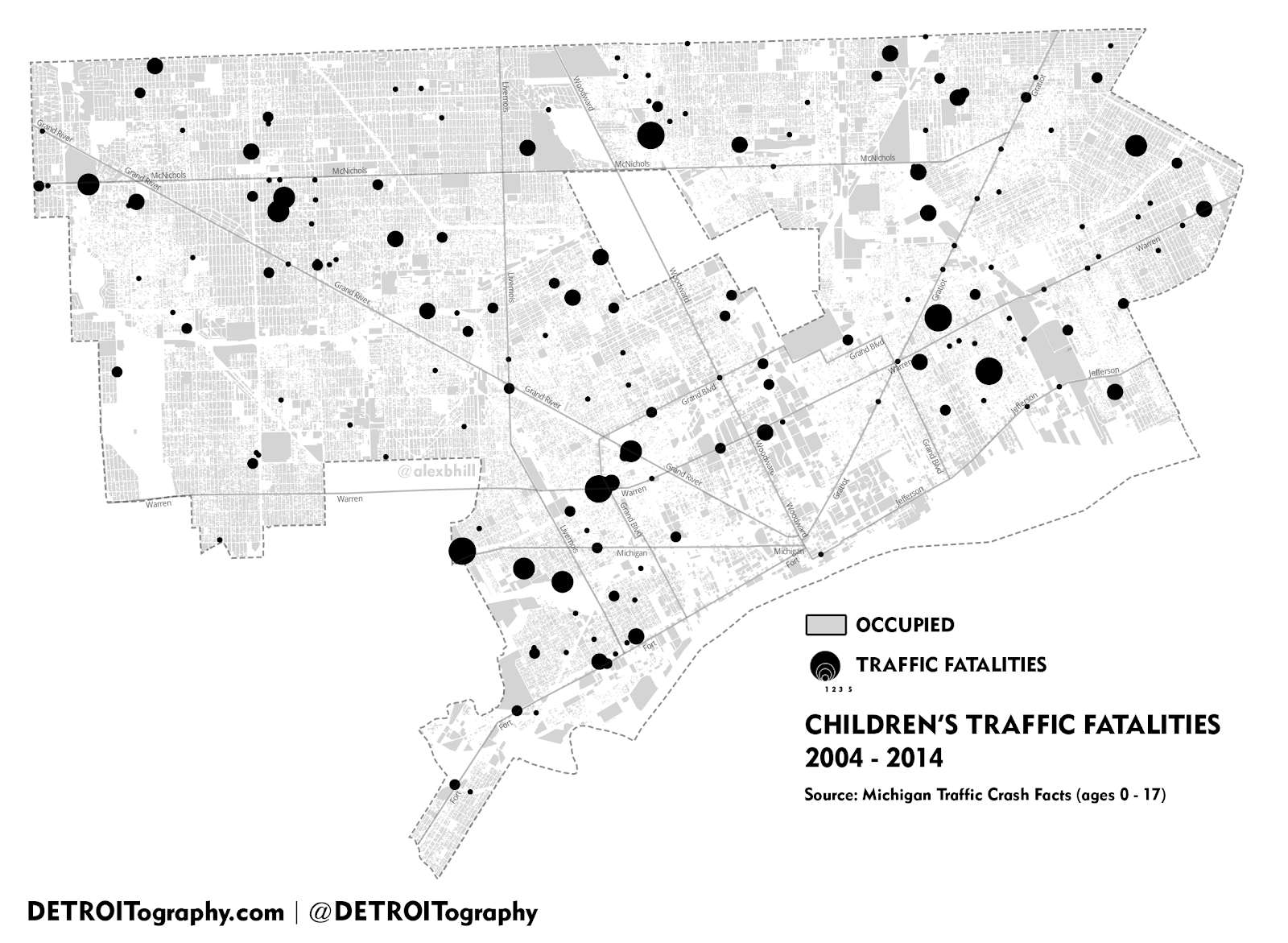
    Those lists of places could be geo-coded and turned into something like this, a map of Children's Traffic Fatalities in Detroit 2004-2014 (notice how the size of the dot indicates frequency).

Topic Modeling

Topic modeling is a procedure used to derive topical content from documents. One of the 
most frequently used tools for topic modeling is MALLET, which provides this 
definition:  
Topic models provide a simple way to analyze large volumes of unlabeled text. A "topic" consists of a cluster of words that frequently occur together. Using contextual clues, topic models can connect words with similar meanings and distinguish between uses of words with multiple meanings.

Tool
Topic Modeling Tool
Whereas MALLET is a command-line tool, Topic Modeling Tool provides an interactive interface

Exercise

  1. Download Topic Modeling Tool.
  2. Open TopicModelingTool.jar.
  3. Click Select Input File or Dir and navigate to the unzipped looted_heritage_reports_txt folder (or use any folder of text files).
  4. Create a new folder on your computer to hold the topic model data you will create, such as looted_heritage_reports_text_output.
  5. Click Select Output Dir and select the new folder.
  6. For Number of topics: enter 15.
  7. Click Learn Topics.
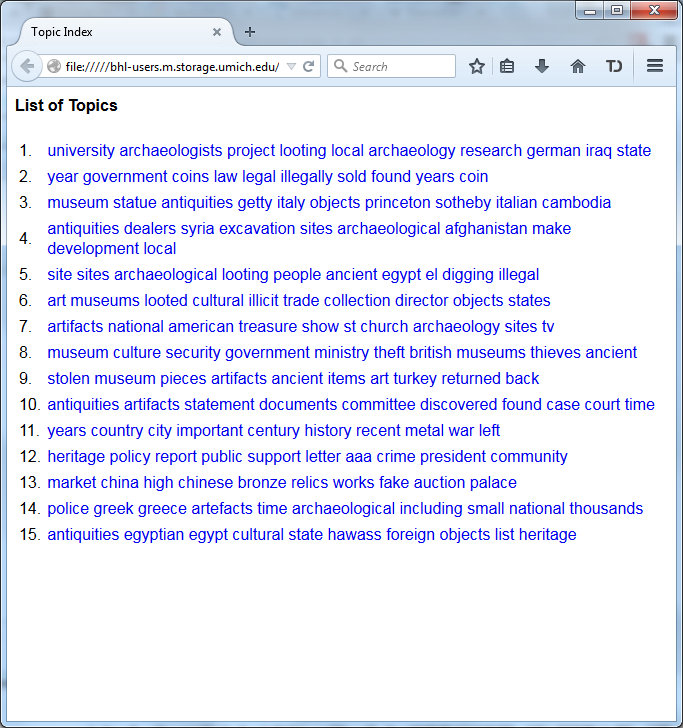
  8. Take a look at the output_csv directory.
  9. Take a look at the output_html directory.
  10. Explore the Advanced… options.
This actual collection of looted heritage reports was used in Mining the Open Web with 'Looted Heritage'. If you scroll down to Findings - Topic Modeling, you can see how this author created descriptive labels for the key words discovered using MALLET (like you just did!) in a draft of a publication. A similar process could be used to turn topics into subject headings.

And there's more! Take a look at this example of topic modeling in action:
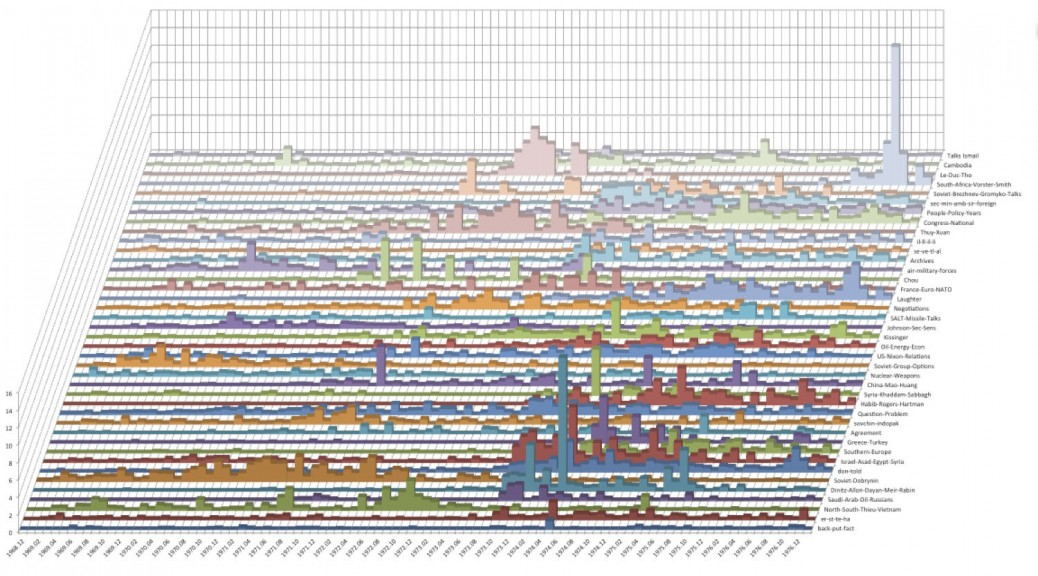
Topic Model Stacked Bar Graphs from Quantifying Kissinger.

Conclusion

What do you think? Could analysis of drives, digital forensics or digital humanities methods and tools be incorporated into your workflow, or have they been? How else are you overcoming the keyword searching problem? Is the keyword searching problem even a problem at all? What do your researchers think? Let us know!


[1] At least according to this article, and this one as well. Yes, I was very thorough...
[2] Maybe. Possibly. Not as much as we like to think, probably. According to our most recent server logs for September (with staff users and bots filtered out), only 0.25% of users of our finding aids looked at our subject headings. That says something, even if it is true that our current implementation of subject headings is rather static.
[3] The following two sections contain content developed by Thomas Padilla and Devin Higgins for a Mid-Michigan Digital Practitioners workshop, Leveraging Digital Humanities Methods and Tools in the Archive. Thanks, guys!

Monday, October 5, 2015

Tools for the programming archivist: ead manipulation with python and lxml

LXML is an awesome python tool for reading and editing xml files, and we've been using it extensively during the grant period to do programmatic cleanup to our legacy EAD files. To give an example of just how powerful the library is, late last week we ran a script to make tens of thousands of edits to all of our ~2800 EAD files, and it took all of 2 minutes to complete. This would have been an impossible task to complete manually, but lxml made it easy.

We want to share the love, so in this post we'll be walking through how we use the tool to make basic xml edits, with some exploration of the pitfalls and caveats we've encountered along the way.

Setup

Assuming you already have a version of python on your system, you'll first need to install the lxml library

In an ideal world, that should be as easy as running "pip install lxml" from a command-line. If that doesn't work, you have a few options based on what your OS is:

  1. If you're on a mac, try "sudo pip install lxml", and type in your password when prompted.
  2. If you're on windows, you may need to run a special installer. Try this official version. You may be required to first install these two dependencies: libxml2 and libxslt.

We'll also need an ead file (or directory of files) to work on. For this demo we'll be using the ead for the UMich gargoyle collection (raw data here).

Basic usage


Parsing the ead file

First, we need to point lxml to the input ead.

Now we have an lxml "etree" or "element tree" object to work with, and we can do all sorts of things with it. From this parent tree, we can now select individual tags or groups of tags in the ead document to perform actions on, based on just about any criteria we can come up with. To do this we'll first need to use an "xpath" search:


Using xpaths

There are a few things to know about lxml's xpath function:

First, it takes input in the xpath language standard, which is a standardized way to designate exact locations within an xml file. For example, the above search returns a list of every extent tag appearing in the ead file -- the double slashes at the beginning mean that it should look for those tags anywhere in the document. If I wanted to be more specific, I could use an exact search, which would be something like "/ead/archdesc/did/physdesc/extent". We will only be going into basic xpath usage here, but the language is ridiculously powerful - if you're curious as to more advanced things you can do with it, check out this tutorial.

Second, an xpath search always returns a list, even if only one result is found. It's really easy to forget this while writing a quick script, so if you're getting errors talking about your code finding a list when it didn't expect one, that's probably the reason.

A few more xpath examples:


Accessing individual tags and their data

The xpath search will give us a list of results, but to look at or edit any individual tag we'll need to grab it out of the search results. Once we have an individual element (lxml's representation of the tag) we can start to access some of its data:


Tag manipulation

Ok! Now that we know how to get at subsections of the ead file, we can start doing some programmatic edits. In our experience, our edits fall into one of just a few categories of possible changes:

  • editing tag text
  • editing tag types
  • moving tags around
  • creating new tags
  • deleting old tags
  • editing attributes

We'll go through each of these and give some examples and practical tips from our own experience working with EADs at the Bentley.


Editing tag text

This is usually a fairly straightforward task, though there is one big exception when dealing with groups of inline tags. A simple straightforward example:

This gets more complicated when you're dealing with a tag like the following:

<unittitle>Ann Arbor Township records, <unitdate>1991-2002</unitdate>, inclusive</unittitle>

Trying to access unittitle.text here will only return "Ann Arbor Township records, " and ignore everything afterwards. There is no easy way around this through lxml itself, so in these cases we've found it easiest to just convert the whole element to a string using the etree.tostring() method, doing some normal python string manipulation on that result, then converting it back into an element using etree.fromstring() and inserting it back into the ead file. That looks a little like this:

Don't worry if some of that didn't make sense -- we'll be going over more of the creating, inserting, and moving elements later on.


Editing tag types

The most straight-forward of edits. Here's an example:


Editing tag attributes

Attributes are accessed by calling .attrib on the element, which returns a python dictionary containing a set of keys (the attribute names) and their respective values:

Editing the attributes is a pretty straightforward task, largely using python's various dictionary access methods:


Deleting tags

Here you will need to access the parent tag of the tag to be deleted using the element's .getparent() method:


Creating tags

There are two primary ways of going about this - one long and verbose, and the other a kind of short-hand built in to lxml. We'll do the long way first:

The alternate method is to use lxml's element builder tool. This is what that would look like:


Moving tags around

The easiest way to do this is to treat the element objects as if they were a python list. Just like python's normal list methods, etree elements can use .insert, .append, .index, or .remove. The only gotcha to keep in mind is that lxml never copies elements when they are moved -- the singular element itself is removed from where it was and placed somewhere else. Here's a move in action:


Saving the results

Once you've made all the edits you want, you'll need to write the new ead data to a file. The easiest way we've found to do this is using the etree.tostring() method, but there are a few important caveats to note. .tostring() takes a few optional arguments you will want to be sure to include: to keep your original xml declaration you'll need to set xml_declaration=True, and to keep a text encoding statement, you'll need encoding="utf-8" (or whatever encoding you're working with):

We can also pretty-print the results, which will help ensure the ead file has well-formed indentation, and is generally not an incomprehensible mess of tags. Because of some oddities in the way lxml handles tag spacing, to get pretty-print to work you'll need to add one extra step to the the input file parsing process:

Note that the new parser will effectively remove all whitespace (spaces and newlines) between tags, which can cause problems if you have any complicated tag structure. We had some major issues with this early on, and ended up writing our own custom pretty-printing code on top of what is already in lxml, which ensures that inline tags keep proper spacing (as in, <date>1926,</date> <date>1965</date> doesn't become <date>1926,</date><date>1965</date>), and to prevent other special cases like xml lists from collapsing into big blocks of tags. Anyone is welcome to use or adapt what we've written - check it out here!


Thanks for reading along! We've found lxml to be indispensable in our cleanup work here at the Bentley, and we hope you'll find it useful as well. And if you have any thoughts or use any other tools in your own workflows we'd love to hear about them -- let us know in the comments below!

Friday, September 25, 2015

Overcoming Digital Preservation Challenges to Better Serve Users

This afternoon, I'll be participating on a panel at Network Detroit, a conference aimed at sharing and promoting cutting-edge digital work in the humanities. In it, I'll be giving a little different spin on the ArchivesSpace-Archivematica-DSpace Workflow Integration project, one that "fits it into a larger socio-historical and theoretical professional context" and that, hopefully, is halfway interesting digital humanities folks. I even wrote it out humanities conference-style. Citations for quotes and images (as well as acknowledgements for some stuff I stole wholesale from Mike's last blog post on access) are currently in my notes and slides; I'll get those into here soon.

Also, thank you Dallas for organizing a reading group that helped introduce me to archival theory.


Good afternoon. My name is Max Eckard, and I’m the Assistant Archivist for Digital Curation at the Bentley Historical Library (University of Michigan). For some context, and I’m quoting here from our website, “the Bentley Historical Library collects the materials for and promotes the study of... two great... institutions, the State of Michigan [including Detroit] and the University of Michigan.” If you can’t tell from my job title, I work with digital stuff.

I came here today to talk about our Mellon foundation-funded ArchivesSpace-Archivematica-DSpace Workflow Integration project. 


It’s pretty exciting. We’re taking three open source pieces of software, each of which currently occupy their own spaces in the digital curation ecosystem, and integrating them into an end-to-end digital archiving workflow. It will facilitate the formal ingest, description and overall curation of digital archives, all the way to deposit into a preservation and access repository. We’re even doing it in way that will facilitate this workflow for the larger community as well.

And I still plan to talk about this project, but just a little. I started thinking about the audience today--that is, digital humanities folks--and I realized that you might not actually be that interested in the details of what we’re doing.

Instead, I’d like to use this time to think a little bigger about this project and what it is--really--that we’re trying to accomplish. I also thought I'd try my hand a making a real, formal argument--I even wrote this out humanities-conference style.


I’ll start with the concept of archives, what they are, what they do and competing visions for how they function in society and culture. You may even get your first introduction to the way that archivists think about archives. Then I’ll talk about our project, where it fits into this larger socio-historical and theoretical professional context, and how, in many ways, it is a practical critique of our collective professional reaction to the Digital Revolution. Finally, I’ll conclude with my perspective on how and where our profession would like to grow, and here’s a spoiler: it has to do with that second “end” in end-to-end, access. All in 15-20 minutes. So here we go…


Definitions are important. You can’t have a conversation, let alone make an argument, without them.


As you might imagine, there’s not one way that the word “archives” has been or is defined, but I’m going to suggest that we use this definition from the Society of American Archivists (SAA) the professional association for members of our profession, at least in the United States:


Now, I know this isn’t the archives you may have heard about from humanist theorists like Jacques Derrida or Michel Foucault. I also know this isn’t the way this word gets used the vernacular. However, I do think there is something we can all learn from a key difference I see between these humanist definitions and the vernacular use of the word “archives” and the SAA’s definition of it, namely, the latter’s emphasis on the collection itself--and the people and organizations that created it--as well the practical consideration of how it should be collected, that is, on product and process.


Before continuing I’d like to draw your attention to the phrase in that definition that starts with “especially” because it enumerates some of the oldest modern archival principles:


provenance...


...and original order...


...as well as collective control.


Right from the very beginning of modern archival thinking, which really came into its own after the French Revolution in Europe, provenance and original order have been core archival principles.

In this context, the term “provenance” connotes the individual, family, or organization that created or received the items in a collection. The principle of provenance or the respect des fonds dictates that records of different origins (provenance) be kept separate to preserve their context.

In this context, the term “original order” connotes the organization and sequence of records established by the creator of the records.


Both were codified in the The Manual for the Arrangement and Description of Archives (Manual) of 1898, which detailed these and many other rules concerning both the nature and treatment of archives.

It’s interesting to note that the very first rule in the Manual, the “foundation upon which everything must rest,” according to its authors, gave its own definition of the word archives: “the whole of the written documents, drawings and printed matter, officially received or produced by an administrative body or one of its officials.” Already that should give you some sense of the context out of which these particular principles came, but I’ll get more into that in a second.

If you were to further investigate that definition from the SAA, you’d see that there is an extensive Notes section, which details two more prominent thinkers (DWEM) in the history of archival theory: Hilary Jenkinson and Theodore Schellenberg.


Jenkinson, writing just twenty-four years after the Manual in 1922, defended archives as “impartial evidence” and envisioned archivists as “guardians” of that evidence. He argued that the only real archives were those records that were “part of an official transaction and were preserved for official reference.” For Jenkinson, who, importantly, was coming out of the same context from which the Manual came (and again, more on that in a second), the records creator is responsible for determining which records should be transferred to the archives for preservation. So there’s another archival principle:


...evidential value.


I’ll note here, because I am also supposed to be thinking about cultural criticism and how it relates to my topic, that it is this early context, the context that produced the Manual and Jenkinson, with its emphasis on “administrative bodies” and “officials,” who alone--because archivists were impartial!--were able to determine which records would be preserved for posterity, that the postmodern critique of archives as political agents of the collective memory, whose institutional origins legitimized institutional, statist power and helped to marginalize those without such power, is perhaps most obviously justified (although how far we’ve come since then is definitely up for debate--and trust me, I’m probably on your side).


Fast forward to the middle of the twentieth century, when Schellenberg was writing. Times were changing. Archives were still largely institutional, but the nature of the records they collected were very different. Facing a paper avalanche in the mounting crisis of contemporary records, archivists could no longer responsibly retain the “whole,” as the Manual put it (and Foucault, I might add), of anything. Archival theory responded by shifting from focusing on preservation of records to selection of records for preservation. Schellenberg called this selection process:


...appraisal.

To quote the SAA:


He also advocated for working with researchers to determine what records had secondary value. I think is a pretty exciting development in this story, although in his time “researchers” really just meant “historians,” so sorry digital humanities folks.

Many archivists, especially in the United States and including us at the Bentley, have been influenced by Schellenberg.


And then came the Digital Revolution. From Wikipedia:


Analogous to the Agricultural Revolution and Industrial Revolution, the Digital Revolution marked the beginning of the Information Age.

Needless to say, the Digital Revolution has had a profound effect on the nature and treatment of archives in contemporary society, as well as their use. And this is only to be expected, because the very context that produced the Manual and the works of Jenkinson has fundamentally changed.


With the advent of the Internet and social media and the democratizing effect these have had on society (And I’m thinking here of the Arab Spring, and other informal, non-hierarchical movements like #OccupyWallStreet and #BlackLivesMatter...), no one can honestly say that the only records that make a difference anymore, even politically, are those that are produced by “administrative bodies” or “officials.”


Likewise, if Schellenberg thought there was too much paper back in his day, what would he have thought of today’s version of that crisis, which is on a totally different scale? Did you know that there are:
  • 2.9 million emails sent, every second;
  • 375 megabytes of data consumed by households, each day;
  • 24 petabytes of data processed by Google, per day (did you even know petabytes was a word?);
  • etc., etc., etc.

What would Schellenberg have thought of Big Data?

So, the context has fundamentally changed… but wait, there’s more. The records themselves have also fundamentally changed. Digital records (the actual stuff that gets archived), are much more fragile than their physical counterparts, and we have less experience with them.


Digital preservation is challenging!

Specifically, there are issues with digital storage media:
"Digital materials are especially vulnerable to loss and destruction because they are stored on fragile magnetic and optical media that deteriorate rapidly and that can fail suddenly." (Hedstrom and Montgomery 1998)

There are issues with changes in technology:
"Unlike the situation that applies to books, digital archiving requires relatively frequent investments to overcome rapid obsolescence introduced by galloping technological change." (Feeney 1999)

And, there are issues with authenticity and integrity:
“While it is technically feasible to alter records in a paper environment, the relative ease with which this can be achieved in the digital environment, either deliberately or inadvertently, has given this issue more pressing urgency.”

There are other issues, like money (of course!), the fact that access always has to be mediated and the myth that digital material is somehow immaterial, but I don’t really want to get into all that here.


So we, as a profession, started scrambling. We even invented a whole new specialization within library and information science to deal with these radical changes in context and content:


...digital curation. Since it’s inception over 10 years ago, digital curators have been hard at work developing strategies that help to mitigate some of the risks I just enumerated, in part to help ensure continued access to digital materials for as long as they are needed.


We adopted and created models, for example, like the Open Archival Information System (OAIS) Reference Model and the DCC Curation Lifecycle Model to inform the systems and the work that we do. We created metadata schemes to record new types of information about digital material, like the Preservation Metadata Implementation Standard (PREMIS), which records information on…


...provenance (sound familiar?), but also preservation activity done to preserve digital material, the technical environment needed to render or interact with it, and rights management.


We started using techniques like checksums and file format migrations in order to verify the authenticity and integrity of digital material (because digital material doesn’t have....


...evidential value if it isn’t what it purports to be).


We even borrowed techniques from law enforcement called write-blocking and disk imaging, so that we could make exact, sector-by-sector copies of source mediums, perfectly replicating the structure and contents of a storage device, which I think sounds a whole lot like a techy version of…


...original order.

Along the way there was a lot of education and advocacy that occurred and is occurring around these issues for both archivists and content creators and actually, a lot of this is the stuff that the Archivematica part of the ArchivesSpace-Archivematica-DSpace Workflow Integration project is good at.


So, where have these developments left us? Technology-wise, it’s maybe mid-2000s. Digital curators often complain that the technology we’ve created to deal with digital archives seems to lag about 10 years behind the archives themselves. Archival theory-wise, though, it’s probably more like 1924, with the Manual and Jenkinson, with provenance, original order and impartial evidence.

Others have observed that even in the face of the enormous scale of the digital deluge, archivists somewhat ironically abandoned another core component of archival theory (also mentioned in the SAA definition, even though I haven’t talked much about it here):


...collective control.


This they did in favor of item-level description, and, with it, “informational content over provenance and context,” treating digital objects as “discrete and isolated items” rather than as part of the “comprehensive information universe of the record creator,” but I think you might have to be an archivist to appreciate that one.


OK, I’d like to start to wrap this up. Two things and then I’m done.


The first is that the ArchivesSpace-Archivematica-DSpace Workflow Integration project is definitely overcoming digital curation and preservation challenges, and it’s doing so in a novel way that brings contemporary archival practice back in line with contemporary archival theory. To be honest, the Curation (previously Digital Curation) division at the Bentley already had a strong, nationally-recognized reputation for this, but for dramatic effect I’ll just pretend that this is all thanks to our project!


The project has a number of goals, but the one that has taken the most time and resources is the development of new appraisal and arrangement functionality in Archivematica, so archivists may review content and, among other things, deaccession or separate some or even all of it from a collection. That is, so that archivists can begin to do with digital records what they have been doing for a long time now with paper records:


...some good ole fashioned Schellenbergian appraisal.


The arrangement part of this new functionality is also really exciting. It helps to address the collective control issue I outlined earlier by allowing archivists to create intellectual arrangements and associate them with archival objects from ArchiveSpace in a pretty sophisticated way, in aggregate, with APIs and everything. Really, this is cool stuff!

But now what? When the grant is over, where will we be?


I really wanted to end this talk by asserting that our work leaves us (us at the Bentley and us as a profession) in a better place to serve users like you. And it does. We were already helping to mitigate all of those risks for everything that comes in our door, making sure it will be available and usable for future generations. At the end of this project we will be doing it even better than we are now.

But, if I’m honest, I’m actually not entirely sure that this project leaves us in a place to better serve users, or, as we call it, to provide “access,” at least not directly.


Actually, and I’m trying to think critically here, what it does is make our lives easier. It improves our process so we can make more product, and, I hate to say it, but our profession is notorious for thinking about product and process, sometimes at the expense of the end users--read, people--that we’re doing all this for. When we do think about access, it’s often an afterthought, and it’s usually about how to lock it down. In fact, there’s not even a reference to access (or users, or even researchers) in the definition of archives I provided earlier, that is, the definition provided by the professional organization for archivists, even if you check the Notes!

But there’s some good news. We are getting better about this. The Bentley is putting a lot of time and resources into some exciting initiatives to provide better access to our materials, both physical and digital, getting some audio and video online, and to engage users that we haven’t traditionally engaged. As a profession, we’re also getting better. It is now common for library and information science programs to teach courses on user experience, and at the SAA’s annual meeting this past August, we talked a lot about access, especially for digital material. It’s an exciting time to be in this field.

At the end of this project, all I can really say is that we (at the Bentley and we in the profession) are more poised than we ever have been to, like you’re doing in your profession, shift the paradigm, to redefine archives even! We’re living in the Information Age, after all. Providing access can mean so much more than it ever has, and, with the Internet, it can break down barriers of time and space like never before. And yes, users like you are pushing the boundaries of what it means to do research with digital archives, and we have to keep up with the new ways you want access. And you should continue to demand this non-traditional type of access. And we should continue to try to keep up...


This last part is to all the archivists and librarians out there (digital humanities folks, you can take it or leave it):

Here’s what we’re currently thinking about with regard to access, at least practice-wise at the Bentley, although I suspect that an abstracted version of this is also what’s on deck for archival theory:
  • exploring and better understanding the challenges and opportunities surrounding the OAIS functional entity of ‘access’;
  • managing rights and enforcing restrictions/permissions (which is something, by the way, that we’ve also historically taken a progressive stance on because, as one of my favorite Tweets from this year's SAA Annual Meeting went:


  • establishing use metrics and collecting quantitative data regarding the impact of our collections and outcomes of curation activities;
  • permitting users a more seamless experience in searching for and using materials that are in disparate/siloed locations; and'
  • leveraging linked data to facilitate research across collections and institutions.


At this stage in the game, we aren't even thinking about specific implementation strategies, but we do know that an access portal should emphasize interoperability, employ open source software and, importantly, focus on end users.


It’s taken us an amazingly long time (since 1898), to get to that last one, a focus on end users.

To conclude, archives have always been about product and process. I’d like to end by suggesting a third “P” to help us move forward in our thinking about access in archival theory and practice:


...people.


What did you think? Was it a fair assessment? Let us know!