Thursday, January 28, 2016

Archivematica to DSpace (and back again to ArchivesSpace)

So, we haven't talked much yet on this blog about DSpace...
DSpace is a turnkey institutional repository.
Well, I guess that's not entirely true. Mike has written about both digital objects/DSpace items and also our current use of DSpace to provide access to digital archives (to see what condition his condition was in). But it's only been in the most recent phase of development with Artefactual that we've turned to DSpace/Deep Blue (our slightly customized DSpace instance) integration.

If you're interested, we've also been working on some optimization issues, packaging AIPs and prioritizing our development requests for improvements to the Appraisal and Arrangement tab (including some exciting UI enhancements--thanks, Dan!)--but all of that's a topic for another day!

Today's post is on the Archivematica-DSpace part of the ArchivesSpace-Archivematica-DSpace Workflow Integration project. I suspect this will be a two-parter. Today, I'll outline the workflow we envision as well as some of the options we're weighing for making it happen. Later, I'll report back on what course of action we decided to take and why.

Workflow

The essential workflow goes like this:

  1. An archivist accessions (ArchivesSpace), transfers (Archivematica), appraises and arranges (forthcoming in Archivematica 1.6) a SIP.
  2. An archivist "Finalize[s] Arrangement" for a particular digital object and it's components.
  3. Archivematica runs said digital object through the rest of it's Ingest process (we'll be normalizing for preservation but you can do whatever you like!).
  4. Archivematica creates a single Digital Object in ArchivesSpace, with one or more associated Digital Object Components.
  5. Archivematica spits out a bagged AIP (actually two bags, one with the data itself and one with more administrative-type information) into a user-selected collection in DSpace, data (an item composed of one or more bitstreams) and metadata, the latter likely coming from the ArchivesSpace metadata we've been using/creating already within Archivematica (i.e., not pulled from ArchivesSpace, or at least not pulled immediately from ArchivesSpace). [1]
  6. Archivematica updates ArchivesSpace with the relevant information: handle, URL, etc.

Considerations

It all doesn't come down to workflow. We have some goals for the way we'd like for this to work, and Archivematica and DSpace have some additional responsibilities as components of an OAIS.

Our Goals

One of our goals for this Mellon-funded project is to ensure that new features and functionality are modular so that other institutions may adopt some or all project deliverables. Indeed, this is a requirement of Mellon's, an organization that "aims to maximize the use and sustainability of technology," and would like for "funded work to be made publicly available for the long-term benefit of... cultural institutions." 

This is something we take very seriously. It has informed everything about this process, from the way we've done development (so that, for example, institutions who don't use ArchivesSpace can still make use of the Appraisal and Arrangement tab), to our attempts to ensure that workflows are flexible (for MPLP as a baseline folks and for item-level folks) to our plans for sustainability (all code, in addition to just being out there, will be incorporated into Archivematica's core code and maintained by Artefactual going forward). It's even informed the way we've tried to reach out to others on thorny issues and the way we're trying to be as open as possible and share as much as we can on this blog.

All of this holds true for this process of deciding how we'll get data and metadata from Archivematica and DSpace. Ideally, we'd like for this to work for all institutions, regardless of the repository they're using (or even if they're not using a repository, but that parts easy). As we consider a move to Hydra in the next few years, this would actually work out well for us too. If that won't work, we'd at least like for this to work for everyone who uses DSpace, and not be tied specifically to Deep Blue. If even that won't work, we'll reluctantly settle for something that will only work for Deep Blue, for our local Dublin Core conventions or that MLibrary LIT developers will have to develop and maintain because, after all, we do have to make sure that data and metadata do actually get from Archivematica to DSpace by the time the grant concludes.

Archivematica's (and DSpace's) Additional Responsibilities

In addition, Archivematica and DSpace, by virtue of the fact that they are components of a digital preservation system, have some additional responsibilities above and beyond just exchanging data and metadata. Archivematica, for instance, needs to be able to ensure that AIPs have successfully transferred to what we're using for Archival Storage (i.e., DSpace), for example, by having some mechanism to verify checksums on both ends of a transfer. For all you OAIS junkies out there, that would be the Error Checking function of the Archival Storage Functional Entity:
The Error Checking function provides statistically acceptable assurance that no components of the AIP are corrupted in Archival Storage or during any internal Archival Storage data transfer... The Preservation Description Information (PDI) Fixity Information provides some assurance that the Content Information has not been altered as the AIP is moved and accessed.
As a result, whatever protocol or method we use to transfer data and metadata needs to be able to check this kind of thing and throw up an error if something goes wrong.

Archivematica also has a responsibility to be able to reassemble the AIP upon request. That would be the Provide Data function of the Archival Storage Functional Entity:
This function receives an AIP request that identifies the requested AIP(s) and provides them on the requested media type or transfers them to a temporary storage area.
As a result, Archivematica will need to have more granular information about individual bitstreams that make up an AIP than we originally anticipated needing, for example, for the minimal metadata that we'll record for Digital Objects in ArchivesSpace. [2] The handles are important for this, but so are the bitstream URLs, even for the administrative bit that will be hidden to users.

Those are just two examples but I hope they serve to illustrate the fact that this data/metadata exchange won't be quite as simple as copying files from one place to another.

Options

Just last week we had a brainstorming session with representatives from Artefactual, the Bentley, MLibrary LIT and the University of Edinburgh (including someone who works on SWORD) on the topic of Archivematica-DSpace data and metadata exchange. Justin at Artefactual began by outlining what he sees as the three options for getting data and metadata from Archivematica to DSpace, and we spent the hour discussing the advantages and disadvantages of each. 

REST API

The DSpace REST API provides a programmatic interface to DSpace Communities, Collections, Items and Bitstreams. In the latest version, the REST API allows authentication to access restricted content as well as allowing Create, Edit and Delete on DSpace Objects. REST Endpoints allow you to do things like login, logout and, important for our purposes, post metadata and bitstreams to items, post policies to bitstreams, and get handles.

If you want to know more about the REST API, check out the latest documentation on their wiki.

Some advantages of the REST API:
  • Can deposit bitstreams.
  • Can edit metadata.

Some disadvantages:
  • This would not work with other repositories. 
  • We'd need to develop a callback for something like verifying checksums.
  • While you can get access to restricted content, we're not sure if it can handle groups that we use for permissions (for example, Bentley IP addresses for Reading Room Only material).
  • Harder to get handle.

Simple Archive Format

DSpace also has a set of command line tools for importing and exporting items in batches using the DSpace Simple Archive Format. The basic idea is to produce a particular directory structure (like the one you see above) with sub-directories for Items. Each sub-directory contains components for the item's descriptive metadata and the files that make up the item. There are also conventions for the XML files and for the contents of the contents folder. Important for our purposes, the Simple Archive Format allows you to import items to particular collections, can alert (e-mail) folks that items have been imported, can resume a failed import and can add items from a ZIP file. There's also a UI for import, but I don't suspect we'll be using that.

For more on the Simple Archive Format, check out the latest documentation on their wiki.

Some advantages of the Simple Archive Format:
  • It's simple! But seriously, we have a lot of experience with it--we use it all the time.
  • Less work to implement.
  • We could do everything we want with it with some development.
  • Already works with our locally-grown embargo functionality.
  • Returns a file that maps deposited filenames to what they became.

Some disadvantages:
  • This would not work with other repositories.
  • There are some questions about how difficult it would be to make this work for DSpace and specific instances of DSpace like Deep Blue, given variations in Dublin Core and that kind of thing.
  • We'd need to develop a callback for something like verifying checksums.
  • It's an offline communication format, so it's slower and involves more code to maintain.
  • Would have to be developed by individual institutions.

 SWORD

They was looking for the SWORDs, they was looking for the SWORDs! Sorry, couldn't help myself.
This is the SWORD we're looking for.
SWORD (Simple Web-service Offering Repository Deposit) is an interoperability standard that allows digital repositories to accept the deposit of content from multiple sources in different formats via a standardized protocol. SWORD allows clients to talk to repository servers. Important for our purposes, it allows deposit to a SWORD-compliant repository (DSpace is one of them, and so is Fedora) by a third party system (like Archivematica). It allows you to deposit files and, in its latest version, copes not only with the "fire and forget" deposit scenario, but also to facilitate the functions needed to support the whole deposit lifecycle--such as notifying a depositor that a deposit was successful and even verifying a Content-MD5 header. Cool stuff.

If you want to know more about SWORD, check out their website.

Some advantages of using sword:
  • This would work for other repositories besides DSpace, which means a lot for our goals.
  • It's good for depositing files.
  • Hydra/Fedora support is already there.
  • Does things live and dynamically.
  • May allow you to create a handle and add metadata later.
  • Can e-mail folks letting them know that ingest was successful.

And some disadvantages:
  • It's not really for adding or editing metadata.
  • Doesn't handle permissions, restrictions or embargoed items.

Conclusion

Decisions, decisions! It's important to note that it's not like these are all mutually exclusive options. Simple Archive Format scripts and SWORD could be used in conjunction, for example, and this is one of the options we're currently exploring. We could also make changes to the DSpace code itself.

Well, that's about it for Archivematica-DSpace/Deep Blue Integration. Check back soon for an update on the course we've decided to take!

[1] I'm actually not sure what order this will happen in, that is, whether the Digital Object will get created in ArchivesSpace first or if content will get deposited into DeepBlue first.
[2] Check out Mike's post on digital objects and ArchivesSpace for more information on how we envision using Digital Objects in ArchivesSpace. Full disclosure, our thinking on this is evolving a bit, but for now it's still true that we'd like to use Digital Objects in ArchivesSpace mostly for their ability to point or link out to, in our case, a handle. That a fairly minimal implementation compared to all the rich technical and administrative metadata you could add to Digital Objects. It's a system of record thing!
[3] Grantmaking Policies, Andrew J. Mellon Foundation.

Monday, January 18, 2016

ArchivesSpace + Vagrant = Archivagrant

If you're anything like me, you find yourself regularly creating, destroying, and recreating ArchivesSpace instances to run test migrations with a slightly modified set of data, to test new or updated plugins, or to verify that everything that previously worked still works with a new version of ArchivesSpace. Manually downloading an ArchivesSpace release, setting up a MySQL database, editing or copying over a config file, setting up default values, and all of the other steps that go into getting an ArchivesSpace release ready for testing can be a time consuming process. If you're even more like me, you went through this process countless times, all the while thinking "there must be a better way" without realizing the entire time that there is, indeed, a better way: Vagrant.

Vagrant is an application that allows users to create a single configuration file (aka a Vagrantfile) that can be used, shared, and reused to "create and configure lightweight, reproducible, and portable development environments" in the form of virtual machines. Vagrant, and tools like it, have been widely used by developers to solve issues that arise when development on a single application is done in a variety of development environments and to make the process of configuring a development environment across time, users, and operating systems easier and more consistent. Vagrant allows users to do some upfront work to configure an environment so that other people working on a project (and their future selves) will not have to worry about going through manual, time-consuming, and error-prone configuration steps ever again. While we aren't doing a lot of heavy developing, repurposing an existing tool like Vagrant to cut down on the amount of time we spend unzipping directories, editing config files, installing plugins, and so on allows us to focus on the work that we really need to do.

This blog post will walk through our ArchivesSpace Vagrant (or, Archivagrant) project to demonstrate how to setup a Vagrantfile and related provisioning scripts that, once written, will download the latest ArchivesSpace release, install dependencies and user plugins, setup ArchivesSpace to run against a MySQL database, and setup some of our local ArchivesSpace default values.

In order to beginning using Vagrant, you will need to first do the following:

  1. Install VirtualBox
  2. Install Vagrant
  3. Install a terminal application with ssh (Secure Shell). If you're on Mac or Linux, the default terminal should work. If you're on Windows and have git installed, the git shell should also work. Another option is to use a Unix-like terminal emulator such as Cygwin, being sure to install the ssh package during setup and installation.

If you've never used Vagrant before and are curious about how it works in general, follow along with the Vagrant Getting Started instructions for information about downloading and installing boxes, setting up a basic Vagrantfile, and provisioning, starting, and accessing a Vagrant virtual machine before continuing with the following instructions.

As detailed in the Vagrant setup instructions, a Vagrantfile is all that's needed to set up a Vagrant virtual machine that can be installed, started, stopped, destroyed, and recreated at any time and on any machine. Here's ours:


The Vagrantfile for this project is pretty simple. First, it indicates that the box to be used is hashicorp/precise32, which is an Ubuntu 12.04 LTS 32-bit box. Next, ports 8080 and 8089 from the guest virtual machine are forwarded to the same ports on the host machine. This will allow us to use the browser on our host machine (the computer running Vagrant) to access the ArchivesSpace application running inside of the virtual machine and interact with the ArchivesSpace application as if it were running on our actual machine using its default backend and staff interface ports. That way, we don't need to worry about finding the IP address of the Vagrant machine or remembering any non-default ports (it also means that we don't need to change anything in the many scripts we have that access the ArchivesSpace API using http://localhost:8089). Next, the Vagrantfile allocates 2 GB of RAM to the virtual machine to improve performance. Finally, the Vagrantfile provisions the virtual machine using three shell scripts: setup_python.sh, setup_mysql.sh, and setup_archivesspace.sh.


The first shell script, setup_python.sh, is fairly short and simple. It first updates Ubuntu's packages (to ensure that we'll be downloading the most up-to-date packages in this and any subsequent provisioning scripts), then installs the Python package manager pip using the Ubuntu package manager, upgrades pip to its latest version, and installs the Python Requests library, which we'll be using later to find and download the latest version of ArchivesSpace and configure our ArchivesSpace defaults.


The next shell script, setup_mysql.sh, installs the Ubuntu mysql-server package, sets up a root username and password (since this is a temporary virtual machine used only for testing purposes, it's okay if the username and password are weak and exposed), and finally creates and configures a database following the official ArchivesSpace documentation for running ArchivesSpace against MySQL.

The final provisioning script, setup_archivesspace.sh, is the most detailed. It also makes use of two separate Python scripts that do the bulk of the work, so for the purposes of this post we'll take a look at setup_archivesspace.sh in two parts. It's worth reiterating that this provisioning script configures ArchivesSpace for our needs here at the Bentley Historical Library, but you should be able to modify it to suit your needs by changing some of the variables and removing some of the plugins (or adding your own).


The first part of the setup_archivesspace.sh shell script is pretty straightforward. The script first installs the Ubuntu packages that will be used in provisioning ArchivesSpace: Java (required by ArchivesSpace), unzip (used to extract the downloaded ArchivesSpace release), and git (used to install plugins from the Bentley's GitHub repository). Then, the shell script calls a separate Python script, download_latest_archivesspace.py, which is used to locate and download the latest release of ArchivesSpace.


This Python script uses the Python Requests library and the GitHub API to find the URL for the latest official ArchivesSpace release, download it, and extract it to the guest machine's home directory.


After downloading and unzipping the latest version of ArchivesSpace, the setup_archivesspace.sh provisioning script sets variables for the database URL and plugins entries to be edited in the ArchivesSpace config file. Then, several plugins are downloaded to the ArchivesSpace plugins directory, including the latest version of the container management plugin, our own EAD importer and exporter plugins, and our slightly modified version of Mark Cooper's very handy aspace-jsonmodel-from-format plugin (used to convert our legacy EADs to ArchivesSpace JSONModel format before posting them via the API -- we'll blog about that at some point, but it makes error identification much easier). Next, the setup_archivesspace.sh script edits the ArchivesSpace config file, replacing the default database URL and plugins entries with the variables that we set up earlier. The script continues by running the ArchivesSpace setup-database.sh script, then configures ArchivesSpace to run at system start (so we won't have to access the virtual machine just to start the application), and starts ArchivesSpace. Finally, the provisioning script calls another Python script, archivesspace_defaults.py, to set up some of our default configurations.


This script uses the ArchivesSpace API to setup some of the default values that we've been using for testing, including setting up a repository, container profiles, classifications, and repository preferences and editing the subject sources and name sources enumerations. While these are all configurations that can easily be set up using the ArchivesSpace staff interface, setting up some of these basic configurations in a provisioning script makes the process of starting and using an ArchivesSpace Vagrant instance that much faster.

Now that we've written our Vagrantfile and associated provisioning scripts, the process of setting up a new ArchivesSpace instance for testing is as simple as doing the following:

  1. Clone the archivagrant GitHub repository (if we haven't already)
  2. Open a terminal application and change directories to the archivagrant directory
  3. vagrant up
The first time that we issue the vagrant up command, it provisions the virtual machine using the scripts detailed above. Once the provisioning process is complete, we can point our host machine's browser to http://localhost:8080 (to access the ArchivesSpace staff interface) and any scripts we have to http://localhost:8089 (to access the ArchivesSpace backend). If we need to gain command line access to the running virtual machine (to stop or restart ArchivesSpace, install any additional packages, mess around in an Ubuntu server without worrying that we're going to break everything, etc.), we can vagrant ssh into it. The virtual machine can be suspended using a vagrant suspend command; shutdown using vagrant halt; and destroyed with vagrant destroy. If suspended or shut down, the virtual machine can be started back up again to its previous state with another vagrant up. If destroyed, a vagrant up will recreate the virtual machine from scratch, going through the entire provisioning process. For the pros and cons of each approach, check out the Vagrant teardown documentation. I use vagrant halt most of the time, but a vagrant destroy is easiest when a new version of ArchivesSpace is released or when I have messed everything up beyond salvation.


Finally, there may be times when we want to start over with a fresh ArchivesSpace database in an existing Vagrant virtual machine without going through the process of recreating the entire machine through a vagrant destroy. The script reset_archivesspace.sh can be run by doing a vagrant ssh into the guest machine and changing directories to the /vagrant directory (a shared folder setup by Vagrant that syncs the contents of the Vagrant project's directory on the host machine to the guest machine).


The script sets up a clean MySQL database and our ArchivesSpace defaults without redownloading ArchivesSpace or reprovisioning the entire machine.

It looks like there are several other ArchivesSpace users that use a Vagrant ArchivesSpace configuration that might be worth checking out if the previously described setup doesn't quite work for you or if you want to see how others are doing it. If you're using some other way to ease the pain of frequently installing ArchivesSpace test instances, let us know!


Wednesday, January 6, 2016

2015: A Year of Progress on ArchivesSpace-Archivematica-DSpace Workflow Integration

Greetings and Happy New Year to one and all!

As we're still in the first week of 2016, we hope you'll allow us to cast one last glance back at 2015.  The past year has been one of intense effort on the part of our Mellon grant team.  From the three-day site visit by Evelyn McLellan and Justin Simpson of Artefactual Systems last January through our presentations at SAA and iPRES to our exploration of ASpace digital object records and PREMIS rights crosswalks, we've had our noses to grindstone!

We've been thrilled with the interest and engagement of our peers in the project and this blog in particular; thanks to everyone who's read or commented (and please keep the feedback coming)!

Based upon page views, here are the most popular posts from the past year—please take a moment to check them out (and get ready, because best is yet to come!):
  1. The Work of Appraisal in the Age of Digital Reproduction
  2. Hello World!
  3. Dystopia and Digital Preservation: Archivematica's Character Flaws (and Why We're OK with Them)
  4. Advocacy and Born-Digital Archives
  5. The Mythical Man-Month: What ArchivesSpace Isn't (and Why That's OK)
  6. Digital Objects and ArchivesSpace
  7. Normalizing Dates with OpenRefine
  8. Order from the chaos: Reconciling local data with LoC auth records
  9. Git-Flow for Archival Workflows
  10. Digital Preservation is for People: An Archivist's Take on the Digital Humanities
Happy reading and here's to an exciting and productive 2016!

Tuesday, November 24, 2015

U-M IT Symposium

Today, Max is presenting on our ArchivesSpace-Archivematica-DSpace Workflow Integration project at the University of Michigan IT Symposium, which is designed to "help create connections between community members, while showcasing the innovation occurring across all campuses."
Posters for the people!
We're trying to get the word out here on campus about our efforts to preserve and provide access to university records of long-term historical and administrative value.  We're hopeful that this kind of outreach will highlight our status as a trusted partner in the preservation of digital materials and drive more units to transfer their born-digital records to the archives.

Download a copy of the poster here.

Until next time...

Monday, November 23, 2015

Code4Lib 2016 Proposal

We've thrown our hat into the ring to present at Code4Lib 2016--please cast a vote for us if you'd like to hear more about the project and see a demo in Philadelphia next March!

Monday, November 16, 2015

Digital Objects and ArchivesSpace

One (somewhat unexpected) challenge in our ArchivesSpace-Archivematica-DSpace Workflow Integration project has involved mapping terms and terminologies across the different platforms.  In conversations with our development partners at Artefactual Systems, members of the ASpace community, and other peer institutions, we've found that it's really important to take a moment and make sure we're all on the same page when we're talking about something like a 'digital object.'

Having some common ground/shared understanding is very important, as our workflow establishes the following equivalences:

1 Archivematica SIP = 1 Archivematica AIP = 1 ASpace Digital Object Record = 1 DSpace Item

I'd like to take this opportunity to review the reasons behind this structure, but first I think it would be useful to take a look at how others in the ASpace user community are approaching digital object records.

Perspectives on the ASpace Digital Object Record

As evidenced by the introductory materials for an ASpace workshop that was held here in Ann Arbor this past January, the digital object record was designed to be flexible:
The Digital Object record is optimized for recording metadata for digitized facsimiles or born-digital resources. The Digital Object record can either be single- or multilevel, that is, it can have sub-components just like a Resource record. Moreover, the record can represent the structural relationship between the metadata and associated digital files--whether as simple relationships (e.g., a metadata record associated with a scanned image, and its derivatives) or complex relationships (e.g., a metadata record for a multi-paged item; and additionally, a metadata record for each scanned page, and its derivatives). One or more file versions can be referenced from the Digital Object metadata record.  The Digital Object record can be created from within a Resource record, or created independently and then either linked or not to a Resource record.
While this flexibility is great, it also provokes a lot of questions about just how to implement the digital object records, some of which have been featured in conversations on the ArchivesSpace Google Group as well as the ArchivesSpace Users Group.

On one end of the spectrum, we have complex digital objects--multilevel intellectual entities comprised of multiple bitstreams that can be represented in a structured hierarchy.  Brad Westbrook provides some examples of this use case in this thread from the ASpace Google Group. Those of us in attendance at the "Using Open-Source Tools to Fulfill Digital Preservation Requirements" workshop a couple weeks ago at iPRES got to see a real-world example of how a complex digital object could be represented in ASpace via content from the UC San Diego Research Data Curation Program in the Online Archive of California

Far more common (based upon conversations with peers and posts to the lists), is a simpler approach in which the digital object record is used primarily to record URL information that will provide links to content from the public ASpace interface or from <dao> elements in exported EAD.  This thread provides some valuable thoughts from Ben Goldman, Jarrett Drake, Chris Prom, Maureen Callahan, and our own Max Eckard.

Several of the important ideas raised in that conversation include the need for institutions to:
  • Define systems of record for data/metadata and determine how ASpace fits into this ecosystem.
  • Identify how information in the digital object records can be used now and in the future (i.e., the records can bring together digital content stored in various systems/locations, serialize information to EAD files, respond to queries via the API, etc.)
I won't attempt to delineate the different positions in the thread but encourage you to give it a thorough read!

Moving from this (very) brief review of the landscape, I wanted to identify some of our key assumptions here at the Bentley:
  • The general position outlined by Max is still accurate ("We're thinking of the DO module more as a place to record location than as a place to "manage" digital objects or the events that happen to them"): we are primarily interested in using the ASpace digital object module to create <dao> tags and links to content in EAD finding aids.
    •  We would therefore not be looking to include technical/preservation metadata about AIPs in the digital object record or do extensive arrangement with the digital object components.
    • With the above in mind, the ‘digital object’ records become somewhat analogous to physical ‘instances’--these are manifestations of the archival description expressed in the associated archival object record.
    •  In addition, within AS a digital object may be ‘simple’ or ‘complex’ (in the latter case, comprised of one or more digital object components).  We're now contemplating slightly more 'complex' digital object records...
    • We've also been working with Artefactual Systems and some other peer institutions to think more about how and where to record machine-understandable/actionable PREMIS rights information associated with digital objects.
  • Within the new Appraisal and Arrangement tab, a dedicated ASpace pane will display the ‘archival objects’ (i.e., the subordinate components) of a given resource record in a hierarchical structure. Within the ASpace pane, users will be able to create new archival objects and add basic metadata.

  • Within the appraisal tab, archivists will drag/drop content (individual files and/or entire directories) to a given ‘archival object’ in the ASpace pane.

    • All content associated with an archival object will be a single SIP/AIP in Archivematica.
    • Furthermore, each SIP/AIP will comprise a single ASpace ‘digital object’
    • 1 ASpace digital object = 1 Archivematica SIP = 1 Archivematica AIP = 1 DSpace item
  • We are not spinning off separate DIPs; we may configure Archivematica's Format Policy Registry (FPR) to spin off lightweight copies for some file formats, but otherwise the Archival Information Packages (AIPs) will serve for both preservation and access.
  • The Bentley's past/current use of DSpace is another factor here, as a single 'item' may contain one or more 'bitstreams' (i.e., files).  We therefore would like to be able to do some minimal arrangement of bitstreams within an ASpace digital object to control how materials will be deposited to DSpace.
    • Whenever possible, we strive to describe materials at an aggregate level, which means that a fairly large number of files (in number or space on disk) may be associated with a given 'item.' We also package content in .zip files to reduce the number of files we have to manage and that our users have to download.
    • To avoid presenting our users with extremely large .zip files that could be difficult to download and access, we often will chunk content across multiple .zips--i.e., instead of one 10 GB .zip, we will provide users with five 2 GB zips, as evidenced in this example from our Governor Jennifer Granholm collection:

    • In other cases, we might want to differentiate between access and preservation copies of materials in a collection. As an example, the following DSpace item includes an .mp4 access copy of a video recording while the .zip file contains an .iso image file of the original DVD:


    • We see the DSpace item as being the equivalent of the ASpace digital object record, with the individual bitstreams corresponding to the digital object components.
    • We won't be using DSpace forever (Michigan recently became a Hydra partner) and so we don't want to predicate our ASpace-Archivematica workflows on legacy systems.

Potential New Features

So...where does this leave us?  I wanted to talk through a possible arrangement workflow (based upon the new Appraisal tab) and how this might be translated into ASpace digital object records.  Let's see how this goes...

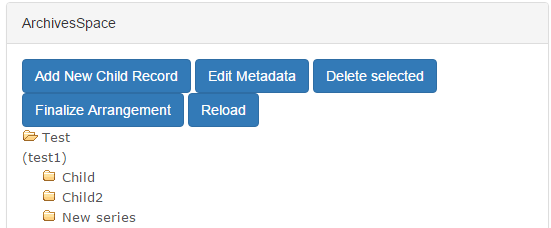
We've suggested the addition of an “Add digital object component” button in the ASpace pane (see above screenshot), which could function as follows:
  • A user would select a particular archival object in the ASpace pane and click the “Add digital object component” button.
  • Clicking the button will trigger the creation of a ‘digital object component’ that will appear as a child of the archival object.
    • Adding at least one digital object component essentially creates the main digital object record (which may include multiple components).
    • All the ‘digital object components’ nested under an archival object will comprise a single AS ‘digital object.’
    • In arranging the digital object components, users would only be able to work with 1 level of hierarchy--this will be very simple and minimal ‘arrangement.’
  • A digital object component will essentially be a bucket or a virtual container where one or more files and/or folders may be dragged/dropped.
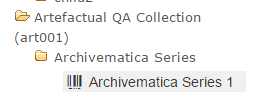
  • To visually distinguish the ‘digital object component’ from archival objects, it should have a different icon (perhaps use the following from the digital object record in ASpace) and/or the text might have a different colored background.
  • The digital object component would display a default title, comprised of the associated archival object’s title and/or date and a consecutive integer. (In other words, for the archival object ‘Archivematica Series’, the first digital object component would be ‘Archivematica Series 1’, the next would be ‘Archivematica Series 2’ and so forth.)
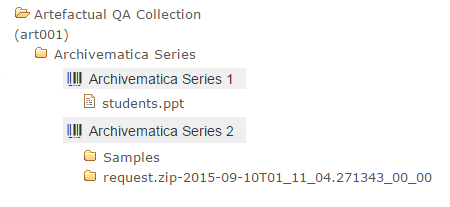
  • The user would drag one or more files/folders on top of a digital object component. The file(s) and/or folder(s) would be nested under the digital object component. The following example has two digital object components:
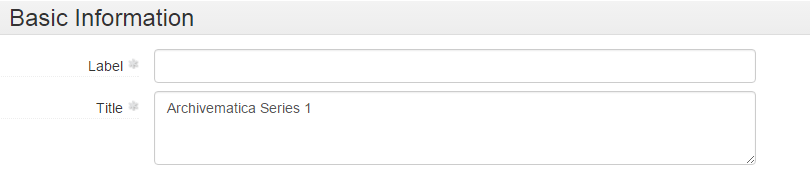
  • The user can select a digital object component and click the ‘Edit Metadata’ button. This would permit the user to edit the only pieces of metadata required for digital object components, ‘title’ and/or ‘label’, as seen below in AS:

We've also thought about some simple rules for digital object components (and information packages), as well.  Once an archivist clicks the 'Finalize Arrangement' button, Archivematica will create a SIP for the materials associated with a given archival object and commence its Ingest procedures, which may result in the creation of preservation copies (or OCR text).  Based upon this:
  • If there is only one file, it will be deposited to DSpace as individual bitstreams.
  • If there is more than one file and/or a folder (including derivatives produced by Archivematica), everything in the digital object component will be included in a single .zip file (perhaps using the digital object component title) that will be deposited to DSpace.
  • Additional components of the AIP produced by Archivematica (the logs folder, metadata folder, and METS file) will be packaged in a .zip file and deposited as an additional digital object component (perhaps with some default file name). The Bentley would want this content to be be inaccessible to the general public (and ‘not published’ within the ASpace digital object record).
After Ingest processes are complete and the content has been deposited to DSpace, information will be written back to the ASpace digital object record.  The main (i.e., 'top level') digital object would by default inherit the title and/or date of the associated archival object, employ the DSpace handle for File URI (as well as identifier? TBD…), and have an extent (in bytes) that represents all associated content.  PREMIS rights information could also be written to the digital object record, though we'd love to hear from folks with thoughts about this (for instance, would the associated archival object be a more suitable location?).

The digital object components (i.e., each specific grouping of content as well as the Archivematica logs and metadata) would then be added as children of the main digital object record: 

 
The digital object component records might also include extent information, more specific rights information, or...???

It's been exciting to think about the possibilities of ASpace's digital object record, but the fairly wide-open nature of the endeavor is also daunting, as there's no established best practices to fall back on.  What do you think?  How are (or would) you proceed?  We'd love to get your feedback and/or reactions!

Thursday, October 29, 2015

The Big Squeeze, Or, How We Plan to Get All of Our Legacy Accession Data into ArchivesSpace

Almost two months ago, I wrote a post on what we thought would be thorny issues that would get in the way of importing legacy accession data into ArchivesSpace. This was mostly conjecture, because at that point, we hadn't actively been trying to move data from Beal (a homegrown FileMaker Pro database) to ArchivesSpace. Now that we've had some time to play around with importing legacy accession data, we thought you might like an update on our plan.

The Big Squeeze

Unlike the actual episode from Season 3 of the A-Team, our big squeeze does not involve loan sharks, mob extortion bosses, breaking fingers, sniper assaults (phew!), or Irish pubs (or does it...).
First things first (and this is important), we came up with a name for this project: "The Big Squeeze." Not only is this a nod to an actual episode from Season 3 of the A-Team (the name we've given to the crew here working on ArchivesSpace implementation, that is, the ArchivesSpace Team, or simply, the A-Team), but, as you'll see, it actually fits for some of the way we'll approach importing legacy accession data into ArchivesSpace, namely, squeezing a number of disparate Beal fields into single ArchivesSpace fields.

Big Decision Early On: Don't Worry, Be Happy

Early on, we made the important decision that we simply weren't going to worry about accession records as much as we worried about EADs--we certainly weren't going to spend as much time cleaning them as we did, and still sometimes do, with our EADs. Here's our reasoning: Accession records are relatively static, and serve as mostly internal evidence of a particular transaction or event. EADs, on the other hand, are ever-changing and evolving portals to our collections for humans (internal ones, like archivists, and external ones, like researchers) and systems (and, now, other integrated systems, like DSpace and Hydra!). Likewise, going forward we simply won't be using individual accession records as frequently or even in the same way as we will individual archival descriptions  (there's one exception to this which I'll talk about later). 

As a result, there may be differences, even significant ones, between our legacy conventions and conventions going forward in ArchivesSpace for recording accession information. Our legacy accession records may not be super machine-readable. They won't be connected to associated finding aids. They'll be a little dirty (the horror!). We'll be using some user-defined fields that we won't use going forward. Rather than making significant changes to ArchivesSpace or the accessions importer, we'll just be squeezing a number of Beal fields into one ArchivesSpace field. We'll use Boolean fields rather than create events for some information. We'll use free text fields rather than create actual locations (at least for now). And we're OK with all this. Dare I say we're actually happy with this decision...

The Plan, Stan

The plan. Ignore that stuff on the bottom left.
As you may or may not be able to read in the image above (I don't have the best handwriting), we've formulated a six-step plan:
  1. "Clean" and prep a data dump from Beal.
  2. Map Beal fields to ArchivesSpace fields
  3. Build the JSON that ArchivesSpace expects.
  4. Deal with donors.
  5. Do a dry run.
  6. Do the real thing.
Simple, right?

"Clean" and Prep a Data Dump from Beal (Our Homegrown FileMaker Pro Database)

First things first, we need to get our accession data out of our current database. This is a fairly straightforward process, since exporting records from FileMaker Pro is as simple as File --> Export Records, choosing a file name and type, and specifying fields and order for export. I say "fairly" straightforward because of some little quirks about FileMaker Pro we've learned along the way, such as the fact that CSV exports don't include header information, but that there's a mysterious file extension ".mer" that does, that exports contain a bunch of null characters which lead to encoding errors, and that the CSV/MER export by default has a very strange way of recording multiple values in the same field, namely, that it throws the second, third, fourth, etc., values onto the next line(s), all by themselves (and since the CSV reader object in Python is not iterable, it gets tricky to associate orphan values with their proper record).

Then, there's "cleaning" and prepping. Cleaning is in quotes because we aren't actually cleaning all that much. Mostly, "cleaning" is more like straightening, not spring or deep cleaning, preparing the accession records by distilling them down to only the essentials. We made header column names unique (because there were some that weren't), we removed blanks rows, we identified and weeded out meaningless (read, information-less) records, and we filled in missing date information (ArchivesSpace accession records require dates) in most instances by writing a program that automatically guesses a date using context clues and, for about 30 or so, filled them in by hand. In some instances, we also normalized some values for fields with controlled vocabularies--nothing major, though.

Since we're still actively accessioning materials, we're trying to do this in way that will allow us to easily replicate it on future exports from Beal. 

You can read through the code Dallas used to do most of this here; date guessing is here.

Map Beal Fields to ArchivesSpace Fields

Again, this process was fairly straightforward, especially once we made the decision not to worry too much about differences in the ways that Beal and ArchivesSpace model and expect all the components that make up an accession record.
We'll be making fairly extensive use of the user-defined portion of ArchivesSpace accession records. Has anyone changed the labels for these fields? If so, let us know! We're keen to explore this.
We broke this down into a number of categories:
  • Basic Information, like a date and description for an accession, it's size, provenance information, and basic events associated with it, such as whether or not it's receipt has been acknowledged (here's an example of a case where we'll use a Boolean rather than create an event, even though going forward we'll probably use an actual ArchivesSpace event). 
  • Separations, or information about parts of collections we decided not to keep. Here we're talking about fields like description, destruction or return date, location information and volume. When we do have a date associated with a separation, we'll create an actual deaccession record. If we don't, we'll just squeeze all this information into the basic disposition field in ArchivesSpace (again, probably not how we'll use that field going forward, but that's OK!). 
  • Gift Agreement, the status of it, at least. We'll be using a user defined controlled vocabulary field.
  • Copyright, like information on whether it has been transferred. We're going with the tried and true Conditions Governing Use note, although we've been doing a lot of talking lately about how we'll record this type of information going forward, especially for digital collections, and how the rights module in ArchivesSpace, which we'd like to be the system of record for this type of information, isn't really set up to take in full PREMIS rights statements from Archivematica (or RightsStatements.org rights, for that matter) [1]. 
  • Restrictions, which will go to a Conditions Governing Access note (although that same discussion about rights from above applies here as well).
  • Processing, that is, information we record upon accession that helps us plan and manage our processing, information like the difficulty level, the percentage we expect to retain, the priority level, the person who will do it, any notes and the status. Mostly we'll take advantage of the Collection Management fields in ArchivesSpace, and for that last one (the exception I mentioned earlier), we're hopeful that, after an ongoing project to actually determine the status for many backlogged collections, we'll be able to use the events "Processing in Progress" and "Processing Completed". Our thought process here is that this is an instance where we actually will be using accession records actively going forward to determine which accessions still need to be processed; we didn't want different conventions for this pre- and post-ArchivesSpace migration. If that doesn't work out, or it turns out that it will take too much time to straighten out the backlog, we'll be using another user-defined controlled vocabulary field.
  • Unprocessed Location, which will, in the interim, just go to a user-defined free text field. This information has not been recorded consistently, and in the past we haven't been as granular with location information as ArchivesSpace is. We actually like the granularity of location information in ArchivesSpace, though, especially with the affordances of the Yale Container Mangement Plug-in and other recent news. So this is definitely something that will be different going forward, and may actually involve extensive retrospective work.
  • Donors, their names and contact information, as well as some identifiers and numbers we use for various related systems. More on that later. This is also an exception, an instance where we did decide to make a significant change to ArchivesSpace. Check out this post to learn more about the Donor Details Plug-in.
  • Leftovers, or information we won't keep going forward. Hopefully we won't regret this later!
One thing we're considering is trying to make it obvious in ArchivesSpace which records are legacy records and which aren't, perhaps making them read only, so that if conventions change for recording a particular type of information because of the new ArchivesSpace environment, it will be less likely (but not impossible) that archivists will see the old conventions and use those as a model. 

You can check out our final mapping here.

Build the JSON that ArchivesSpace Expects

If you've never played around with it, JSON is awesome. It's nothing fancy, just really well-organized data. It's easy to interact with and it's what you get and post from ArchivesSpace and a number of other applications via their API.
Another famous JSON Jason! [2]
In that mapping spreadsheet you can see how we've mapped Beal fields to the JSON that ArchivesSpace expects. Essentially this involves reading from the CSV and concatenating certain fields (in a way that we could easily parse later if need be), that is, the big squeeze, then making ArchivesSpace deaccession, extent, collection management, user-defined, external documents, date, access restrictions, etc., lists and then JSON. 

You can take a look at that code from Walker here.

Deal with Donors

Donors get their own section. In the end, we hope to do donor agents for accessions the same way we did subject and creator agents (as well as other types of subjects) for EADs, importing them first and linking them up to the appropriate resource/accession later. This won't be too hard, but there are some extenuating circumstances a number of moving parts to this process.

We still have some work to do with some associates of the A-Team here matching up donor information from Beal with donor information from a university system called Dart which is used to track all types of donations to the university, This is a little tricky because we're not always sure which system has the most up-to-date contact information, and because we're not always if Samuel Jackson and Samuel L. Jackson, for example, are the same person (but seriously, we don't have anything from Samuel L. Jackson). The Donor Details plug-in will help us keep this straight (once we're using it!), but in the interim, we have to go through and try to determine which is which. 

We're also currently deciding whether we should actually keep contact information in ArchivesSpace or just point to Dart as the system of record for this information, which is on a much more secure server than ArchivesSpace will be. That presents some problems, obviously, if people need contact information but don't have access to Dart, but we've had internal auditors question our practice of keeping this type of sensitive information in Beal, for example. So that's still an open issue.

Do a Dry Run

It's been done! And it works! It only took an hour and twenty some minutes to write 20,000 accessions (albeit, without donor information)! If you go to the build the JSON link you can also get a peak at how we used the ArchivesSpace API to write all this data to ArchivesSpace. Dallas has also written an excellent post on how to use the ArchivesSpace API more generally which you should also check out.

Do the Real Thing

Sometime between now and April 1, 2016, at the end of our grant, when all the stars align and all the moving parts converge (and once, as a staff we're ready to go forward with accession material and describing it in ArchivesSpace), we'll import or copy legacy accession data into our production environment (this is, by the way, also after we have a production environment...). We're thinking now that we might go live with resources in ArchivesSpace before we go live with accessions, but no firm dates either way as of yet.

Conclusion

Well, that's the plan! What do you think? How did you approach accessions? Are we committing sacrilege by taking a "don't worry, be happy" approach? Let us know via email or on Twitter, or leave a comment below!

[1] Thanks, Ben, for bringing that to our attention.
[2] Stolen from the Internet: http://www.snarksquad.com/wp-content/uploads/2013/01/redranger.gif