Wednesday, June 8, 2016

Born-Digital Data: What Does It *Really* Look Like (Research Data Redux)

This is a follow up to Jenny Mitcham's recent Research data - what does it *really* look like post, and in particular, these questions she posed:
I'd be interested to know whether for other collections of born digital data (not research data) a higher success rate would be expected? Is identification of 37% of files a particularly bad result or is it similar to what others have experienced?

Background

Extracting technical metadata with the file profiling tool DROID has been part of our digital processing procedures for born-digital accessions since the beginning, so to speak, about 2012. Right before deposit into DeepBlue and our dark archive, a CSV export of DROID's output gets included in a metadata folder in our Archival Information Packages (AIPs). Kudos to Nancy Deromedi and Mike Shallcross for their foresight and for their insistence on standardizing our AIPs. It made my job today easy!

At first I was thinking that I'd write a Python script that would recursively "walk" the directories in our dark archive looking for files that began with "DROID_" (our standard prefix for these files) and ended with ".csv". That would have worked, but I'm a bit paranoid about pointing Python at anything super important (read: pointing my code at anything super important), and making a 1.97 TB working copy wasn't feasible. So, I took the easy way out...

First, I did a simple search (DROID_*.csv) in Windows Explorer...


...made my working copy of individual DROID outputs (using TeraCopy!)...


...and wrote a short script to make one big (~215 MB) DROID output file.


These are not the DROIDs you're looking for.


Note that I had the script skip over Folders (because we're only interested in files here), packaged files, like ZIPs (because DROID looks in [most of] these anyway) and any normalized versions of files, which I could identify because they get a "_bhl-[CRC-8]" suffix. Kudos again to Nancy and Mike for making this easy.

All of the data (about 3/4 million individual files!) in this sample represents just about anything and everything born-digital that we've processed since 2012... basically anything related to to our two collecting areas of the University of Michigan and the state. I'd guess that much of it is office documents and websites (and recently, some Twitter Archives). The vast majority of the data was last modified in the past 15 years, and our peaks are in in 2006 and 2008. The distribution of dates is illustrated below...


Here are some of the findings of this exercise:

Summary Statistics

  • DROID reported that 731,949 individual files were present
  • 658,520 (89.9%) were given a file format identification by Droid
  • 657,808 (99.9%) of those files that were identified were given just one possible identification. 610 files were given two different identifications, 1 file was given three different identifications, 3 files were given five different identifications, 13 files were give six different identifications, 45 files were give seven different identifications, 28 files were given eight different identifications, and a further 12 were given nine different identifications. In all these cases, the identification for 331 files was done by signature and the identification for 380 files was done by extension.

Files that Were Identified

  • Of the 658,520 files that were identified:
    • 580,310 (88.1%) were identified by signature (which, as Jenny suggests, is a fairly accurate identification)
    • 13,478 (2%) were identified by extension alone (which implies a less accurate identification)
    • 64,732 (9.8%) were identified by container. Like Jenny said, these were mostly Microsoft Office files, which are types of container files (and still suggests a high level of accuracy)
    • Lots of these were HTML and XML files, although there were some Microsoft Office files as well
  • 180 different file formats were identified within the collection of born-digital data
  • Of the identified files 152,626 (19%) were HTML files. This was by far the most common file format identified within the born-digital dataset. The top 10 identified files are as follows:
    • Hypertext Markup Language - 152,626
    • JPEG File Interchange Format - 142,161
    • Extensible Hypertext Markup Language - 62,039
    • JP2 (JPEG 2000 part 1) - 56,986
    • Graphics Interchange Format - 48,317
    • Microsoft Word Document - 38,459
    • Exchangeable Image File Format (Compressed) - 18,826
    • Microsoft Word for Windows Document - 18,140
    • Acrobat PDF 1.4 - Portable Document Format - 17,840
    • Acrobat PDF 1.3 - Portable Document Format - 10,875

Files that Weren't Identified

  • Of the 73,421 that weren't identified by DROID, 851 different file extensions were represented
  • 1,888 (2.6%) of the unidentified files had no file extension at all
  • The most common file extensions for the files that were not identified are as follows:
    • emlx - 21,987
    • h - 8,545
    • cpp - 8,501
    • htm - 8,032
    • pdf - 5,216
    • png - 4,250
    • gif - 2,085
    • dat - 1,419
    • xml - 1,379

Some Thoughts

  • Like Jenny, we do have a long tail of file formats, but perhaps not quite as long as the long-tail of research data. I actually expected it to be longer (10.1% seems pretty good... I think?), since at times it feels like as a repository for born-digital archives we get everything and the kitchen sink from our donors (we don't, for example, require them to deposit certain types of formats), and because we are often working with older (again, relative) material.
  • We too had some pretty common extensions (many, in fact) that did not get identified (including the .dat files that Jenny reported on). Enough that I feel like I'm missing something here...
  • In thinking about how the community could continue to explore the problem, perhaps a good start would be defining what information is useful to report out on (I simply copied the format in Jenny's blog), and hear from other institutions. It seems like it should be easy enough to anonymize and share this information.
  • What other questions should we be asking? I think Jenny's questions seem focused on their goal of feeding information back to PRONOM. That's a great goal, but I also think there are ways we can use this information to identify risks and issues in our collections and assure that our or our patron's technical environments support them, as well as to advocate in our own institutions for more resources.
And, if you haven't yet, be sure to check out the original post and subscribe to that Digital Archiving at the University of York blog! Also be sure to check out the University of York's and University of Hull's exciting, Jisc-funded work to enhance Archivematica to better handle research data management.

[1] I think Jenny's only interested in original files, but an interesting follow-up question might ask questions along the lines of what percentage of files we were able to normalize...

Monday, May 16, 2016

Introduction to Free and/or Open Source Tools for Digital Preservation


Over the weekend, Mike, Dallas and I gave a workshop entitled "Introduction to Free and/or Open Source Tools for Digital Preservation" as part of the Personal Digital Archiving 2016 conference. This hands-on workshop introduced participants to a mix of open source and/or free software (and some relatively ubiquitous proprietary software) that can be used via the command line or graphical user interfaces to characterize and review personal digital archives and also perform important preservation actions on content to ensure its long-term authenticity, integrity, accessibility, and security. It was awesome!

After introductions, we discussed:
  • Digital Preservation 101
    • Definitions
    • Challenges
    • Models
  • Tools and Strategies (the hands-on part!)
    • Characterizing and reviewing content
      • WinDirStat
      • DROID
      • bulk_extractor
    • File format transformations (I discussed this a bit in a recent blog post on the theory behind file format migrations)
      • Still Images
        • IrfanView
        • ImageMagick
      • Text(ual) Content 
        • Adobe Acrobat Pro
        • Ghostscript
      • Audio and Video
        • ffmpeg
        • HandBrake
    • Metadata for Digital Preservation
      • Descriptive Metadata
        • Microsoft Word
        • Adobe Acrobat
      • Technical Metadata
        • ExifTool
      • Preservation Metadata
        • MD5summer

In case you're interested, we thought we'd make the slides...


...and exercises....


available to a wider audience! Enjoy!

Monday, May 9, 2016

Grant Update: Extension through Oct. 2016

Greetings, all; while things have been a little quiet on our blog as of late, we've been as busy as ever on our Mellon-funded ArchivesSpace-Archivematica-DSpace Workflow Integration project.

Amidst the general hustle and bustle here in Ann Arbor, we neglected to mention that the Mellon Foundation approved an extension of our project through October 31, 2016.  While things were on course to be completed by the original deadline of April 30, we decided that an extension was necessary so that our consultants at Artefactual Systems could further refine the interface of Archivematica's new Appraisal Tab and thoroughly identify and fix bugs without rushing.  The extended period of time will also give archivists at the Bentley an opportunity to gain expertise with the new functionality and thereby document workflows that may be shared with the archives and digital preservation communities.

Current and upcoming work on the project includes:
  • Refactoring the Archivematica workflow to support the new packaging functionality (in both the Archivematica ‘Ingest’ pipeline as well as the platform’s ‘Storage Service,’ which is used to track and recompile completed AIPs).
  • Verifying that packaging steps are recorded accurately in Storage Service pointer files.
  • Evaluating PREMIS 2 vs. PREMIS 3 to decide how to best implement the preservation metadata for packing (and implementing PREMIS 3 support, as needed).
  • Implementing user interface changes to support the new workflow (and also allow users to adhere to existing Archivematica workflows and AIP packaging procedures).
  • Establishing (and then verifying) a workflow and protocols to automate the transfer data and metadata from Archivematica to DSpace.
  • User interface changes in the Storage Service.
We'll look to provide highlights of these processes in the coming months...so stay tuned!

Thursday, May 5, 2016

Migrating Files to Preservation Formats: Theory

Hello! It's been a while! On behalf of the Mellon crew, I'd like to first acknowledge that yes, it's been nearly eight weeks since our last post...

...but we're back! Mike, Dallas and I have been busy preparing for an workshop next week at Personal Digital Archiving (PDA) 2016 on free and/or open source tools for digital preservation. My part's on the theory and practice of migrating files to preservation formats, including tutorials for different file types (with single and batch conversion examples using both GUIs and the command line). I thought I'd share it here.

For your convenience, here's a little navigation bar that will be updated as new posts come out.
  • Theory
  • Practice:
    • Still Images
    • Text(ual) Content
    • Audio and Video

First up, some theory. 

I'll say right off the bat that, yes, even though migration is a standard part of our current (and future) ingest procedures, it is probably less important than good organization, description and redundant storage, especially for personal (i.e., lay person-al) digital archives. That being said, technology changes all the time. At some point you'll need a strategy to deal with the fact that you can't read your parent's extension-less Word 2.0 file from 1991 (which, by the way, you know proves that you're the favorite child) on your fancy new computer with your fancy new version of Word, especially because it was saved on a 3.5-inch floppy disk and you don't have a bay for it. You've also probably never heard of DROID or anything like it, so you won't even know in the first place that it's a Word file.

The Performance Model and the Fundamental Nature of Digital Records


I believe I was first introduced to the National Library of Australia's Performance Model, detailed in their article entitled "An Approach to the Preservation of Digital Records," at the DigCCurr Professional Institute back in 2012. As is the case with just about any other model, it's overly simple and, mostly for that reason, it has its issues. It's also a bit dated (2002) and in places this shows. However, I think it does a good job of framing a discussion about migrating files to preservation formats, so we're going to use it!

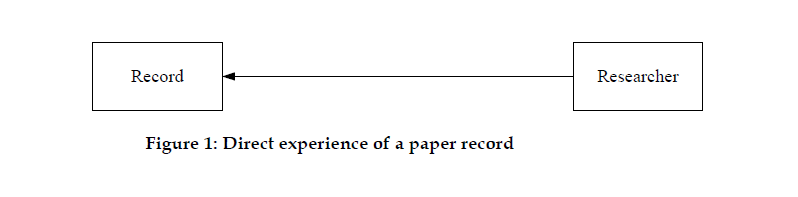
First, let's think about the world of physical records. You might say it looks something like this:


In this world, a researcher can have a "direct experience" of a record, with just their eyes. No mediation required.

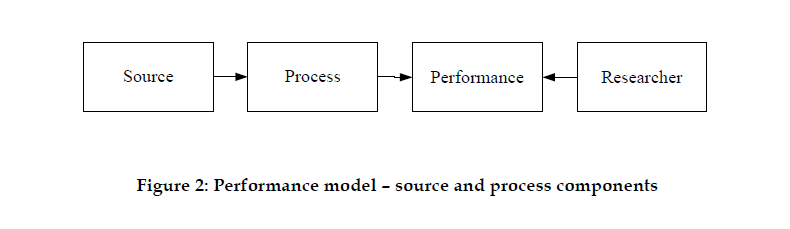
Now, let's think about the world of digital records which, you might say, looks something like this:


In this world, a researcher can't really have a direct experience of a record. If they did, they'd be looking at a bunch of meaningless (to human eyes, at least) 1s and 0s. They might also have escaped from the Matrix. Instead, some sort of process has to be performed on the source (no longer, as we'll see, considered the record), and the thing the researcher interacts with is a type of performance

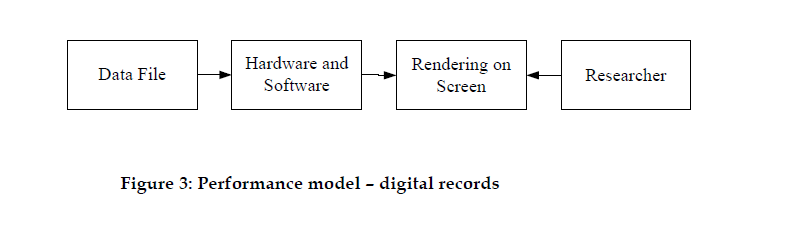
Put a little more concretely:


A source is basically a data file, like the Word 2.0 document provided as an example above or anything else you can think of that's sitting on your hard drive. The data file is formatted in a particular way, and gets processed by some combination of hardware and software that can understand it. Usually this combination needs to be fairly specific. To quote the article, "a Word source requires the correct version of the Word application, using a Windows operating system, which is installed on a suitable Intel computer" (p. 9). That's not entirely accurate, but I think you get the point. The performance, then, becomes the way that the data file, through the hardware and software, gets rendered on the screen. This performance, the authors argue, is what the researcher is after--not the original data file or the hardware and software.

Make sense?

Migration


Migration, in this context, is just a fancy word for converting a digital object form one data format to another, for example, from Word 2.0 file to a Portable Document Format (PDF) file. We'll get lots of practice with this when we look later at migrating still images and text(ual) content as well as audio and video. 

It's a strategy (I'll talk briefly about others later) that gets employed to handle the digital preservation scenario outlined above. In performance model terms, migration converts a source object from an obsolete or proprietary format into a current or open format so that a current process (hopefully a somewhat less specific combination of hardware and software) can render it. 

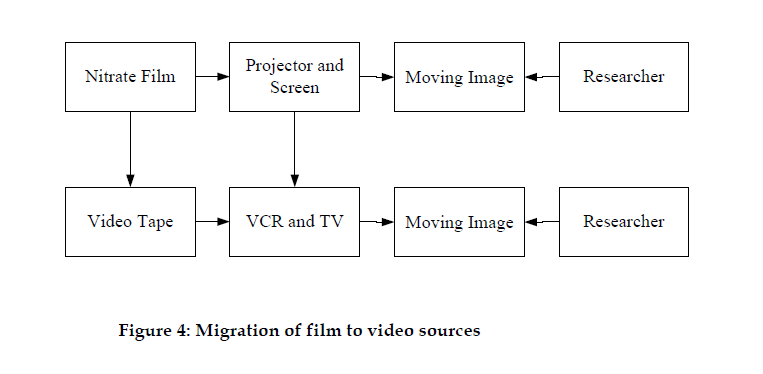
Consider this analogous (get it?) scenario from the audiovisual world:


Nitrate film, which requires a projector and screen to produce a moving image, is an unstable source. In this scenario, it gets migrated to video tape, recognized (at least in 2002) as a more stable source. This new source requires a new process to produce a moving image, namely, a VCR and TV. In both cases, though, and this is the important part, it's the performance (i.e., the moving image) that becomes the record that the researcher is interested in. The same is true for migrations like the ones we'll be doing.

The Concept of Essence, or Significant Characteristics


That all sounds fine and dandy until you start to think that changing files sounds (and, in fact, is) pretty risky! How do we ensure the the moving image from the videotape on a VCR and TV is the same moving image as the earlier one from the nitrate film on a projector and screen? I'll quote the article at length here:
The performance model demonstrates that digital records are not stable art[i]facts; instead they are a series of performances across time. Each performance is a combination of characteristics, some of which are incidental and some of which are essential to the meaning of the performance. The essential characteristics are what we call the ‘essence’ of a record.
These essential characteristics (also known as significant characteristics or, sometimes, significant properties, although this usage seems to be falling out of favor) are what's really important about a record; they provide "a formal mechanism for determining the characteristics that must be preserved for the record to maintain its meaning over time" (p. 13).

Consider our Word 2.0 file. It's a type of word processing document. The essential characteristics may include:
  • it's message:
    • the textual content; and
  • the message's qualifiers:
    • formatting such as bolded text;
    • font type and size;
    • layout;
    • bullets;
    • color; and
    • embedded graphics.
These were, at least, the characteristics deployed by the author to get the message across to a reader or to help out with its comprehension.

The lesson here is that migration is a great strategy for overcoming the challenges of digital preservation. If you have a way to check that significant characteristics for source files match on either side of a migration (we'll get some practice with this too in upcoming posts), it's an even better strategy. [1][2]

Alright, enough theory.

The Elephant in the Room: Emulation


Since I'm talking to a bunch of archivists, I'll add that migration isn't the only strategy for overcoming the challenges of digital preservation. It's often contrasted with emulation, an approach that, using the Performance Model, "keeps the source digital object in its original data format but recreates some or all of the processes (for instance, the hardware configuration or software applications such as operating systems), enabling the performance to be recreated on current computers” (p. 12). There are convincing arguments to be made in favor of both approaches, and it seems like they all come down to what one considers to be the true essence of a digital record!

Now, migration definitely has its disadvantages. It's costly and time-consuming (but to be fair, so is emulation) and the actual process, in a production environment, is error-prone.[3] That being said, it's what's available for many institutions, at least in the US (Archivematica, Preservica and Rosetta, for example, all employ this strategy). I'll also reiterate here that migration and emulation are both probably secondary to good organization, description and redundant storage of digital archives, as well as migrating content off of legacy storage media. 

When I first learned about digital curation and preservation, I was taught that emulation was a kind of "will be nice after more research and development, maybe" strategy. I think this perception is still fairly common (we keep our original files around, even the weird ones, for example, just in case that research and development ever happens). However, I'm not so convinced anymore. Emulation as a Service seems particularly exciting for enabling emulation at scale, even at smaller institutions.

I won't pretend to be an expert on emulation, so if you want more background, there's this interesting thread on the Signal (make sure you read the comments) that's worth a read. 

In the end, migration doesn't have to be your exclusive, or even primary, digital preservation strategy. It is a trusted strategy, though, for many libraries and archives. If you'd like to explore it in a little more depth, stay tuned for upcoming posts!

---

[1] Of course, this is the kind of thing that sounds great in theory, but in practice I find it's really hard to define significant characteristics, especially the way we currently try to do it according to file format or type. Pagination of a word processing document, for example, could be an essential or incidental characteristic depending on how that document gets used, or if it needs to be cited. You'd also probably ruffle some feathers if you said explicitly (as the article says implicitly) that file format is an incidental characteristic.

[2] This kind of significant characteristics check (currently, at least) isn't part Archivematica, unless you count checking that a migrated file's size isn't 0. That's not to call them out or anything, just to say that we should cover making this type of customization at Archivematica Camp 2016!

[3] We've done migrations on old word processing documents that resulted in 15-20 pages of random characters on either side of their one meaningful page--the essential characteristics were there, in other words, they were just mixed in with so many incidental characteristics they were hard to find. 

Monday, March 14, 2016

BHL @ code{4}Lib

Greetings, all; I had the great good fortune last week to attend and present at code{4}lib 2016 in Philadelphia.  This was my first c4l conference and it was awesome! Good people, inspiring presentations, and incredible location (the Liberty Bell was just a hop, skip and a jump away!).

I gave a very brief overview of our ArchivesSpace-Archivematica-DSpace Workflow Integration project—if you'd like to hear me speak a mile-a-minute (especially at the end!), please check out this video from the conference livestream:


As the video is kind of grainy, here are the slides themselves:


I'd like to expand upon what's 'On Deck' for us (especially since I ran out of time at the conference), but will save that for another day...  Thanks for stopping by!

Wednesday, February 17, 2016

The Ingest Entity at the Bentley Historical Library

The other night I gave a guest lecture for a University of Michigan School of Information course Mike is teaching on "Digital Preservation." The session was nominally titled "SIPs and File Format Identification," but the focus was on "Ingest" more broadly, including what ingest means here at the Bentley Historical Library, some examples of real-world SIPs and AIPs (current and future!) and a little checksum calculation exercise--because who doesn't like checksum calculation exercises?

At the heart of the presentation is the following diagram that documents our current ingest strategy and a [relatively] current version of our workflow. It's a useful reference Nancy and Mike put together a couple years ago that I don't think we've featured here before.
BHL Digital Processing Workflow

Here are the slides if you're interested!

Friday, February 5, 2016

A Primer on PREMIS and PREMIS Rights

In today's post, I'd like to talk a little about PREMIS (the data dictionary, not the working group--although I'm sure they're all great people, like Evelyn!). We've been using something akin to "PREMIS Lite" as part of our digital archiving workflow for a while now. As part of our work on the ArchivesSpace-Archivematica-DSpace Workflow Integration project, however, and in thinking about our eventual move to Hydra, we're gearing up to implement something more like PREMIS Proper, especially for PREMIS Rights Statements.

An Overview of PREMIS

http://www.loc.gov/standards/premis/images/premis-text2.gif
PREMIS Data Dictionary for Preservation Metadata, Version 3.0
Let's dive in with an overview of PREMIS. The following is lifted straight from their website:
The PREMIS Data Dictionary for Preservation Metadata is the international standard for metadata to support the preservation of digital objects and ensure their long-term usability. Developed by an international team of experts, PREMIS is implemented in digital preservation projects around the world, and support for PREMIS is incorporated into a number of commercial and open-source digital preservation tools and systems. The PREMIS Editorial Committee coordinates revisions and implementation of the standard, which consists of the Data Dictionary, an XML schema, and supporting documentation.
Leaving descriptive metadata, especially domain-specific descriptive metadata, to the many existing descriptive metadata schemes and encoding standards (like MARC, MODS, Dublin Core, EAD, etc.), and leaving super format-specific technical metadata to those who would get super nerdy about format-specific technical metadata (you know who you are), what I love about PREMIS is that it focuses specifically on one of my favorite things, digital preservation. It allows the digital archivist to record and, in some ways it event defines--although they might not like that I said that--the common denominator of preservation actions a preservation repository might perform on a digital object.

As of PREMIS 3.0, the data model consists of four entities:
The PREMIS Data Model
  • Digital Objects:  Discrete units of information subject to digital preservation. This could also be an "Environment," that is, hardware or software that support a Digital Object in some way, like rendering or executing it. Digital Objects are further broken down into the following subcategories.
Conceptual view between object categories
    • Intellectual Entity: A set of content that makes up a single unit for purposes of management and description. Pretty much anything, at any level, can be an intellectual entity, and intellectual entities may (or may not) be made up of other intellectual entities. A website (an intellectual entity you might describe or manage as an aggregate) may have a webpage (another intellectual entity) which may have an image (another intellectual entity, especially if you apply some additional descriptive metadata to it  or migrate its file it to a new format).
    • Representation: A set of files, including structural information, needed for a "complete" or at least "reasonable" rendition of the Intellectual Entity. To take a book as an example, consider different ways you might represent it: a single PDF file, 10 images, one for each page (which must be read in a particular order), etc.
    • File: A sequence of bytes. This is the thing that has a format, access permissions, last modification date, etc.
    • Bitstream: Contiguous and non-contiguous data within a file that has meaningful common properties for preservation purposes. Makes perfect sense, right?
  • Events: Actions, like preservation actions, that involve Digital Objects or Agents.
  • Agents: People, organizations or software that are associated with Events (or the rights attached to them). That is, people like me, organizations like the Bentley Historical Library or software like Archivematica or FIDO.
  • Rights Statements: Assertion of one (or more, which is the exciting part, but more on that later) rights or permissions statements pertaining to a Digital Object or Agent.
That's about it. If you want more information you can read the latest PREMIS Data Dictionary yourself!

PREMIS at the Bentley

We currently record information (that is, identifier, date and time, detail and outcome) about the following PREMIS event types (with ourselves as the agent as well as the piece of software we used):

  • Virus Scan/Check: The process of scanning a file for malicious programs.
  • Personally Identifiable Information Scan: Hmm, I can't really seem to find this one in the controlled vocabulary. Maybe we made this one up? In any case, internal consistency is what's really important, right?
  • Identify Missing File Extensions/File Extension Change: Assignment of a new filetype extension to a file object; typically done only if the existing extension was found to be incorrect.
  • Compression of Files: The process of coding data to save storage space or transmission time. We go for lossless and don't actually compress anything.
  • Technical Metadata Extraction: Extraction of technical (or non-technical) metadata like the resolution, colordepth etc. from a file using tools such as JHOVE.
That's it! PREMIS Lite! This information gets recorded in the humble CSV format (no fancy XML for us!). We also record additional information that technically counts as PREMIS Events, like checksums (and the algorithms we used to calculate them), as well as what files got normalized (and what they got normalized to). While this information doesn't make it into this particular CSV, it does get recorded elsewhere.

The Future: PREMIS Rights Statements

By virtue of us moving to Archivematica, within mere months we'll become much more PREMIS Proper-compliant (and we'll have that PREMIS in XML!). But that's not all--there's also been a lot of discussion around here (and around MLibrary, Artefactual, ArchivesSpace, the Hydra folks and various listservs) about PREMIS Rights, especially the communication of PREMIS Rights Statements between systems, and the enforcement of them by repositories.

First, the Why

Before I jump into an outline of PREMIS Rights and all of their granular goodness, I wanted to talk briefly about the problem that PREMIS Rights Statements solve. Take, for example, two familiar standards, Dublin Core and EAD:

<dc>
  ...
  <rights>Some random free text rights statement.</rights>
  ...
</dc>

<ead>
  ...
  <accessrestrict>Some free text Conditions Governing Access note that ends on this <date>date</date>.</accessrestrict>
  <userestrict>Some free text Conditions Governing Use note.</userestrict>
  ...
</ead> 


Look familiar? Now, I'm not trying to bash Dublin Core or EAD and, certainly, some rights statements are better than no rights statements. However, there's a big issue I see with these examples. Because they are free text fields, they aren't really machine-actionable. Of course, an institution can try to be as prescriptive as possible about how to fill these out (and, in fact, we are one of those institutions), and that can arguably lead to rudimentary machine-actionability, but over time it's hard to make the case that this is a sustainable approach. It's just too hard to keep folks entering metadata on the straight path. Eventually, dates get entered in all kinds of formats and non-standard text proliferates. DPLA knows this perhaps like no other institution, because they get rights statements from institutions all over the US: "For DPLA content alone, contributing organizations have used over 87,000 different rights statements," part of the motivation behind rightsstatements.org. This variety makes it hard for a computer to predict or parse and, ultimately, enforce rights statements. 

So, for example, you can say that a particular component of a collection has an "Executive Restriction until February 5, 2036," and while that works just fine for the reference archivist or researcher in your reading room looking at a finding aid or box list, if you're talking about digital content you still have to tell the repository separately (in our case, we "e-mail José") to embargo this content for 20 years, and you still have to go back in 20 years and update the original rights statement because it has expired. Human error abounds in these types of situations, and I'm sure we're not alone in having had a researcher let us know that a particular restriction has expired. To add a layer of complexity, "Executive Restriction," when taken out of the context of a University of Michigan collection at the Bentley Historical Library, doesn't mean much to a researcher halfway across the world who might be accessing our content through something like DPLA. To put on my librarian hat for a second, free text fields also don't lend themselves to explicitly identification with standard licenses such as Creative Commons, but perhaps that's hardly ever the case for archival material.

PREMIS Rights Statements, by contrast, were designed to be machine-actionable and interoperable between software systems. They do allow for some free text explanation of what would probably be an human-unreadable rights statement, but first and foremost PREMIS Rights Statements are about solving the problem I outlined above.

PREMIS Rights Statements

PREMIS rights statements provide a flexible framework for describing both rights ("entitlements allowed to agents by copyright or other intellectual property law") and permissions ("powers or privileges granted by agreement between a rights holder and another party").

The data dictionary outlines four types of rights, or rights bases to which permissions can be linked: copyright, license, statute and other for everything else, including all those weird donor requests. Acts get applied a basis, and restrictions can refine an act. A simple example is given in Implementing the Rights Entity in Archivematica by Evelyn McClellan, a draft chapter for an upcoming book on PREMIS we got to sneak a peak at. 
Thus, a simple rights statement in a PREMIS implementation can consist of a rightsBasis (such as copyright); an act (such as replicate), and information about any restriction on the act (for example, replication permitted only for the purpose of making preservation copies).
The other cool thing about PREMIS is that you can apply multiple rights bases and associated acts and restrictions to a given digital object. For example, you may have an institutional policy (rightsBasis is Other) that allows you to have acts like migrating or deleting an item, while your transfer of copyright (rightsBasis is Copyright) allows you to have acts like modifying, publishing or disseminating an item. You can sort of do this in DACS and EAD since there are spots for both Conditions Governing Use and Access, but in those scenarios you only compound the issue I outlined above since now a machine won't be able to understand multiple human-readable rights statements.

Other Considerations

As part of our work on the grant project, I mentioned that we've been thinking a lot about PREMIS Rights. Here are some questions we're asking: 
  • Could we use PREMIS Rights Statements for access? According to the data dictionary, this is slightly out of scope for PREMIS and PREMIS Rights Statements, as the latter are meant to apply more to preservation actions. However, it seems feasible and desirable to use granular PREMIS Rights Statements to tell our repository, for example, to embargo or not embargo a particular digital object, or to restrict access to a particular IP address. Artefactual has expressed interest in developing this functionality between Archivematica and AtoM, and we're interested in being able to record PREMIS Rights Statements in Archivematica, management them in ArchivesSpace, and have those be acted upon by DSpace or  Fedora/Hydra, for example.
  • Is anybody using PREMIS Rights Statements in the way I just described? That is, is anyone actually using PREMIS Rights Statements to tell a repository what to do, particularly if those rights statements were recorded in a separate digital preservation or archival management system (particularly if those are Archivematica and ArchivesSpace, respectively)? So far as we know, the answer to that question is negative. If you are, let us know! We want to steal your stuff.
  • Can we pass PREMIS Rights Statements from Archviematica to ArchivesSpace for subsequent maintenance of PREMIS Rights Statements? We want ArchivesSpace to be the system of record for this type of information, and we may sometimes need to edit rights statements, for example, when a restriction is based on donor death date and the donor is living when we process the collection. So far, the answer to this question is also negative; rights in ArchivesSpace are PREMIS-ish (they have a spot for rightsbasis but associated acts are one-to-one not one-to-many), while rights in Archivematica are fully PREMIS. Basically, there's nowhere (at least not yet, but there are rumors that this is changing!), to put this information in ArchivesSpace.

Conclusion

Thats about it for this Primer on PREMIS and PREMIS Rights! It's a Brave New World out there for rights statements and machine-actionability!

As an FYI, PREMIS is constantly being updated. Just this week there was a call to review the controlled vocabulary for preservation events. Let them know what you think!